
Enterprise OneDrive & SharePoint Uploaders
PowerShell scripts for parallel file uploads to OneDrive for Business and SharePoint using Microsoft Graph API with auto mode and resume capability
Technologies
PowerShell 7Microsoft Graph APIAzure ADOAuth 2.0
Overview
The Enterprise Upload Suite consists of two PowerShell scripts for bulk file uploads using the Microsoft Graph API:
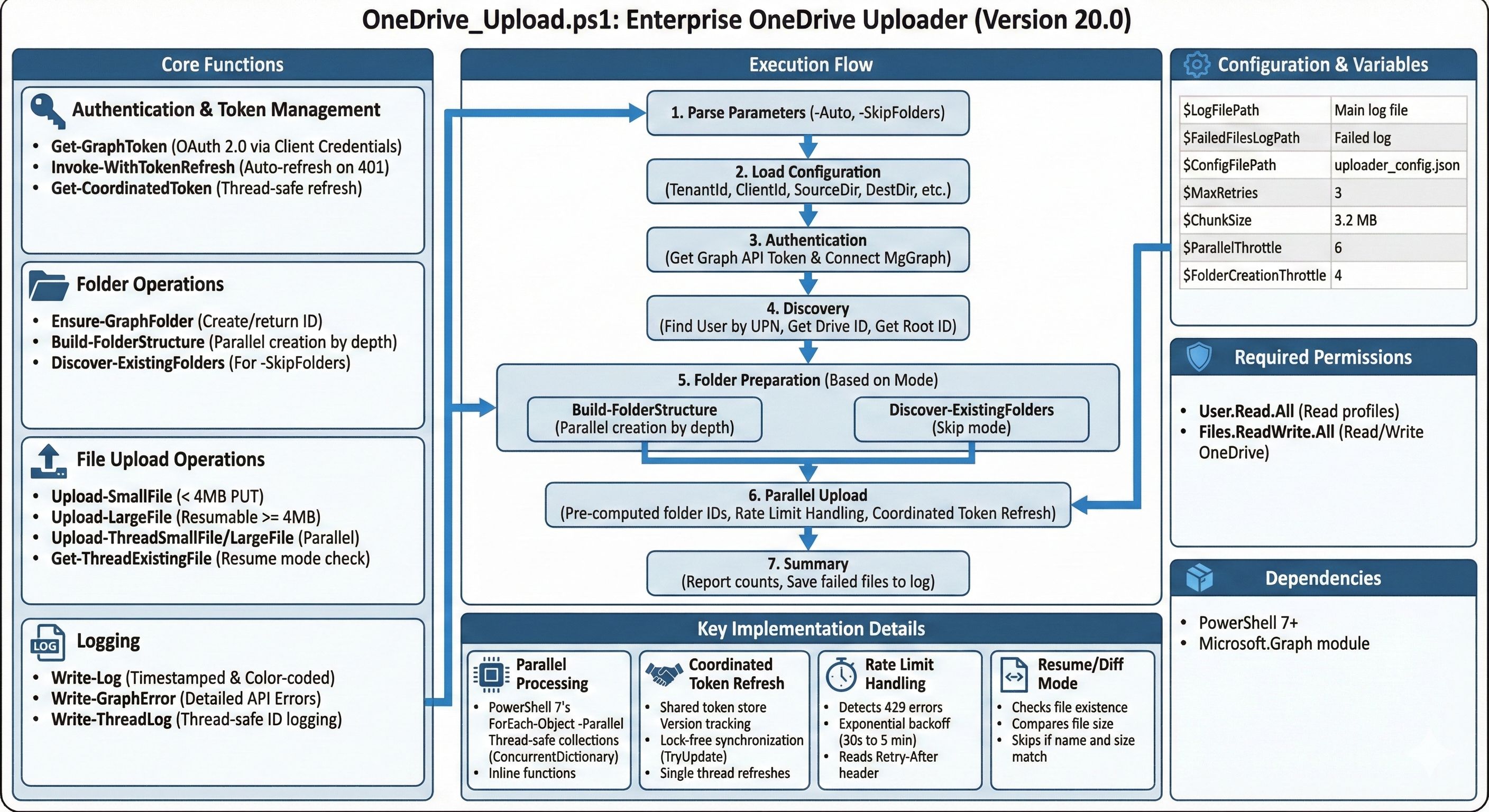
- OneDrive Uploader (v20.0) - Upload files to a user’s OneDrive for Business
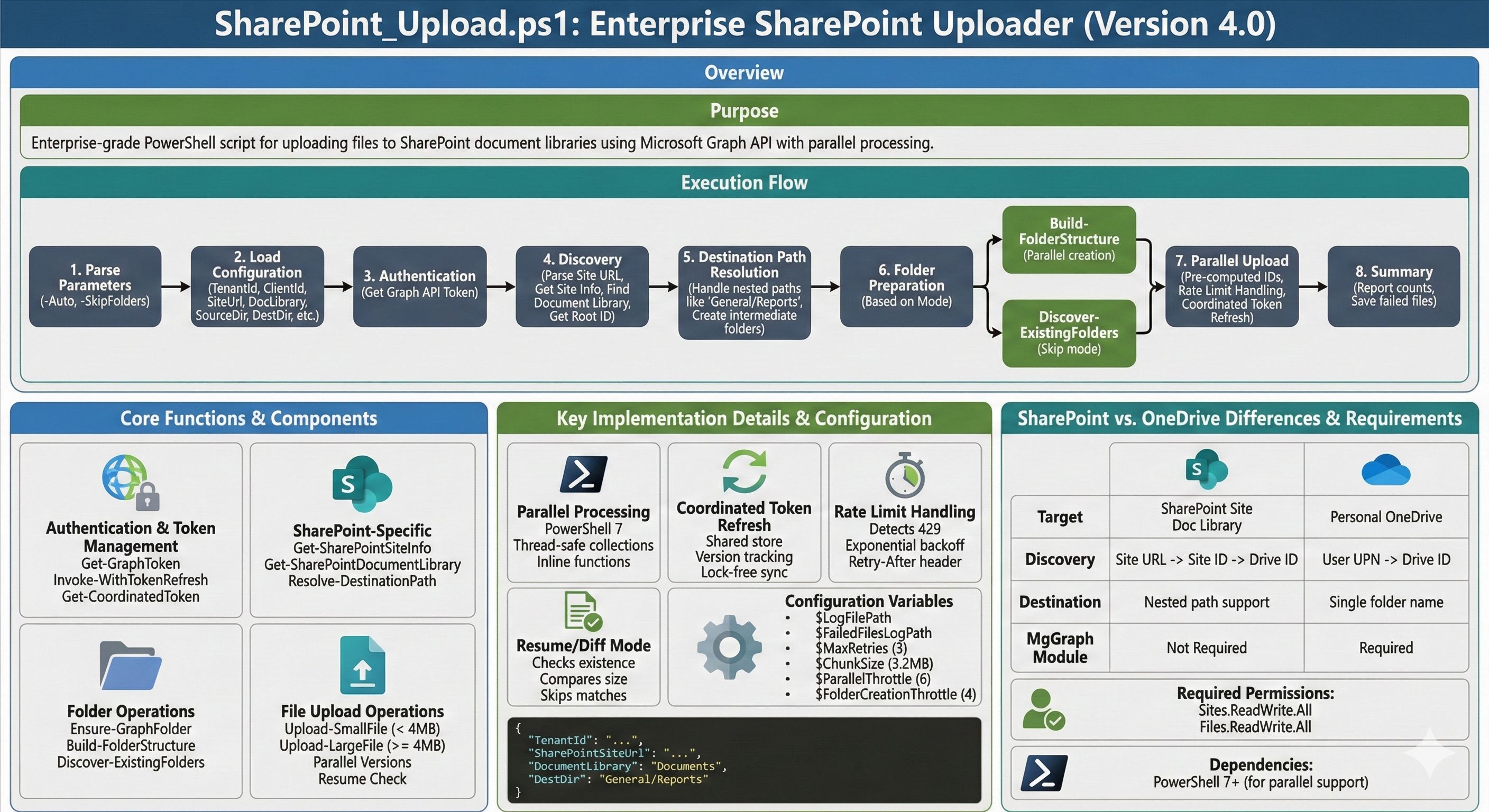
- SharePoint Uploader (v4.0) - Upload files to SharePoint document libraries
Both scripts feature parallel processing, auto/unattended mode, resume capability, and intelligent rate limit handling.
Key Features
- Parallel Uploads: Configurable concurrent uploads (default: 6 threads)
- Parallel Folder Creation: Creates folders in parallel by depth level
- Auto Mode: Run unattended with
-Autoswitch using saved configuration - Skip Folder Creation: Use
-SkipFoldersfor reruns where folders already exist - Resume/Diff Mode: Skip files that already exist with matching size
- Rate Limit Handling: Detects 429 errors with exponential backoff (30s, 60s, 120s…)
- Coordinated Token Refresh: Single thread refreshes token, others wait and reuse
- Chunked Uploads: Large files (>4MB) uploaded in 3.2MB chunks
- Comprehensive Logging: Timestamped logs with failed file tracking
Command Line Parameters
# OneDrive - Interactive mode.\OneDrive_Upload.ps1
# OneDrive - Auto mode (uses saved config, creates folders, enables resume).\OneDrive_Upload.ps1 -Auto
# OneDrive - Auto mode, discover existing folders instead of creating.\OneDrive_Upload.ps1 -Auto -SkipFolders
# SharePoint - Same parameters available.\SharePoint_Upload.ps1 -Auto -SkipFolders
Configuration Options
| Variable | Value | Description |
|---|---|---|
$ChunkSize | 3.2 MB | Chunk size for large file uploads |
$ParallelThrottle | 6 | Concurrent upload threads |
$FolderCreationThrottle | 4 | Concurrent folder creation threads |
$MaxRetries | 3 | Retry attempts per file |
Core Functions
| Function | Purpose |
|---|---|
Get-GraphToken | Acquires OAuth access token via client credentials |
Test-TokenExpired | Checks if token needs refresh (5-min buffer) |
Get-CoordinatedToken | Thread-safe token refresh across parallel threads |
Invoke-WithTokenRefresh | Wrapper that auto-refreshes token on 401 errors |
Ensure-GraphFolder | Creates folder if missing, returns folder ID |
Build-FolderStructure | Pre-creates folders in parallel by depth level |
Discover-ExistingFolders | Finds existing folders (for -SkipFolders mode) |
Upload-SmallFile | Direct PUT upload for files <4MB |
Upload-LargeFile | Resumable upload session for large files |
Start-UploadProcess | Main orchestration function |
SharePoint-Specific Functions
| Function | Purpose |
|---|---|
Get-SharePointSiteInfo | Parses SharePoint URL and retrieves site info |
Get-SharePointDocumentLibrary | Finds document library by name |
Resolve-DestinationPath | Handles nested paths (e.g., General/Reports) |
Execution Flow
- Authentication - Gets Graph API token (+ MgGraph module for OneDrive)
- Discovery - Finds target drive (OneDrive user or SharePoint library)
- Folder Prep - Pre-creates folder structure in parallel OR discovers existing
- Upload - Parallel file uploads with retry logic and rate limit handling
- Summary - Reports uploaded/skipped/failed counts
Parallel Upload Implementation
Uses PowerShell 7’s ForEach-Object -Parallel with:
- Thread-safe counters (
ConcurrentDictionary) - Thread-safe collections (
ConcurrentBag) for failures/skipped - Coordinated token refresh via shared token store with version tracking
- Lock-free synchronization using
TryUpdatepattern - Inline function definitions (required for parallel scope)
Requirements
- PowerShell 7+ (for parallel support)
- Microsoft.Graph module (for OneDrive initial auth/discovery)
- Azure AD App registration with appropriate permissions:
- OneDrive:
User.Read.All,Files.ReadWrite.All - SharePoint:
Sites.ReadWrite.All,Files.ReadWrite.All
- OneDrive:
OneDrive Uploader Script (v20.0)
Save as OneDrive_Upload.ps1:
# Command line parametersparam( [switch]$Auto, # Run in unattended mode (uses saved settings, creates folders, enables resume) [switch]$SkipFolders # In auto mode: discover existing folders instead of creating)
<#.SYNOPSIS Enterprise OneDrive Uploader (v20.0 - Parallel Uploads with Auto Mode)
.DESCRIPTION Uploads files to OneDrive for Business with parallel processing.
Resume/Diff Functionality: - Optional check for existing files before upload - Skips files already in OneDrive with matching size - Perfect for resuming interrupted uploads - Re-uploads files with size differences - Tracks skipped files in summary
Additional Features: - PARALLEL UPLOADS: Configurable concurrent uploads (default: 6) - PARALLEL FOLDER CREATION: Creates folders in parallel by depth level - SKIP FOLDER CREATION: Option to skip folder creation on reruns - SHARED TOKEN REFRESH: Single coordinated token refresh across all threads - RATE LIMIT HANDLING: Detects 429 errors and waits with exponential backoff - AUTO MODE: Run unattended with --auto switch (uses saved config) - Uses direct Graph API calls for reliable personal OneDrive targeting - Validates WebUrl contains "/personal/" to prevent SharePoint confusion - Comprehensive logging and clear success/failure reporting
.PARAMETER Auto Run in unattended mode. Requires saved configuration file. Automatically creates folders and enables resume mode.
.PARAMETER SkipFolders Use with -Auto to discover existing folders instead of creating them.
.EXAMPLE .\OneDrive_Upload.ps1 Interactive mode with prompts.
.EXAMPLE .\OneDrive_Upload.ps1 -Auto Unattended mode using saved settings, creates folders, resume mode enabled.
.EXAMPLE .\OneDrive_Upload.ps1 -Auto -SkipFolders Unattended mode, discovers existing folders instead of creating.
.NOTES Requires: Microsoft.Graph module (for initial authentication only) Requires: PowerShell 7+ for parallel upload support#>
# --- CONFIGURATION ---$LogFilePath = "$PSScriptRoot\OneDriveUploadLog_$(Get-Date -Format 'yyyyMMdd-HHmm').txt"$FailedFilesLogPath = "$PSScriptRoot\FailedUploads_$(Get-Date -Format 'yyyyMMdd-HHmm').txt"$ConfigFilePath = "$PSScriptRoot\uploader_config.json"$MaxRetries = 3$ChunkSize = 320 * 1024 * 10 # 3.2 MB chunks$ParallelThrottle = 6 # Concurrent file uploads (can increase for small files)$FolderCreationThrottle = 4 # Concurrent folder creations (keep low to avoid 429 rate limits)
# --- HELPER FUNCTIONS ---
function Write-Log { param ([string]$Message, [string]$Level = "INFO") $timestamp = Get-Date -Format "yyyy-MM-dd HH:mm:ss" $color = switch ($Level) { "ERROR" {"Red"} "SUCCESS" {"Green"} "WARN" {"Yellow"} "DEBUG" {"Magenta"} Default {"Cyan"} } Write-Host "[$timestamp] [$Level] $Message" -ForegroundColor $color Add-Content -Path $LogFilePath -Value "[$timestamp] [$Level] $Message"}
function Write-GraphError { param ($ExceptionObject, [string]$Context = "") $msg = $ExceptionObject.Message
if ($Context) { $msg = "$Context - $msg" }
if ($ExceptionObject.Response -and $ExceptionObject.Response.StatusCode) { $msg += " [Status: $($ExceptionObject.Response.StatusCode)]" }
# Try to extract detailed error from response try { if ($ExceptionObject.Exception.Response) { $result = $ExceptionObject.Exception.Response.GetResponseStream() $reader = New-Object System.IO.StreamReader($result) $reader.BaseStream.Position = 0 $responseBody = $reader.ReadToEnd() if ($responseBody) { Write-Log "Response Body: $responseBody" "ERROR" } } } catch { # If we can't read the response, just continue }
Write-Log "API Error: $msg" "ERROR"}
function Get-GraphToken { param ($TenantId, $ClientId, $ClientSecret) try { $tokenBody = @{ Grant_Type = "client_credentials" Scope = "https://graph.microsoft.com/.default" Client_Id = $ClientId Client_Secret = $ClientSecret } $tokenResponse = Invoke-RestMethod -Uri "https://login.microsoftonline.com/$TenantId/oauth2/v2.0/token" -Method POST -Body $tokenBody -ErrorAction Stop
# Return token info including expiration return @{ Token = $tokenResponse.access_token ExpiresIn = $tokenResponse.expires_in AcquiredAt = Get-Date } } catch { Write-GraphError $_.Exception throw "Failed to acquire Access Token" }}
function Test-TokenExpired { param ($TokenInfo, [int]$BufferMinutes = 5)
if (-not $TokenInfo -or -not $TokenInfo.AcquiredAt) { return $true }
$expirationTime = $TokenInfo.AcquiredAt.AddSeconds($TokenInfo.ExpiresIn) $bufferTime = (Get-Date).AddMinutes($BufferMinutes)
# Return true if token will expire within buffer time return $bufferTime -gt $expirationTime}
function Invoke-WithTokenRefresh { param ( [ScriptBlock]$ScriptBlock, [ref]$TokenInfoRef, $TenantId, $ClientId, $ClientSecret )
$maxRetries = 2 $attempt = 0
while ($attempt -lt $maxRetries) { $attempt++
# Check if token needs refresh before operation if (Test-TokenExpired -TokenInfo $TokenInfoRef.Value) { Write-Log "Token expired or expiring soon, refreshing..." "INFO" $TokenInfoRef.Value = Get-GraphToken -TenantId $TenantId -ClientId $ClientId -ClientSecret $ClientSecret Write-Log "Token refreshed successfully" "SUCCESS" }
try { # Execute the script block with current token return & $ScriptBlock } catch { # Check if it's a 401 Unauthorized error if ($_.Exception.Response -and $_.Exception.Response.StatusCode -eq 401) { Write-Log "Received 401 Unauthorized - refreshing token and retrying..." "WARN" $TokenInfoRef.Value = Get-GraphToken -TenantId $TenantId -ClientId $ClientId -ClientSecret $ClientSecret Write-Log "Token refreshed, retrying operation..." "INFO" } else { # Not a 401 error, rethrow throw } } }
throw "Operation failed after token refresh attempts"}
function Get-FreshToken { param ([ref]$TokenInfoRef, $TenantId, $ClientId, $ClientSecret)
# Check if token needs refresh if (Test-TokenExpired -TokenInfo $TokenInfoRef.Value) { Write-Log "Token expiring soon, refreshing..." "INFO" $TokenInfoRef.Value = Get-GraphToken -TenantId $TenantId -ClientId $ClientId -ClientSecret $ClientSecret $expiresAt = $TokenInfoRef.Value.AcquiredAt.AddSeconds($TokenInfoRef.Value.ExpiresIn) Write-Log "Token refreshed (New expiration: $($expiresAt.ToString('HH:mm:ss')))" "SUCCESS" }
return $TokenInfoRef.Value.Token}
function Ensure-GraphFolder { param ([string]$DriveId, [string]$ParentItemId, [string]$FolderName, [string]$AccessToken)
# Validate folder name is not empty if ([string]::IsNullOrWhiteSpace($FolderName)) { Write-Log "ERROR: Attempted to create folder with empty name! Parent: $ParentItemId" "ERROR" throw "Invalid folder name (empty or whitespace)" }
$headers = @{ "Authorization" = "Bearer $AccessToken"; "Content-Type" = "application/json" }
# 1. Check exists try { $uri = "https://graph.microsoft.com/v1.0/drives/$DriveId/items/$ParentItemId/children?`$filter=name eq '$FolderName'" $response = Invoke-RestMethod -Method GET -Uri $uri -Headers $headers -ErrorAction Stop $item = $response.value | Select-Object -First 1 if ($item) { return $item.id } } catch { # Folder doesn't exist, will create }
# 2. Create (or get if already exists) try { # Use "replace" to avoid conflicts - if folder exists, it will return the existing folder $body = @{ name = $FolderName folder = @{} "@microsoft.graph.conflictBehavior" = "replace" } | ConvertTo-Json
$createUri = "https://graph.microsoft.com/v1.0/drives/$DriveId/items/$ParentItemId/children" $newItem = Invoke-RestMethod -Method POST -Uri $createUri -Headers $headers -Body $body -ErrorAction Stop
Write-Log "Created folder: $FolderName" "INFO" return $newItem.id } catch { # If creation fails for any reason, try to fetch the existing folder Write-Log "Folder creation failed, attempting to fetch existing folder..." "WARN" Write-GraphError $_.Exception "Folder Creation"
try { $uri = "https://graph.microsoft.com/v1.0/drives/$DriveId/items/$ParentItemId/children?`$top=999" Write-Log "Fetching children to find folder: $uri" "DEBUG" $response = Invoke-RestMethod -Method GET -Uri $uri -Headers $headers -ErrorAction Stop $target = $response.value | Where-Object { $_.name -eq $FolderName } | Select-Object -First 1 if ($target) { Write-Log "Found existing folder: $($target.webUrl)" "SUCCESS" return $target.id } else { Write-Log "Folder '$FolderName' not found in parent" "ERROR" } } catch { Write-Log "Failed to fetch folder list: $($_.Exception.Message)" "ERROR" }
Write-Log "CRITICAL: Unable to create or find folder '$FolderName'" "ERROR" throw "Folder operation failed for: $FolderName" }}
function Build-FolderStructure { param ( [string]$DriveId, [string]$RootFolderId, [string]$SourceDir, [array]$Files, [string]$AccessToken, [int]$FolderThrottle = 4, [string]$TenantId, [string]$ClientId, [string]$ClientSecret )
Write-Log "Pre-creating folder structure (parallel by depth level)..." "INFO"
# Build unique set of relative folder paths $folderPaths = @{} foreach ($file in $Files) { $relativePath = $file.DirectoryName.Substring($SourceDir.Length) $cleanPath = $relativePath.Trim([System.IO.Path]::DirectorySeparatorChar, [System.IO.Path]::AltDirectorySeparatorChar)
if ($cleanPath.Length -gt 0) { # Add this path and all parent paths $parts = $cleanPath.Split([System.IO.Path]::DirectorySeparatorChar, [System.StringSplitOptions]::RemoveEmptyEntries) $buildPath = "" foreach ($part in $parts) { if ($buildPath) { $buildPath += [System.IO.Path]::DirectorySeparatorChar } $buildPath += $part $folderPaths[$buildPath] = $true } } }
if ($folderPaths.Count -eq 0) { Write-Log "No folders to create" "INFO" $result = @{} $result[""] = $RootFolderId return $result }
# Group paths by depth level $pathsByDepth = @{} foreach ($path in $folderPaths.Keys) { $depth = ($path.Split([System.IO.Path]::DirectorySeparatorChar, [System.StringSplitOptions]::RemoveEmptyEntries)).Count if (-not $pathsByDepth.ContainsKey($depth)) { $pathsByDepth[$depth] = @() } $pathsByDepth[$depth] += $path }
$maxDepth = ($pathsByDepth.Keys | Measure-Object -Maximum).Maximum Write-Log "Creating $($folderPaths.Count) folders across $maxDepth depth levels..." "INFO"
# Thread-safe folder map $folderMap = [System.Collections.Concurrent.ConcurrentDictionary[string,string]]::new() $folderMap[""] = $RootFolderId
# Shared token store for coordinated token refresh across threads $folderTokenStore = [System.Collections.Concurrent.ConcurrentDictionary[string,object]]::new() $folderTokenStore["token"] = $AccessToken $folderTokenStore["version"] = [long]0 $folderTokenStore["refreshLock"] = [int]0
# Process each depth level in order (parallel within each level) for ($depth = 1; $depth -le $maxDepth; $depth++) { $pathsAtDepth = $pathsByDepth[$depth] if (-not $pathsAtDepth) { continue }
Write-Log " Level $depth`: $($pathsAtDepth.Count) folders" "DEBUG"
$pathsAtDepth | ForEach-Object -ThrottleLimit $FolderThrottle -Parallel { $path = $_ $DriveId = $using:DriveId $FolderMapRef = $using:folderMap $TokenStore = $using:folderTokenStore $TenantId = $using:TenantId $ClientId = $using:ClientId $ClientSecret = $using:ClientSecret
# Get current token from shared store $currentTokenVersion = [long]$TokenStore["version"] $currentToken = $TokenStore["token"]
# Coordinated token refresh function (inline for parallel scope) function Get-FolderCoordinatedToken { param ($TokenStore, $MyVersion, $TenantId, $ClientId, $ClientSecret) $currentVersion = [long]$TokenStore["version"] if ($currentVersion -gt $MyVersion) { return @{ Token = $TokenStore["token"]; Version = $currentVersion; Refreshed = $false } } $gotLock = $TokenStore.TryUpdate("refreshLock", 1, 0) if ($gotLock) { $currentVersion = [long]$TokenStore["version"] if ($currentVersion -gt $MyVersion) { $TokenStore["refreshLock"] = 0 return @{ Token = $TokenStore["token"]; Version = $currentVersion; Refreshed = $false } } try { $tokenBody = @{ Grant_Type = "client_credentials" Scope = "https://graph.microsoft.com/.default" Client_Id = $ClientId Client_Secret = $ClientSecret } $tokenResponse = Invoke-RestMethod -Uri "https://login.microsoftonline.com/$TenantId/oauth2/v2.0/token" -Method POST -Body $tokenBody -ErrorAction Stop $newVersion = $currentVersion + 1 $TokenStore["token"] = $tokenResponse.access_token $TokenStore["version"] = $newVersion return @{ Token = $tokenResponse.access_token; Version = $newVersion; Refreshed = $true } } finally { $TokenStore["refreshLock"] = 0 } } else { $waitCount = 0 while ([int]$TokenStore["refreshLock"] -eq 1 -and $waitCount -lt 30) { Start-Sleep -Milliseconds 500 $waitCount++ } return @{ Token = $TokenStore["token"]; Version = [long]$TokenStore["version"]; Refreshed = $false } } }
# Parse path to get folder name and parent $parts = $path.Split([System.IO.Path]::DirectorySeparatorChar, [System.StringSplitOptions]::RemoveEmptyEntries) $folderName = $parts[-1] $parentPath = if ($parts.Count -eq 1) { "" } else { ($parts[0..($parts.Count - 2)]) -join [System.IO.Path]::DirectorySeparatorChar } $parentId = $FolderMapRef[$parentPath]
# Retry logic with token refresh $maxRetries = 3 $folderId = $null
for ($attempt = 1; $attempt -le $maxRetries; $attempt++) { $headers = @{ "Authorization" = "Bearer $currentToken"; "Content-Type" = "application/json" } try { # Check if folder exists $uri = "https://graph.microsoft.com/v1.0/drives/$DriveId/items/$parentId/children?`$filter=name eq '$folderName'" $response = Invoke-RestMethod -Method GET -Uri $uri -Headers $headers -ErrorAction Stop $existing = $response.value | Select-Object -First 1 if ($existing) { $folderId = $existing.id; break }
# Create folder $body = @{ name = $folderName; folder = @{}; "@microsoft.graph.conflictBehavior" = "replace" } | ConvertTo-Json $createUri = "https://graph.microsoft.com/v1.0/drives/$DriveId/items/$parentId/children" $newItem = Invoke-RestMethod -Method POST -Uri $createUri -Headers $headers -Body $body -ErrorAction Stop $folderId = $newItem.id break } catch { $errorMsg = $_.Exception.Message $is401 = ($errorMsg -match "401") -or ($errorMsg -match "Unauthorized") $is429 = ($errorMsg -match "429") -or ($errorMsg -match "Too Many Requests")
if ($is401 -and $attempt -lt $maxRetries) { $refreshResult = Get-FolderCoordinatedToken -TokenStore $TokenStore -MyVersion $currentTokenVersion -TenantId $TenantId -ClientId $ClientId -ClientSecret $ClientSecret $currentToken = $refreshResult.Token $currentTokenVersion = $refreshResult.Version } elseif ($is429 -and $attempt -lt $maxRetries) { $waitSeconds = 30 * [Math]::Pow(2, $attempt - 1) if ($waitSeconds -gt 300) { $waitSeconds = 300 } Start-Sleep -Seconds $waitSeconds } elseif ($attempt -eq $maxRetries) { throw "Failed to create folder '$folderName' after $maxRetries attempts: $errorMsg" } } } if ($folderId) { $FolderMapRef[$path] = $folderId } } }
Write-Log "Folder structure created successfully" "SUCCESS"
# Convert to regular hashtable for return $result = @{} foreach ($key in $folderMap.Keys) { $result[$key] = $folderMap[$key] } return $result}
function Discover-ExistingFolders { param ( [string]$DriveId, [string]$RootFolderId, [string]$SourceDir, [array]$Files, [string]$AccessToken )
Write-Log "Discovering existing folder structure..." "INFO"
# Build unique set of relative folder paths needed $folderPaths = @{} foreach ($file in $Files) { $relativePath = $file.DirectoryName.Substring($SourceDir.Length) $cleanPath = $relativePath.Trim([System.IO.Path]::DirectorySeparatorChar, [System.IO.Path]::AltDirectorySeparatorChar)
if ($cleanPath.Length -gt 0) { $parts = $cleanPath.Split([System.IO.Path]::DirectorySeparatorChar, [System.StringSplitOptions]::RemoveEmptyEntries) $buildPath = "" foreach ($part in $parts) { if ($buildPath) { $buildPath += [System.IO.Path]::DirectorySeparatorChar } $buildPath += $part $folderPaths[$buildPath] = $true } } }
if ($folderPaths.Count -eq 0) { Write-Log "No folders to discover" "INFO" $result = @{} $result[""] = $RootFolderId return $result }
# Sort paths by depth to discover parents before children $sortedPaths = $folderPaths.Keys | Sort-Object { $_.Split([System.IO.Path]::DirectorySeparatorChar).Count }
Write-Log "Discovering $($sortedPaths.Count) existing folders..." "INFO"
$folderMap = @{} $folderMap[""] = $RootFolderId $headers = @{ "Authorization" = "Bearer $AccessToken" }
foreach ($path in $sortedPaths) { $parts = $path.Split([System.IO.Path]::DirectorySeparatorChar, [System.StringSplitOptions]::RemoveEmptyEntries) $folderName = $parts[-1] $parentPath = if ($parts.Count -eq 1) { "" } else { ($parts[0..($parts.Count - 2)]) -join [System.IO.Path]::DirectorySeparatorChar } $parentId = $folderMap[$parentPath]
try { $encodedName = [Uri]::EscapeDataString($folderName) $uri = "https://graph.microsoft.com/v1.0/drives/$DriveId/items/$parentId`:/$encodedName" $folder = Invoke-RestMethod -Method GET -Uri $uri -Headers $headers -ErrorAction Stop
if ($folder -and $folder.id) { $folderMap[$path] = $folder.id Write-Log " Found: $path" "DEBUG" } } catch { Write-Log " WARNING: Folder not found: $path - uploads to this path may fail" "WARN" $folderMap[$path] = $null } }
Write-Log "Folder discovery complete" "SUCCESS" return $folderMap}
function Upload-SmallFile { param ($DriveId, $ParentId, $FileObj, $AccessToken)
$encodedName = [Uri]::EscapeDataString($FileObj.Name) $uri = "https://graph.microsoft.com/v1.0/drives/$DriveId/items/$ParentId`:/$encodedName`:/content"
$headers = @{ "Authorization" = "Bearer $AccessToken"; "Content-Type" = "application/octet-stream" }
try { # Read file bytes directly to handle special characters in filenames (brackets, spaces) $fileBytes = [System.IO.File]::ReadAllBytes($FileObj.FullName) $uploadedItem = Invoke-RestMethod -Method PUT -Uri $uri -Headers $headers -Body $fileBytes -ErrorAction Stop return $uploadedItem } catch { Write-Log "Upload failed for: $($FileObj.Name)" "ERROR" Write-GraphError $_.Exception "Small File Upload" throw "Small File Upload Failed" }}
function Upload-LargeFile { param ($DriveId, $ParentId, $FileObj, $AccessToken) $fileName = $FileObj.Name $fileSize = $FileObj.Length $encodedName = [Uri]::EscapeDataString($fileName)
Write-Log "Uploading large file: $fileName ($([math]::Round($fileSize/1MB, 2)) MB)" "INFO"
$sessionUri = "https://graph.microsoft.com/v1.0/drives/$DriveId/items/$ParentId`:/$encodedName`:/createUploadSession" $headers = @{ "Authorization" = "Bearer $AccessToken"; "Content-Type" = "application/json" }
$body = @{ item = @{ "@microsoft.graph.conflictBehavior" = "replace" } } | ConvertTo-Json -Depth 3
try { $session = Invoke-RestMethod -Method POST -Uri $sessionUri -Headers $headers -Body $body -ErrorAction Stop $uploadUrl = $session.uploadUrl } catch { Write-Log "Failed to create upload session for: $fileName" "ERROR" Write-Log "Error details: $($_.Exception.Message)" "ERROR"
# Try to get more details from the response if ($_.Exception.Response) { try { $reader = New-Object System.IO.StreamReader($_.Exception.Response.GetResponseStream()) $reader.BaseStream.Position = 0 $responseBody = $reader.ReadToEnd() Write-Log "API Response: $responseBody" "ERROR" } catch { Write-Log "Could not read error response body" "DEBUG" } }
Write-GraphError $_.Exception "Large File Upload Session" throw "Failed to create upload session" }
$stream = [System.IO.File]::OpenRead($FileObj.FullName) $buffer = New-Object Byte[] $ChunkSize $uploadedBytes = 0
try { while ($uploadedBytes -lt $fileSize) { $bytesRead = $stream.Read($buffer, 0, $ChunkSize) $rangeEnd = $uploadedBytes + $bytesRead - 1 $headerRange = "bytes $uploadedBytes-$rangeEnd/$fileSize"
# ALWAYS create a buffer with exactly the right size # Don't reuse the original buffer as it might cause size mismatches $chunkData = New-Object Byte[] $bytesRead [Array]::Copy($buffer, 0, $chunkData, 0, $bytesRead)
# Content-Range is required for chunked uploads $chunkHeaders = @{ "Content-Range" = $headerRange }
try { # Use Invoke-WebRequest for binary uploads - it handles byte arrays better $webResponse = Invoke-WebRequest -Method PUT -Uri $uploadUrl -Headers $chunkHeaders -Body $chunkData -UseBasicParsing -ErrorAction Stop
# Parse JSON response if ($webResponse.Content) { $response = $webResponse.Content | ConvertFrom-Json } else { $response = $null }
$uploadedBytes += $bytesRead Write-Host -NoNewline "."
if ($response -and $response.id) { # Upload complete Write-Host " Done." if ($response.webUrl) { Write-Log "Uploaded Large File: $($response.webUrl)" "SUCCESS" } return $response } } catch { Write-Log "Chunk upload failed at byte $uploadedBytes" "ERROR" Write-Log "Error: $($_.Exception.Message)" "ERROR"
# Try to extract error details if ($_.Exception.Response) { try { $reader = New-Object System.IO.StreamReader($_.Exception.Response.GetResponseStream()) $reader.BaseStream.Position = 0 $errorBody = $reader.ReadToEnd() Write-Log "API Error Response: $errorBody" "ERROR" } catch {} }
throw } } # If we loop finishes but no response returned (unlikely if loop logic is correct), fetch it.
$finalUri = "https://graph.microsoft.com/v1.0/drives/$DriveId/items/$ParentId/children?`$filter=name eq '$encodedName'" $finalRes = Invoke-RestMethod -Method GET -Uri $finalUri -Headers $headers return $finalRes.value | Select-Object -First 1 } catch { Write-GraphError $_.Exception throw "Large File Chunk Failed" } finally { $stream.Close(); $stream.Dispose() }}
function Start-UploadProcess { param ($SourceDir, $DestDirName, $TargetUPN, $TenantId, $ClientId, $ClientSecret, [bool]$AutoMode = $false, [bool]$SkipFolderCreation = $false)
Write-Log "Initializing..." "INFO"
# 1. AUTH (Get Token with expiration tracking) $TokenInfo = $null try { $TokenInfo = Get-GraphToken -TenantId $TenantId -ClientId $ClientId -ClientSecret $ClientSecret if (-not $TokenInfo -or -not $TokenInfo.Token) { throw "Empty Access Token" }
$expiresAt = $TokenInfo.AcquiredAt.AddSeconds($TokenInfo.ExpiresIn) Write-Log "Token Acquired (Expires: $($expiresAt.ToString('HH:mm:ss')))" "SUCCESS"
# Also Connect-MgGraph for Discovery (using same creds) $secSecret = ConvertTo-SecureString $ClientSecret -AsPlainText -Force $cred = New-Object System.Management.Automation.PSCredential($ClientId, $secSecret) Connect-MgGraph -TenantId $TenantId -Credential $cred -ErrorAction Stop Write-Log "Graph Module Connected." "SUCCESS" } catch { Write-Log "Auth Failed: $($_.Exception.Message)" "ERROR"; return }
# Store credentials for token refresh $script:AuthCreds = @{ TenantId = $TenantId ClientId = $ClientId ClientSecret = $ClientSecret }
# 2. DISCOVERY $DriveIdString = $null; $RootIdString = $null try { Write-Log "Finding User/Drive..." "INFO" $user = Get-MgUser -UserId $TargetUPN -ErrorAction Stop
# Use token refresh wrapper for API calls $TokenInfoRef = [ref]$TokenInfo $targetDrive = Invoke-WithTokenRefresh -TokenInfoRef $TokenInfoRef -TenantId $TenantId -ClientId $ClientId -ClientSecret $ClientSecret -ScriptBlock { $headers = @{ "Authorization" = "Bearer $($TokenInfoRef.Value.Token)" } $driveUri = "https://graph.microsoft.com/v1.0/users/$($user.Id)/drive" Invoke-RestMethod -Method GET -Uri $driveUri -Headers $headers -ErrorAction Stop } $TokenInfo = $TokenInfoRef.Value
if (-not $targetDrive) { throw "No OneDrive for Business drive found for $($user.UserPrincipalName)." }
# Verify this is actually a personal OneDrive (WebUrl should contain "/personal/") if ($targetDrive.webUrl -notmatch "/personal/") { Write-Log "WARNING: Drive WebUrl does not contain '/personal/'. WebUrl: $($targetDrive.webUrl)" "WARN" Write-Log "This may be a SharePoint site instead of personal OneDrive. Proceeding anyway..." "WARN" }
Write-Log "Connected to OneDrive: $($user.UserPrincipalName)" "SUCCESS" $DriveIdString = $targetDrive.id.ToString()
# Get root item using REST API with token refresh $rootItem = Invoke-WithTokenRefresh -TokenInfoRef $TokenInfoRef -TenantId $TenantId -ClientId $ClientId -ClientSecret $ClientSecret -ScriptBlock { $headers = @{ "Authorization" = "Bearer $($TokenInfoRef.Value.Token)" } $rootUri = "https://graph.microsoft.com/v1.0/drives/$DriveIdString/root" Invoke-RestMethod -Method GET -Uri $rootUri -Headers $headers -ErrorAction Stop } $TokenInfo = $TokenInfoRef.Value $RootIdString = $rootItem.id.ToString() } catch { Write-Log "Discovery Error: $($_.Exception.Message)" "ERROR"; return }
# Token reference for refresh operations (shared across phases) $TokenInfoRef = [ref]$TokenInfo
# 3. UPLOAD PHASE $uploadedCount = [System.Collections.Concurrent.ConcurrentDictionary[string,int]]::new() $uploadedCount["count"] = 0 $failedUploads = [System.Collections.Concurrent.ConcurrentBag[string]]::new() $skippedFiles = [System.Collections.Concurrent.ConcurrentBag[string]]::new()
if (-not (Test-Path $SourceDir)) { Write-Log "Missing Source: $SourceDir" "ERROR"; return } $files = Get-ChildItem -Path $SourceDir -Recurse -File
# Calculate and display source directory size $totalBytes = ($files | Measure-Object -Property Length -Sum).Sum $sizeDisplay = if ($totalBytes -ge 1GB) { "{0:N2} GB" -f ($totalBytes / 1GB) } elseif ($totalBytes -ge 1MB) { "{0:N2} MB" -f ($totalBytes / 1MB) } else { "{0:N2} KB" -f ($totalBytes / 1KB) } Write-Log "Found $($files.Count) files ($sizeDisplay total)" "INFO"
# Get fresh token for upload operations $currentToken = Get-FreshToken -TokenInfoRef $TokenInfoRef -TenantId $TenantId -ClientId $ClientId -ClientSecret $ClientSecret $TokenInfo = $TokenInfoRef.Value
$currentRemoteParentId = $RootIdString if (-not [string]::IsNullOrWhiteSpace($DestDirName)) { $currentRemoteParentId = Ensure-GraphFolder -DriveId $DriveIdString -ParentItemId $RootIdString -FolderName $DestDirName -AccessToken $currentToken if (-not $currentRemoteParentId) { return } }
# Determine folder creation mode $skipFolders = $SkipFolderCreation if (-not $AutoMode) { Write-Host "" Write-Host "Skip folder creation? (Use for reruns where folders already exist)" -ForegroundColor Cyan Write-Host " Choose 'y' if you've already run this script and folders exist." -ForegroundColor Gray Write-Host " Choose 'n' for first run or if folder structure changed." -ForegroundColor Gray $skipFolders = (Read-Host "Skip folder creation? (y/n)") -eq 'y' Write-Host "" } else { if ($skipFolders) { Write-Log "Auto mode: Discovering existing folders" "INFO" } else { Write-Log "Auto mode: Creating folder structure" "INFO" } }
# Build folder map - either create new or discover existing $folderMap = $null if ($skipFolders) { Write-Log "Skipping folder creation - discovering existing folders..." "INFO" $folderMap = Discover-ExistingFolders -DriveId $DriveIdString -RootFolderId $currentRemoteParentId -SourceDir $SourceDir -Files $files -AccessToken $currentToken } else { Write-Log "Creating folder structure..." "INFO" $folderMap = Build-FolderStructure -DriveId $DriveIdString -RootFolderId $currentRemoteParentId -SourceDir $SourceDir -Files $files -AccessToken $currentToken -FolderThrottle $FolderCreationThrottle -TenantId $TenantId -ClientId $ClientId -ClientSecret $ClientSecret }
# Determine resume mode $checkExisting = $AutoMode # Auto mode defaults to resume enabled if (-not $AutoMode) { Write-Host "" Write-Host "Check for existing files and skip them? (Resume/Diff mode)" -ForegroundColor Cyan Write-Host " This will check OneDrive before uploading each file." -ForegroundColor Gray Write-Host " Files with matching size and name will be skipped." -ForegroundColor Gray $checkExisting = (Read-Host "Enable resume mode? (y/n)") -eq 'y' Write-Host "" } else { Write-Log "Auto mode: Resume mode enabled" "INFO" }
Write-Log "=== UPLOADING FILES (Parallel: $ParallelThrottle threads) ===" "INFO" if ($checkExisting) { Write-Log "Resume mode enabled - will skip existing files" "INFO" }
# Progress tracking (thread-safe) $progressCounter = [System.Collections.Concurrent.ConcurrentDictionary[string,int]]::new() $progressCounter["completed"] = 0 $totalFiles = $files.Count
# Shared token store for coordinated token refresh across threads $sharedTokenStore = [System.Collections.Concurrent.ConcurrentDictionary[string,object]]::new() $sharedTokenStore["token"] = $currentToken $sharedTokenStore["version"] = [long]0 $sharedTokenStore["refreshLock"] = [int]0
# Prepare file upload jobs with pre-computed folder IDs $uploadJobs = foreach ($file in $files) { $relativePath = $file.DirectoryName.Substring($SourceDir.Length) $cleanPath = $relativePath.Trim([System.IO.Path]::DirectorySeparatorChar, [System.IO.Path]::AltDirectorySeparatorChar)
# Look up target folder from pre-built map $targetFolderId = if ($cleanPath.Length -gt 0) { $folderMap[$cleanPath] } else { $currentRemoteParentId }
[PSCustomObject]@{ File = $file TargetFolderId = $targetFolderId RelativePath = $cleanPath } }
# Parallel upload execution $uploadJobs | ForEach-Object -ThrottleLimit $ParallelThrottle -Parallel { $job = $_ $file = $job.File $targetFolderId = $job.TargetFolderId
# Import variables from parent scope $DriveId = $using:DriveIdString $CheckExisting = $using:checkExisting $MaxRetries = $using:MaxRetries $ChunkSize = $using:ChunkSize $LogFile = $using:LogFilePath $TotalFiles = $using:totalFiles $ProgressCounter = $using:progressCounter $UploadedCountRef = $using:uploadedCount $FailedUploadsRef = $using:failedUploads $SkippedFilesRef = $using:skippedFiles $TenantId = $using:TenantId $ClientId = $using:ClientId $ClientSecret = $using:ClientSecret $TokenStore = $using:sharedTokenStore
# Get current token from shared store and track version $currentTokenVersion = [long]$TokenStore["version"] $AccessToken = $TokenStore["token"]
# Thread-local logging function function Write-ThreadLog { param ([string]$Message, [string]$Level = "INFO") $timestamp = Get-Date -Format "yyyy-MM-dd HH:mm:ss" $color = switch ($Level) { "ERROR" {"Red"} "SUCCESS" {"Green"} "WARN" {"Yellow"} Default {"Cyan"} } $threadId = [System.Threading.Thread]::CurrentThread.ManagedThreadId Write-Host "[$timestamp] [$Level] [T$threadId] $Message" -ForegroundColor $color Add-Content -Path $LogFile -Value "[$timestamp] [$Level] [T$threadId] $Message" }
# Coordinated token refresh - only one thread refreshes, others wait and use updated token function Get-CoordinatedToken { param ($TokenStore, $MyVersion, $TenantId, $ClientId, $ClientSecret) $currentVersion = [long]$TokenStore["version"] if ($currentVersion -gt $MyVersion) { return @{ Token = $TokenStore["token"]; Version = $currentVersion; Refreshed = $false } } $gotLock = $TokenStore.TryUpdate("refreshLock", 1, 0) if ($gotLock) { $currentVersion = [long]$TokenStore["version"] if ($currentVersion -gt $MyVersion) { $TokenStore["refreshLock"] = 0 return @{ Token = $TokenStore["token"]; Version = $currentVersion; Refreshed = $false } } try { $tokenBody = @{ Grant_Type = "client_credentials" Scope = "https://graph.microsoft.com/.default" Client_Id = $ClientId Client_Secret = $ClientSecret } $tokenResponse = Invoke-RestMethod -Uri "https://login.microsoftonline.com/$TenantId/oauth2/v2.0/token" -Method POST -Body $tokenBody -ErrorAction Stop $newVersion = $currentVersion + 1 $TokenStore["token"] = $tokenResponse.access_token $TokenStore["version"] = $newVersion return @{ Token = $tokenResponse.access_token; Version = $newVersion; Refreshed = $true } } finally { $TokenStore["refreshLock"] = 0 } } else { $waitCount = 0 while ([int]$TokenStore["refreshLock"] -eq 1 -and $waitCount -lt 30) { Start-Sleep -Milliseconds 500 $waitCount++ } return @{ Token = $TokenStore["token"]; Version = [long]$TokenStore["version"]; Refreshed = $false } } }
# Thread-local small file upload function Upload-ThreadSmallFile { param ($DriveId, $ParentId, $FileObj, $Token) $encodedName = [Uri]::EscapeDataString($FileObj.Name) $uri = "https://graph.microsoft.com/v1.0/drives/$DriveId/items/$ParentId`:/$encodedName`:/content" $headers = @{ "Authorization" = "Bearer $Token"; "Content-Type" = "application/octet-stream" } $fileBytes = [System.IO.File]::ReadAllBytes($FileObj.FullName) return Invoke-RestMethod -Method PUT -Uri $uri -Headers $headers -Body $fileBytes -ErrorAction Stop }
# Thread-local large file upload function Upload-ThreadLargeFile { param ($DriveId, $ParentId, $FileObj, $Token, $ChunkSize) $fileName = $FileObj.Name $fileSize = $FileObj.Length $encodedName = [Uri]::EscapeDataString($fileName)
$sessionUri = "https://graph.microsoft.com/v1.0/drives/$DriveId/items/$ParentId`:/$encodedName`:/createUploadSession" $headers = @{ "Authorization" = "Bearer $Token"; "Content-Type" = "application/json" } $body = @{ item = @{ "@microsoft.graph.conflictBehavior" = "replace" } } | ConvertTo-Json -Depth 3
$session = Invoke-RestMethod -Method POST -Uri $sessionUri -Headers $headers -Body $body -ErrorAction Stop $uploadUrl = $session.uploadUrl
$stream = [System.IO.File]::OpenRead($FileObj.FullName) $buffer = New-Object Byte[] $ChunkSize $uploadedBytes = 0
try { while ($uploadedBytes -lt $fileSize) { $bytesRead = $stream.Read($buffer, 0, $ChunkSize) $rangeEnd = $uploadedBytes + $bytesRead - 1 $headerRange = "bytes $uploadedBytes-$rangeEnd/$fileSize"
$chunkData = New-Object Byte[] $bytesRead [Array]::Copy($buffer, 0, $chunkData, 0, $bytesRead)
$chunkHeaders = @{ "Content-Range" = $headerRange } $webResponse = Invoke-WebRequest -Method PUT -Uri $uploadUrl -Headers $chunkHeaders -Body $chunkData -UseBasicParsing -ErrorAction Stop
if ($webResponse.Content) { $response = $webResponse.Content | ConvertFrom-Json } else { $response = $null } $uploadedBytes += $bytesRead if ($response -and $response.id) { return $response } } } finally { $stream.Close(); $stream.Dispose() } }
# Thread-local check for existing file function Get-ThreadExistingFile { param ($DriveId, $ParentId, $FileName, $Token) $headers = @{ "Authorization" = "Bearer $Token" } $encodedName = [Uri]::EscapeDataString($FileName) try { $uri = "https://graph.microsoft.com/v1.0/drives/$DriveId/items/$ParentId`:/$encodedName" return Invoke-RestMethod -Method GET -Uri $uri -Headers $headers -ErrorAction SilentlyContinue } catch { return $null } }
# Update progress $completed = $ProgressCounter.AddOrUpdate("completed", 1, { param($k,$v) $v + 1 })
# Check if file already exists (resume/diff mode) if ($CheckExisting) { $existingFile = Get-ThreadExistingFile -DriveId $DriveId -ParentId $targetFolderId -FileName $file.Name -Token $AccessToken if ($existingFile -and $existingFile.size -eq $file.Length) { Write-ThreadLog "[$completed/$TotalFiles] Skipped (exists): $($file.Name)" "INFO" $SkippedFilesRef.Add($file.Name) $null = $UploadedCountRef.AddOrUpdate("count", 1, { param($k,$v) $v + 1 }) return } }
# Upload with retry logic (includes 401 token refresh and 429 rate limit handling) $success = $false $attempt = 0 $currentToken = $AccessToken
do { $attempt++ try { Write-ThreadLog "[$completed/$TotalFiles] Uploading: $($file.Name)..." "INFO"
$uploadedItem = if ($file.Length -gt 4000000) { Upload-ThreadLargeFile -DriveId $DriveId -ParentId $targetFolderId -FileObj $file -Token $currentToken -ChunkSize $ChunkSize } else { Upload-ThreadSmallFile -DriveId $DriveId -ParentId $targetFolderId -FileObj $file -Token $currentToken }
if (-not $uploadedItem -or -not $uploadedItem.id) { throw "API Response Empty" }
Write-ThreadLog "[$completed/$TotalFiles] Complete: $($file.Name)" "SUCCESS" $null = $UploadedCountRef.AddOrUpdate("count", 1, { param($k,$v) $v + 1 }) $success = $true } catch { $errorMsg = $_.Exception.Message $waitSeconds = 2
# Check for 429 Too Many Requests - rate limited $is429 = ($errorMsg -match "429") -or ($errorMsg -match "Too Many Requests")
# Check for 401 Unauthorized - token expired $is401 = ($errorMsg -match "401") -or ($errorMsg -match "Unauthorized")
if ($is429) { $waitSeconds = 30 * [Math]::Pow(2, $attempt - 1) if ($waitSeconds -gt 300) { $waitSeconds = 300 } Write-ThreadLog "[$completed/$TotalFiles] Rate limited (429). Waiting $waitSeconds seconds..." "WARN" } elseif ($is401) { Write-ThreadLog "[$completed/$TotalFiles] Token expired, requesting coordinated refresh..." "WARN" try { $refreshResult = Get-CoordinatedToken -TokenStore $TokenStore -MyVersion $currentTokenVersion -TenantId $TenantId -ClientId $ClientId -ClientSecret $ClientSecret $currentToken = $refreshResult.Token $currentTokenVersion = $refreshResult.Version if ($refreshResult.Refreshed) { Write-ThreadLog "[$completed/$TotalFiles] Token refreshed (this thread), retrying..." "INFO" } else { Write-ThreadLog "[$completed/$TotalFiles] Using token refreshed by another thread, retrying..." "INFO" } } catch { Write-ThreadLog "[$completed/$TotalFiles] Token refresh failed: $($_.Exception.Message)" "ERROR" } } else { Write-ThreadLog "[$completed/$TotalFiles] Retry $attempt/$MaxRetries for $($file.Name): $errorMsg" "WARN" } Start-Sleep -Seconds $waitSeconds } } while ($attempt -lt $MaxRetries -and -not $success)
if (-not $success) { Write-ThreadLog "[$completed/$TotalFiles] FAILED: $($file.Name)" "ERROR" $FailedUploadsRef.Add($file.FullName) } }
# Convert thread-safe collections to arrays for summary $failedUploadsArray = @($failedUploads.ToArray()) $skippedFilesArray = @($skippedFiles.ToArray())
$actuallyUploaded = $uploadedCount["count"] - $skippedFilesArray.Count Write-Log "=== UPLOAD COMPLETE ===" "SUCCESS" Write-Log "Total files: $($files.Count) | Uploaded: $actuallyUploaded | Skipped: $($skippedFilesArray.Count) | Failed: $($failedUploadsArray.Count)" "INFO"
if ($skippedFilesArray.Count -gt 0) { Write-Log "Skipped $($skippedFilesArray.Count) existing files (resume mode)" "INFO" } if ($failedUploadsArray.Count -gt 0) { Write-Log "Failed uploads: $($failedUploadsArray.Count) files" "ERROR" $failedUploadsArray | Set-Content -Path $FailedFilesLogPath Write-Log "Failed file paths saved to: $FailedFilesLogPath" "INFO" }
Write-Log "=== PROCESS COMPLETE ===" "SUCCESS"}
# --- MAIN ---Clear-HostWrite-Host "--- OneDrive Uploader v20.0 (Parallel Uploads with Auto Mode) ---" -ForegroundColor CyanWrite-Host " Concurrent threads: $ParallelThrottle (adjust `$ParallelThrottle to change)" -ForegroundColor Grayif ($Auto) { Write-Host " Running in AUTO mode (unattended)" -ForegroundColor Yellow}$TenantId=$null;$ClientId=$null;$ClientSecret=$null;$TargetUPN=$null;$SourceDir=$null;$DestDir="MigratedFiles"$settingsLoaded = $false
# Auto mode requires saved configif ($Auto) { if (-not (Test-Path $ConfigFilePath)) { Write-Host "ERROR: Auto mode requires saved configuration. Run interactively first to save settings." -ForegroundColor Red exit 1 } try { $s = Get-Content $ConfigFilePath -Raw | ConvertFrom-Json $TenantId=$s.TenantId;$ClientId=$s.ClientId;$ClientSecret=$s.ClientSecret;$TargetUPN=$s.TargetUPN;$SourceDir=$s.SourceDir;$DestDir=$s.DestDir Write-Host "Settings Loaded from config." -ForegroundColor Green $settingsLoaded = $true } catch { Write-Host "ERROR: Failed to load configuration: $($_.Exception.Message)" -ForegroundColor Red exit 1 }} elseif (Test-Path $ConfigFilePath) { if ((Read-Host "Use saved settings? (y/n)") -eq 'y') { try { $s = Get-Content $ConfigFilePath -Raw | ConvertFrom-Json $TenantId=$s.TenantId;$ClientId=$s.ClientId;$ClientSecret=$s.ClientSecret;$TargetUPN=$s.TargetUPN;$SourceDir=$s.SourceDir;$DestDir=$s.DestDir Write-Host "Settings Loaded." -ForegroundColor Green $settingsLoaded = $true } catch { Write-Host "Load Error." -ForegroundColor Red } }}
if (-not $TenantId) { $TenantId = Read-Host "Tenant ID" }if (-not $ClientId) { $ClientId = Read-Host "Client ID" }if (-not $ClientSecret) { $ClientSecret = Read-Host "Client Secret" }if (-not $TargetUPN) { $TargetUPN = Read-Host "Target UPN" }if (-not $SourceDir) { $SourceDir = Read-Host "Source Path" }if (-not $DestDir) { $DestDir = Read-Host "Dest Folder" }
# Only ask to save if settings weren't already loaded from configif (-not $settingsLoaded -and -not $Auto) { if ((Read-Host "Save settings? (y/n)") -eq 'y') { @{ TenantId=$TenantId; ClientId=$ClientId; ClientSecret=$ClientSecret; TargetUPN=$TargetUPN; SourceDir=$SourceDir; DestDir=$DestDir } | ConvertTo-Json | Set-Content $ConfigFilePath }}
Start-UploadProcess -TenantId $TenantId -ClientId $ClientId -ClientSecret $ClientSecret -TargetUPN $TargetUPN -SourceDir $SourceDir -DestDirName $DestDir -AutoMode $Auto -SkipFolderCreation $SkipFolders
if (-not $Auto) { Write-Host "Done. Press Enter." Read-Host} else { Write-Host "Done."}SharePoint Uploader Script (v4.0)
Save as SharePoint_Upload.ps1:
# Command line parametersparam( [switch]$Auto, # Run in unattended mode (uses saved settings, creates folders, enables resume) [switch]$SkipFolders # In auto mode: discover existing folders instead of creating)
<#.SYNOPSIS Enterprise SharePoint Uploader (v4.0 - Parallel Uploads with Auto Mode)
.DESCRIPTION Uploads files to SharePoint document libraries with parallel processing.
Resume/Diff Functionality: - Optional check for existing files before upload - Skips files already in SharePoint with matching size - Perfect for resuming interrupted uploads - Re-uploads files with size differences - Tracks skipped files in summary
Additional Features: - PARALLEL UPLOADS: Configurable concurrent uploads (default: 6) - PARALLEL FOLDER CREATION: Creates folders in parallel by depth level - SKIP FOLDER CREATION: Option to skip folder creation on reruns - SHARED TOKEN REFRESH: Single coordinated token refresh across all threads - RATE LIMIT HANDLING: Detects 429 errors and waits with exponential backoff - AUTO MODE: Run unattended with --auto switch (uses saved config) - Uses direct Graph API calls for SharePoint site targeting - Validates site URL contains "/sites/" to confirm SharePoint target - Supports subsites (e.g., /sites/Parent/Child) - Supports nested destination paths (e.g., General/Reports for Teams channel sites) - Comprehensive logging and clear success/failure reporting
.PARAMETER Auto Run in unattended mode. Requires saved configuration file. Automatically creates folders and enables resume mode.
.PARAMETER SkipFolders Use with -Auto to discover existing folders instead of creating them.
.EXAMPLE .\SharePoint_Upload.ps1 Interactive mode with prompts.
.EXAMPLE .\SharePoint_Upload.ps1 -Auto Unattended mode using saved settings, creates folders, resume mode enabled.
.EXAMPLE .\SharePoint_Upload.ps1 -Auto -SkipFolders Unattended mode, discovers existing folders instead of creating.
.NOTES Requires: PowerShell 7+ for parallel upload support Permissions: Sites.ReadWrite.All, Files.ReadWrite.All (Application)#>
# --- CONFIGURATION ---$LogFilePath = "$PSScriptRoot\SharePointUploadLog_$(Get-Date -Format 'yyyyMMdd-HHmm').txt"$FailedFilesLogPath = "$PSScriptRoot\SharePointFailedUploads_$(Get-Date -Format 'yyyyMMdd-HHmm').txt"$ConfigFilePath = "$PSScriptRoot\sharepoint_uploader_config.json"$MaxRetries = 3$ChunkSize = 320 * 1024 * 10 # 3.2 MB chunks$ParallelThrottle = 6 # Concurrent file uploads (can increase for small files)$FolderCreationThrottle = 4 # Concurrent folder creations (keep low to avoid 429 rate limits)
# --- HELPER FUNCTIONS ---
function Write-Log { param ([string]$Message, [string]$Level = "INFO") $timestamp = Get-Date -Format "yyyy-MM-dd HH:mm:ss" $color = switch ($Level) { "ERROR" {"Red"} "SUCCESS" {"Green"} "WARN" {"Yellow"} "DEBUG" {"Magenta"} Default {"Cyan"} } Write-Host "[$timestamp] [$Level] $Message" -ForegroundColor $color Add-Content -Path $LogFilePath -Value "[$timestamp] [$Level] $Message"}
function Write-GraphError { param ($ExceptionObject, [string]$Context = "") $msg = $ExceptionObject.Message
if ($Context) { $msg = "$Context - $msg" }
if ($ExceptionObject.Response -and $ExceptionObject.Response.StatusCode) { $msg += " [Status: $($ExceptionObject.Response.StatusCode)]" }
# Try to extract detailed error from response try { if ($ExceptionObject.Exception.Response) { $result = $ExceptionObject.Exception.Response.GetResponseStream() $reader = New-Object System.IO.StreamReader($result) $reader.BaseStream.Position = 0 $responseBody = $reader.ReadToEnd() if ($responseBody) { Write-Log "Response Body: $responseBody" "ERROR" } } } catch { # If we can't read the response, just continue }
Write-Log "API Error: $msg" "ERROR"}
function Get-GraphToken { param ($TenantId, $ClientId, $ClientSecret) try { $tokenBody = @{ Grant_Type = "client_credentials" Scope = "https://graph.microsoft.com/.default" Client_Id = $ClientId Client_Secret = $ClientSecret } $tokenResponse = Invoke-RestMethod -Uri "https://login.microsoftonline.com/$TenantId/oauth2/v2.0/token" -Method POST -Body $tokenBody -ErrorAction Stop
# Return token info including expiration return @{ Token = $tokenResponse.access_token ExpiresIn = $tokenResponse.expires_in AcquiredAt = Get-Date } } catch { Write-GraphError $_.Exception throw "Failed to acquire Access Token" }}
function Test-TokenExpired { param ($TokenInfo, [int]$BufferMinutes = 5)
if (-not $TokenInfo -or -not $TokenInfo.AcquiredAt) { return $true }
$expirationTime = $TokenInfo.AcquiredAt.AddSeconds($TokenInfo.ExpiresIn) $bufferTime = (Get-Date).AddMinutes($BufferMinutes)
# Return true if token will expire within buffer time return $bufferTime -gt $expirationTime}
function Invoke-WithTokenRefresh { param ( [ScriptBlock]$ScriptBlock, [ref]$TokenInfoRef, $TenantId, $ClientId, $ClientSecret )
$maxRetries = 2 $attempt = 0
while ($attempt -lt $maxRetries) { $attempt++
# Check if token needs refresh before operation if (Test-TokenExpired -TokenInfo $TokenInfoRef.Value) { Write-Log "Token expired or expiring soon, refreshing..." "INFO" $TokenInfoRef.Value = Get-GraphToken -TenantId $TenantId -ClientId $ClientId -ClientSecret $ClientSecret Write-Log "Token refreshed successfully" "SUCCESS" }
try { # Execute the script block with current token return & $ScriptBlock } catch { # Check if it's a 401 Unauthorized error if ($_.Exception.Response -and $_.Exception.Response.StatusCode -eq 401) { Write-Log "Received 401 Unauthorized - refreshing token and retrying..." "WARN" $TokenInfoRef.Value = Get-GraphToken -TenantId $TenantId -ClientId $ClientId -ClientSecret $ClientSecret Write-Log "Token refreshed, retrying operation..." "INFO" } else { # Not a 401 error, rethrow throw } } }
throw "Operation failed after token refresh attempts"}
function Get-FreshToken { param ([ref]$TokenInfoRef, $TenantId, $ClientId, $ClientSecret)
# Check if token needs refresh if (Test-TokenExpired -TokenInfo $TokenInfoRef.Value) { Write-Log "Token expiring soon, refreshing..." "INFO" $TokenInfoRef.Value = Get-GraphToken -TenantId $TenantId -ClientId $ClientId -ClientSecret $ClientSecret $expiresAt = $TokenInfoRef.Value.AcquiredAt.AddSeconds($TokenInfoRef.Value.ExpiresIn) Write-Log "Token refreshed (New expiration: $($expiresAt.ToString('HH:mm:ss')))" "SUCCESS" }
return $TokenInfoRef.Value.Token}
function Get-SharePointSiteInfo { param ( [string]$SiteUrl, [string]$AccessToken )
# Parse SharePoint site URL # Expected formats: # https://contoso.sharepoint.com/sites/MySite # https://contoso.sharepoint.com/sites/Parent/Child
try { $uri = [System.Uri]$SiteUrl $hostname = $uri.Host $sitePath = $uri.AbsolutePath.TrimEnd('/')
if ([string]::IsNullOrWhiteSpace($sitePath) -or $sitePath -eq "/") { throw "Invalid SharePoint site URL. Expected format: https://tenant.sharepoint.com/sites/SiteName" }
Write-Log "Parsed URL - Host: $hostname, Path: $sitePath" "DEBUG"
$headers = @{ "Authorization" = "Bearer $AccessToken" }
# Get site by hostname and path $siteUri = "https://graph.microsoft.com/v1.0/sites/${hostname}:${sitePath}" Write-Log "Fetching site info from: $siteUri" "DEBUG"
$site = Invoke-RestMethod -Method GET -Uri $siteUri -Headers $headers -ErrorAction Stop
return $site } catch { Write-Log "Failed to get SharePoint site: $($_.Exception.Message)" "ERROR" throw }}
function Get-SharePointDocumentLibrary { param ( [string]$SiteId, [string]$LibraryName, [string]$AccessToken )
$headers = @{ "Authorization" = "Bearer $AccessToken" }
try { # Get all drives (document libraries) for the site $drivesUri = "https://graph.microsoft.com/v1.0/sites/$SiteId/drives" $drives = Invoke-RestMethod -Method GET -Uri $drivesUri -Headers $headers -ErrorAction Stop
# Find the matching library $targetDrive = $drives.value | Where-Object { $_.name -eq $LibraryName } | Select-Object -First 1
if (-not $targetDrive) { Write-Log "Document library '$LibraryName' not found. Available libraries:" "WARN" foreach ($drive in $drives.value) { Write-Log " - $($drive.name)" "INFO" } throw "Document library '$LibraryName' not found" }
return $targetDrive } catch { Write-Log "Failed to get document library: $($_.Exception.Message)" "ERROR" throw }}
function Resolve-DestinationPath { param ( [string]$DriveId, [string]$RootItemId, [string]$DestPath, [string]$AccessToken )
# Handle nested destination paths like "General/Subfolder" or "Channel1\Documents\Reports" # Splits by / or \ and navigates/creates each folder level
if ([string]::IsNullOrWhiteSpace($DestPath)) { return $RootItemId }
# Normalize and split the path using PowerShell's -split operator (handles / and \) $cleanPath = $DestPath.Trim('/', '\', ' ') $pathSegments = $cleanPath -split '[/\\]' | Where-Object { $_ -ne '' }
if (-not $pathSegments -or $pathSegments.Count -eq 0) { return $RootItemId }
# Ensure it's an array even for single segments $pathSegments = @($pathSegments)
Write-Log "Resolving destination path: $cleanPath ($($pathSegments.Count) segments)" "INFO" Write-Log " Path segments: $($pathSegments -join ' -> ')" "DEBUG"
$currentParentId = $RootItemId
foreach ($segment in $pathSegments) { Write-Log " Navigating to: $segment" "DEBUG" $currentParentId = Ensure-GraphFolder -DriveId $DriveId -ParentItemId $currentParentId -FolderName $segment -AccessToken $AccessToken
if (-not $currentParentId) { throw "Failed to resolve path segment: $segment" } }
Write-Log "Destination path resolved successfully" "SUCCESS" return $currentParentId}
function Ensure-GraphFolder { param ([string]$DriveId, [string]$ParentItemId, [string]$FolderName, [string]$AccessToken)
# Validate folder name is not empty if ([string]::IsNullOrWhiteSpace($FolderName)) { Write-Log "ERROR: Attempted to create folder with empty name! Parent: $ParentItemId" "ERROR" throw "Invalid folder name (empty or whitespace)" }
$headers = @{ "Authorization" = "Bearer $AccessToken"; "Content-Type" = "application/json" }
# 1. Check exists try { $uri = "https://graph.microsoft.com/v1.0/drives/$DriveId/items/$ParentItemId/children?`$filter=name eq '$FolderName'" $response = Invoke-RestMethod -Method GET -Uri $uri -Headers $headers -ErrorAction Stop $item = $response.value | Select-Object -First 1 if ($item) { return $item.id } } catch { # Folder doesn't exist, will create }
# 2. Create (or get if already exists) try { # Use "replace" to avoid conflicts - if folder exists, it will return the existing folder $body = @{ name = $FolderName folder = @{} "@microsoft.graph.conflictBehavior" = "replace" } | ConvertTo-Json
$createUri = "https://graph.microsoft.com/v1.0/drives/$DriveId/items/$ParentItemId/children" $newItem = Invoke-RestMethod -Method POST -Uri $createUri -Headers $headers -Body $body -ErrorAction Stop
Write-Log "Created folder: $FolderName" "INFO" return $newItem.id } catch { # If creation fails for any reason, try to fetch the existing folder Write-Log "Folder creation failed, attempting to fetch existing folder..." "WARN" Write-GraphError $_.Exception "Folder Creation"
try { $uri = "https://graph.microsoft.com/v1.0/drives/$DriveId/items/$ParentItemId/children?`$top=999" Write-Log "Fetching children to find folder: $uri" "DEBUG" $response = Invoke-RestMethod -Method GET -Uri $uri -Headers $headers -ErrorAction Stop $target = $response.value | Where-Object { $_.name -eq $FolderName } | Select-Object -First 1 if ($target) { Write-Log "Found existing folder: $($target.webUrl)" "SUCCESS" return $target.id } else { Write-Log "Folder '$FolderName' not found in parent" "ERROR" } } catch { Write-Log "Failed to fetch folder list: $($_.Exception.Message)" "ERROR" }
Write-Log "CRITICAL: Unable to create or find folder '$FolderName'" "ERROR" throw "Folder operation failed for: $FolderName" }}
function Build-FolderStructure { param ( [string]$DriveId, [string]$RootFolderId, [string]$SourceDir, [array]$Files, [string]$AccessToken, [int]$FolderThrottle = 4, [string]$TenantId, [string]$ClientId, [string]$ClientSecret )
Write-Log "Pre-creating folder structure (parallel by depth level)..." "INFO"
# Build unique set of relative folder paths $folderPaths = @{} foreach ($file in $Files) { $relativePath = $file.DirectoryName.Substring($SourceDir.Length) $cleanPath = $relativePath.Trim([System.IO.Path]::DirectorySeparatorChar, [System.IO.Path]::AltDirectorySeparatorChar)
if ($cleanPath.Length -gt 0) { # Add this path and all parent paths $parts = $cleanPath.Split([System.IO.Path]::DirectorySeparatorChar, [System.StringSplitOptions]::RemoveEmptyEntries) $buildPath = "" foreach ($part in $parts) { if ($buildPath) { $buildPath += [System.IO.Path]::DirectorySeparatorChar } $buildPath += $part $folderPaths[$buildPath] = $true } } }
if ($folderPaths.Count -eq 0) { Write-Log "No folders to create" "INFO" $result = @{} $result[""] = $RootFolderId return $result }
# Group paths by depth level $pathsByDepth = @{} foreach ($path in $folderPaths.Keys) { $depth = ($path.Split([System.IO.Path]::DirectorySeparatorChar, [System.StringSplitOptions]::RemoveEmptyEntries)).Count if (-not $pathsByDepth.ContainsKey($depth)) { $pathsByDepth[$depth] = @() } $pathsByDepth[$depth] += $path }
$maxDepth = ($pathsByDepth.Keys | Measure-Object -Maximum).Maximum Write-Log "Creating $($folderPaths.Count) folders across $maxDepth depth levels..." "INFO"
# Thread-safe folder map $folderMap = [System.Collections.Concurrent.ConcurrentDictionary[string,string]]::new() $folderMap[""] = $RootFolderId
# Shared token store for coordinated token refresh across threads $folderTokenStore = [System.Collections.Concurrent.ConcurrentDictionary[string,object]]::new() $folderTokenStore["token"] = $AccessToken $folderTokenStore["version"] = [long]0 $folderTokenStore["refreshLock"] = [int]0
# Process each depth level in order (parallel within each level) for ($depth = 1; $depth -le $maxDepth; $depth++) { $pathsAtDepth = $pathsByDepth[$depth] if (-not $pathsAtDepth) { continue }
Write-Log " Level $depth`: $($pathsAtDepth.Count) folders" "DEBUG"
$pathsAtDepth | ForEach-Object -ThrottleLimit $FolderThrottle -Parallel { $path = $_ $DriveId = $using:DriveId $FolderMapRef = $using:folderMap $TokenStore = $using:folderTokenStore $TenantId = $using:TenantId $ClientId = $using:ClientId $ClientSecret = $using:ClientSecret
# Get current token from shared store $currentTokenVersion = [long]$TokenStore["version"] $currentToken = $TokenStore["token"]
# Coordinated token refresh function function Get-FolderCoordinatedToken { param ($TokenStore, $MyVersion, $TenantId, $ClientId, $ClientSecret)
$currentVersion = [long]$TokenStore["version"] if ($currentVersion -gt $MyVersion) { return @{ Token = $TokenStore["token"]; Version = $currentVersion; Refreshed = $false } }
$gotLock = $TokenStore.TryUpdate("refreshLock", 1, 0) if ($gotLock) { $currentVersion = [long]$TokenStore["version"] if ($currentVersion -gt $MyVersion) { $TokenStore["refreshLock"] = 0 return @{ Token = $TokenStore["token"]; Version = $currentVersion; Refreshed = $false } }
try { $tokenBody = @{ Grant_Type = "client_credentials" Scope = "https://graph.microsoft.com/.default" Client_Id = $ClientId Client_Secret = $ClientSecret } $tokenResponse = Invoke-RestMethod -Uri "https://login.microsoftonline.com/$TenantId/oauth2/v2.0/token" -Method POST -Body $tokenBody -ErrorAction Stop $newVersion = $currentVersion + 1 $TokenStore["token"] = $tokenResponse.access_token $TokenStore["version"] = $newVersion return @{ Token = $tokenResponse.access_token; Version = $newVersion; Refreshed = $true } } finally { $TokenStore["refreshLock"] = 0 } } else { $waitCount = 0 while ([int]$TokenStore["refreshLock"] -eq 1 -and $waitCount -lt 30) { Start-Sleep -Milliseconds 500 $waitCount++ } return @{ Token = $TokenStore["token"]; Version = [long]$TokenStore["version"]; Refreshed = $false } } }
# Parse path to get folder name and parent $parts = $path.Split([System.IO.Path]::DirectorySeparatorChar, [System.StringSplitOptions]::RemoveEmptyEntries) $folderName = $parts[-1] $parentPath = if ($parts.Count -eq 1) { "" } else { ($parts[0..($parts.Count - 2)]) -join [System.IO.Path]::DirectorySeparatorChar }
$parentId = $FolderMapRef[$parentPath]
# Retry logic with token refresh $maxRetries = 3 $folderId = $null
for ($attempt = 1; $attempt -le $maxRetries; $attempt++) { $headers = @{ "Authorization" = "Bearer $currentToken"; "Content-Type" = "application/json" }
try { # Check if folder exists $uri = "https://graph.microsoft.com/v1.0/drives/$DriveId/items/$parentId/children?`$filter=name eq '$folderName'" $response = Invoke-RestMethod -Method GET -Uri $uri -Headers $headers -ErrorAction Stop $existing = $response.value | Select-Object -First 1 if ($existing) { $folderId = $existing.id break }
# Create folder $body = @{ name = $folderName folder = @{} "@microsoft.graph.conflictBehavior" = "replace" } | ConvertTo-Json
$createUri = "https://graph.microsoft.com/v1.0/drives/$DriveId/items/$parentId/children" $newItem = Invoke-RestMethod -Method POST -Uri $createUri -Headers $headers -Body $body -ErrorAction Stop $folderId = $newItem.id break } catch { $errorMsg = $_.Exception.Message $is401 = ($errorMsg -match "401") -or ($errorMsg -match "Unauthorized") -or ($_.Exception.Response -and $_.Exception.Response.StatusCode -eq 401) $is429 = ($errorMsg -match "429") -or ($errorMsg -match "Too Many Requests") -or ($_.Exception.Response -and $_.Exception.Response.StatusCode -eq 429)
if ($is401 -and $attempt -lt $maxRetries) { $refreshResult = Get-FolderCoordinatedToken -TokenStore $TokenStore -MyVersion $currentTokenVersion -TenantId $TenantId -ClientId $ClientId -ClientSecret $ClientSecret $currentToken = $refreshResult.Token $currentTokenVersion = $refreshResult.Version } elseif ($is429 -and $attempt -lt $maxRetries) { $waitSeconds = 30 * [Math]::Pow(2, $attempt - 1) if ($waitSeconds -gt 300) { $waitSeconds = 300 } Start-Sleep -Seconds $waitSeconds } elseif ($attempt -eq $maxRetries) { throw "Failed to create folder '$folderName' after $maxRetries attempts: $errorMsg" } } }
if ($folderId) { $FolderMapRef[$path] = $folderId } } }
Write-Log "Folder structure created successfully" "SUCCESS"
# Convert to regular hashtable for return $result = @{} foreach ($key in $folderMap.Keys) { $result[$key] = $folderMap[$key] } return $result}
function Discover-ExistingFolders { param ( [string]$DriveId, [string]$RootFolderId, [string]$SourceDir, [array]$Files, [string]$AccessToken )
Write-Log "Discovering existing folder structure..." "INFO"
# Build unique set of relative folder paths needed $folderPaths = @{} foreach ($file in $Files) { $relativePath = $file.DirectoryName.Substring($SourceDir.Length) $cleanPath = $relativePath.Trim([System.IO.Path]::DirectorySeparatorChar, [System.IO.Path]::AltDirectorySeparatorChar)
if ($cleanPath.Length -gt 0) { $parts = $cleanPath.Split([System.IO.Path]::DirectorySeparatorChar, [System.StringSplitOptions]::RemoveEmptyEntries) $buildPath = "" foreach ($part in $parts) { if ($buildPath) { $buildPath += [System.IO.Path]::DirectorySeparatorChar } $buildPath += $part $folderPaths[$buildPath] = $true } } }
if ($folderPaths.Count -eq 0) { Write-Log "No folders to discover" "INFO" $result = @{} $result[""] = $RootFolderId return $result }
# Sort paths by depth to discover parents before children $sortedPaths = $folderPaths.Keys | Sort-Object { $_.Split([System.IO.Path]::DirectorySeparatorChar).Count }
Write-Log "Discovering $($sortedPaths.Count) existing folders..." "INFO"
$folderMap = @{} $folderMap[""] = $RootFolderId $headers = @{ "Authorization" = "Bearer $AccessToken" }
foreach ($path in $sortedPaths) { $parts = $path.Split([System.IO.Path]::DirectorySeparatorChar, [System.StringSplitOptions]::RemoveEmptyEntries) $folderName = $parts[-1] $parentPath = if ($parts.Count -eq 1) { "" } else { ($parts[0..($parts.Count - 2)]) -join [System.IO.Path]::DirectorySeparatorChar }
$parentId = $folderMap[$parentPath]
try { # Look up folder by name in parent $encodedName = [Uri]::EscapeDataString($folderName) $uri = "https://graph.microsoft.com/v1.0/drives/$DriveId/items/$parentId`:/$encodedName" $folder = Invoke-RestMethod -Method GET -Uri $uri -Headers $headers -ErrorAction Stop
if ($folder -and $folder.id) { $folderMap[$path] = $folder.id Write-Log " Found: $path" "DEBUG" } } catch { Write-Log " WARNING: Folder not found: $path - uploads to this path may fail" "WARN" # Still add a placeholder - uploads will fail but won't crash the script $folderMap[$path] = $null } }
Write-Log "Folder discovery complete" "SUCCESS" return $folderMap}
function Upload-SmallFile { param ($DriveId, $ParentId, $FileObj, $AccessToken)
$encodedName = [Uri]::EscapeDataString($FileObj.Name) $uri = "https://graph.microsoft.com/v1.0/drives/$DriveId/items/$ParentId`:/$encodedName`:/content"
$headers = @{ "Authorization" = "Bearer $AccessToken"; "Content-Type" = "application/octet-stream" }
try { # Read file bytes directly to handle special characters in filenames (brackets, spaces) $fileBytes = [System.IO.File]::ReadAllBytes($FileObj.FullName) $uploadedItem = Invoke-RestMethod -Method PUT -Uri $uri -Headers $headers -Body $fileBytes -ErrorAction Stop return $uploadedItem } catch { Write-Log "Upload failed for: $($FileObj.Name)" "ERROR" Write-GraphError $_.Exception "Small File Upload" throw "Small File Upload Failed" }}
function Upload-LargeFile { param ($DriveId, $ParentId, $FileObj, $AccessToken) $fileName = $FileObj.Name $fileSize = $FileObj.Length $encodedName = [Uri]::EscapeDataString($fileName)
Write-Log "Uploading large file: $fileName ($([math]::Round($fileSize/1MB, 2)) MB)" "INFO"
$sessionUri = "https://graph.microsoft.com/v1.0/drives/$DriveId/items/$ParentId`:/$encodedName`:/createUploadSession" $headers = @{ "Authorization" = "Bearer $AccessToken"; "Content-Type" = "application/json" }
$body = @{ item = @{ "@microsoft.graph.conflictBehavior" = "replace" } } | ConvertTo-Json -Depth 3
try { $session = Invoke-RestMethod -Method POST -Uri $sessionUri -Headers $headers -Body $body -ErrorAction Stop $uploadUrl = $session.uploadUrl } catch { Write-Log "Failed to create upload session for: $fileName" "ERROR" Write-Log "Error details: $($_.Exception.Message)" "ERROR"
# Try to get more details from the response if ($_.Exception.Response) { try { $reader = New-Object System.IO.StreamReader($_.Exception.Response.GetResponseStream()) $reader.BaseStream.Position = 0 $responseBody = $reader.ReadToEnd() Write-Log "API Response: $responseBody" "ERROR" } catch { Write-Log "Could not read error response body" "DEBUG" } }
Write-GraphError $_.Exception "Large File Upload Session" throw "Failed to create upload session" }
$stream = [System.IO.File]::OpenRead($FileObj.FullName) $buffer = New-Object Byte[] $ChunkSize $uploadedBytes = 0
try { while ($uploadedBytes -lt $fileSize) { $bytesRead = $stream.Read($buffer, 0, $ChunkSize) $rangeEnd = $uploadedBytes + $bytesRead - 1 $headerRange = "bytes $uploadedBytes-$rangeEnd/$fileSize"
# ALWAYS create a buffer with exactly the right size # Don't reuse the original buffer as it might cause size mismatches $chunkData = New-Object Byte[] $bytesRead [Array]::Copy($buffer, 0, $chunkData, 0, $bytesRead)
# Content-Range is required for chunked uploads $chunkHeaders = @{ "Content-Range" = $headerRange }
try { # Use Invoke-WebRequest for binary uploads - it handles byte arrays better $webResponse = Invoke-WebRequest -Method PUT -Uri $uploadUrl -Headers $chunkHeaders -Body $chunkData -UseBasicParsing -ErrorAction Stop
# Parse JSON response if ($webResponse.Content) { $response = $webResponse.Content | ConvertFrom-Json } else { $response = $null }
$uploadedBytes += $bytesRead Write-Host -NoNewline "."
if ($response -and $response.id) { # Upload complete Write-Host " Done." if ($response.webUrl) { Write-Log "Uploaded Large File: $($response.webUrl)" "SUCCESS" } return $response } } catch { Write-Log "Chunk upload failed at byte $uploadedBytes" "ERROR" Write-Log "Error: $($_.Exception.Message)" "ERROR"
# Try to extract error details if ($_.Exception.Response) { try { $reader = New-Object System.IO.StreamReader($_.Exception.Response.GetResponseStream()) $reader.BaseStream.Position = 0 $errorBody = $reader.ReadToEnd() Write-Log "API Error Response: $errorBody" "ERROR" } catch {} }
throw } } # If we loop finishes but no response returned (unlikely if loop logic is correct), fetch it.
$finalUri = "https://graph.microsoft.com/v1.0/drives/$DriveId/items/$ParentId/children?`$filter=name eq '$encodedName'" $finalRes = Invoke-RestMethod -Method GET -Uri $finalUri -Headers $headers return $finalRes.value | Select-Object -First 1 } catch { Write-GraphError $_.Exception throw "Large File Chunk Failed" } finally { $stream.Close(); $stream.Dispose() }}
function Start-UploadProcess { param ($SourceDir, $DestDirName, $SharePointSiteUrl, $DocumentLibrary, $TenantId, $ClientId, $ClientSecret, [bool]$AutoMode = $false, [bool]$SkipFolderCreation = $false)
Write-Log "Initializing..." "INFO"
# 1. AUTH (Get Token with expiration tracking) $TokenInfo = $null try { $TokenInfo = Get-GraphToken -TenantId $TenantId -ClientId $ClientId -ClientSecret $ClientSecret if (-not $TokenInfo -or -not $TokenInfo.Token) { throw "Empty Access Token" }
$expiresAt = $TokenInfo.AcquiredAt.AddSeconds($TokenInfo.ExpiresIn) Write-Log "Token Acquired (Expires: $($expiresAt.ToString('HH:mm:ss')))" "SUCCESS" } catch { Write-Log "Auth Failed: $($_.Exception.Message)" "ERROR"; return }
# Store credentials for token refresh $script:AuthCreds = @{ TenantId = $TenantId ClientId = $ClientId ClientSecret = $ClientSecret }
# 2. DISCOVERY - SharePoint Site and Document Library $DriveIdString = $null; $RootIdString = $null; $SiteInfo = $null try { Write-Log "Finding SharePoint Site..." "INFO"
# Get SharePoint site info $SiteInfo = Get-SharePointSiteInfo -SiteUrl $SharePointSiteUrl -AccessToken $TokenInfo.Token
if (-not $SiteInfo) { throw "Failed to retrieve SharePoint site information" }
Write-Log "Connected to SharePoint Site: $($SiteInfo.displayName)" "SUCCESS" Write-Log "Site URL: $($SiteInfo.webUrl)" "INFO"
# Validate this is a SharePoint site (not personal OneDrive) if ($SiteInfo.webUrl -notmatch "/sites/") { Write-Log "WARNING: Site URL does not contain '/sites/'. This may not be a standard SharePoint site." "WARN" }
# Get the document library Write-Log "Finding Document Library: $DocumentLibrary..." "INFO" $targetDrive = Get-SharePointDocumentLibrary -SiteId $SiteInfo.id -LibraryName $DocumentLibrary -AccessToken $TokenInfo.Token
if (-not $targetDrive) { throw "Document library '$DocumentLibrary' not found" }
Write-Log "Connected to Document Library: $($targetDrive.name)" "SUCCESS" $DriveIdString = $targetDrive.id.ToString()
# Get root item of the document library $headers = @{ "Authorization" = "Bearer $($TokenInfo.Token)" } $rootUri = "https://graph.microsoft.com/v1.0/drives/$DriveIdString/root" $rootItem = Invoke-RestMethod -Method GET -Uri $rootUri -Headers $headers -ErrorAction Stop $RootIdString = $rootItem.id.ToString()
} catch { Write-Log "Discovery Error: $($_.Exception.Message)" "ERROR"; return }
# Token reference for refresh operations $TokenInfoRef = [ref]$TokenInfo
# 3. UPLOAD PHASE $uploadedCount = [System.Collections.Concurrent.ConcurrentDictionary[string,int]]::new() $uploadedCount["count"] = 0 $failedUploads = [System.Collections.Concurrent.ConcurrentBag[string]]::new() $skippedFiles = [System.Collections.Concurrent.ConcurrentBag[string]]::new()
if (-not (Test-Path $SourceDir)) { Write-Log "Missing Source: $SourceDir" "ERROR"; return } $files = Get-ChildItem -Path $SourceDir -Recurse -File
# Calculate and display source directory size $totalBytes = ($files | Measure-Object -Property Length -Sum).Sum $sizeDisplay = if ($totalBytes -ge 1GB) { "{0:N2} GB" -f ($totalBytes / 1GB) } elseif ($totalBytes -ge 1MB) { "{0:N2} MB" -f ($totalBytes / 1MB) } else { "{0:N2} KB" -f ($totalBytes / 1KB) } Write-Log "Found $($files.Count) files ($sizeDisplay total)" "INFO"
# Get fresh token for upload operations $currentToken = Get-FreshToken -TokenInfoRef $TokenInfoRef -TenantId $TenantId -ClientId $ClientId -ClientSecret $ClientSecret $TokenInfo = $TokenInfoRef.Value
# Resolve destination path (supports nested paths like "General/Subfolder" for channel sites) $currentRemoteParentId = Resolve-DestinationPath -DriveId $DriveIdString -RootItemId $RootIdString -DestPath $DestDirName -AccessToken $currentToken if (-not $currentRemoteParentId) { return }
# Determine folder creation mode $skipFolders = $SkipFolderCreation if (-not $AutoMode) { # Ask if user wants to skip folder creation (for reruns where folders already exist) Write-Host "" Write-Host "Skip folder creation? (Use for reruns where folders already exist)" -ForegroundColor Cyan Write-Host " Choose 'y' if you've already run this script and folders exist." -ForegroundColor Gray Write-Host " Choose 'n' for first run or if folder structure changed." -ForegroundColor Gray $skipFolders = (Read-Host "Skip folder creation? (y/n)") -eq 'y' Write-Host "" } else { if ($skipFolders) { Write-Log "Auto mode: Discovering existing folders" "INFO" } else { Write-Log "Auto mode: Creating folder structure" "INFO" } }
# Build folder map - either create new or discover existing $folderMap = $null if ($skipFolders) { Write-Log "Skipping folder creation - discovering existing folders..." "INFO" $folderMap = Discover-ExistingFolders -DriveId $DriveIdString -RootFolderId $currentRemoteParentId -SourceDir $SourceDir -Files $files -AccessToken $currentToken } else { Write-Log "Creating folder structure..." "INFO" $folderMap = Build-FolderStructure -DriveId $DriveIdString -RootFolderId $currentRemoteParentId -SourceDir $SourceDir -Files $files -AccessToken $currentToken -FolderThrottle $FolderCreationThrottle -TenantId $TenantId -ClientId $ClientId -ClientSecret $ClientSecret }
# Determine resume mode $checkExisting = $AutoMode # Auto mode defaults to resume enabled if (-not $AutoMode) { # Ask if user wants to check for existing files (resume/diff functionality) Write-Host "" Write-Host "Check for existing files and skip them? (Resume/Diff mode)" -ForegroundColor Cyan Write-Host " This will check SharePoint before uploading each file." -ForegroundColor Gray Write-Host " Files with matching size and name will be skipped." -ForegroundColor Gray $checkExisting = (Read-Host "Enable resume mode? (y/n)") -eq 'y' Write-Host "" } else { Write-Log "Auto mode: Resume mode enabled" "INFO" }
Write-Log "=== UPLOADING FILES (Parallel: $ParallelThrottle threads) ===" "INFO" if ($checkExisting) { Write-Log "Resume mode enabled - will skip existing files" "INFO" }
# Progress tracking (thread-safe) $progressCounter = [System.Collections.Concurrent.ConcurrentDictionary[string,int]]::new() $progressCounter["completed"] = 0 $totalFiles = $files.Count
# Shared token store for coordinated token refresh across threads # version: increments on each refresh, used to prevent multiple threads from refreshing simultaneously # token: current valid access token # refreshLock: 0 = unlocked, 1 = refresh in progress $sharedTokenStore = [System.Collections.Concurrent.ConcurrentDictionary[string,object]]::new() $sharedTokenStore["token"] = $currentToken $sharedTokenStore["version"] = [long]0 $sharedTokenStore["refreshLock"] = [int]0
# Prepare file upload jobs with pre-computed folder IDs $uploadJobs = foreach ($file in $files) { $relativePath = $file.DirectoryName.Substring($SourceDir.Length) $cleanPath = $relativePath.Trim([System.IO.Path]::DirectorySeparatorChar, [System.IO.Path]::AltDirectorySeparatorChar)
# Look up target folder from pre-built map $targetFolderId = if ($cleanPath.Length -gt 0) { $folderMap[$cleanPath] } else { $currentRemoteParentId }
[PSCustomObject]@{ File = $file TargetFolderId = $targetFolderId RelativePath = $cleanPath } }
# Parallel upload execution $uploadJobs | ForEach-Object -ThrottleLimit $ParallelThrottle -Parallel { $job = $_ $file = $job.File $targetFolderId = $job.TargetFolderId
# Import variables from parent scope $DriveId = $using:DriveIdString $CheckExisting = $using:checkExisting $MaxRetries = $using:MaxRetries $ChunkSize = $using:ChunkSize $LogFile = $using:LogFilePath $TotalFiles = $using:totalFiles $ProgressCounter = $using:progressCounter $UploadedCountRef = $using:uploadedCount $FailedUploadsRef = $using:failedUploads $SkippedFilesRef = $using:skippedFiles
# Import credentials for token refresh $TenantId = $using:TenantId $ClientId = $using:ClientId $ClientSecret = $using:ClientSecret
# Import shared token store $TokenStore = $using:sharedTokenStore
# Get current token from shared store and track version $currentTokenVersion = [long]$TokenStore["version"] $AccessToken = $TokenStore["token"]
# Thread-local logging function function Write-ThreadLog { param ([string]$Message, [string]$Level = "INFO") $timestamp = Get-Date -Format "yyyy-MM-dd HH:mm:ss" $color = switch ($Level) { "ERROR" {"Red"} "SUCCESS" {"Green"} "WARN" {"Yellow"} Default {"Cyan"} } $threadId = [System.Threading.Thread]::CurrentThread.ManagedThreadId Write-Host "[$timestamp] [$Level] [T$threadId] $Message" -ForegroundColor $color Add-Content -Path $LogFile -Value "[$timestamp] [$Level] [T$threadId] $Message" }
# Coordinated token refresh - only one thread refreshes, others wait and use updated token function Get-CoordinatedToken { param ($TokenStore, $MyVersion, $TenantId, $ClientId, $ClientSecret)
# Check if another thread already refreshed (version changed) $currentVersion = [long]$TokenStore["version"] if ($currentVersion -gt $MyVersion) { # Another thread already refreshed - use the new token return @{ Token = $TokenStore["token"] Version = $currentVersion Refreshed = $false } }
# Try to acquire the refresh lock (0 = unlocked, 1 = locked) $gotLock = $TokenStore.TryUpdate("refreshLock", 1, 0)
if ($gotLock) { # We have the lock - check version again (double-check pattern) $currentVersion = [long]$TokenStore["version"] if ($currentVersion -gt $MyVersion) { # Another thread beat us - release lock and use new token $TokenStore["refreshLock"] = 0 return @{ Token = $TokenStore["token"] Version = $currentVersion Refreshed = $false } }
# We're responsible for refreshing try { $tokenBody = @{ Grant_Type = "client_credentials" Scope = "https://graph.microsoft.com/.default" Client_Id = $ClientId Client_Secret = $ClientSecret } $tokenResponse = Invoke-RestMethod -Uri "https://login.microsoftonline.com/$TenantId/oauth2/v2.0/token" -Method POST -Body $tokenBody -ErrorAction Stop
# Update shared store $newVersion = $currentVersion + 1 $TokenStore["token"] = $tokenResponse.access_token $TokenStore["version"] = $newVersion
return @{ Token = $tokenResponse.access_token Version = $newVersion Refreshed = $true } } finally { # Release lock $TokenStore["refreshLock"] = 0 } } else { # Another thread is currently refreshing - wait for it $waitCount = 0 while ([int]$TokenStore["refreshLock"] -eq 1 -and $waitCount -lt 30) { Start-Sleep -Milliseconds 500 $waitCount++ }
# Return the (hopefully refreshed) token return @{ Token = $TokenStore["token"] Version = [long]$TokenStore["version"] Refreshed = $false } } }
# Thread-local small file upload function Upload-ThreadSmallFile { param ($DriveId, $ParentId, $FileObj, $Token) $encodedName = [Uri]::EscapeDataString($FileObj.Name) $uri = "https://graph.microsoft.com/v1.0/drives/$DriveId/items/$ParentId`:/$encodedName`:/content" $headers = @{ "Authorization" = "Bearer $Token"; "Content-Type" = "application/octet-stream" } # Read file bytes directly to handle special characters in filenames (brackets, spaces) $fileBytes = [System.IO.File]::ReadAllBytes($FileObj.FullName) return Invoke-RestMethod -Method PUT -Uri $uri -Headers $headers -Body $fileBytes -ErrorAction Stop }
# Thread-local large file upload function Upload-ThreadLargeFile { param ($DriveId, $ParentId, $FileObj, $Token, $ChunkSize) $fileName = $FileObj.Name $fileSize = $FileObj.Length $encodedName = [Uri]::EscapeDataString($fileName)
$sessionUri = "https://graph.microsoft.com/v1.0/drives/$DriveId/items/$ParentId`:/$encodedName`:/createUploadSession" $headers = @{ "Authorization" = "Bearer $Token"; "Content-Type" = "application/json" } $body = @{ item = @{ "@microsoft.graph.conflictBehavior" = "replace" } } | ConvertTo-Json -Depth 3
$session = Invoke-RestMethod -Method POST -Uri $sessionUri -Headers $headers -Body $body -ErrorAction Stop $uploadUrl = $session.uploadUrl
$stream = [System.IO.File]::OpenRead($FileObj.FullName) $buffer = New-Object Byte[] $ChunkSize $uploadedBytes = 0
try { while ($uploadedBytes -lt $fileSize) { $bytesRead = $stream.Read($buffer, 0, $ChunkSize) $rangeEnd = $uploadedBytes + $bytesRead - 1 $headerRange = "bytes $uploadedBytes-$rangeEnd/$fileSize"
$chunkData = New-Object Byte[] $bytesRead [Array]::Copy($buffer, 0, $chunkData, 0, $bytesRead)
$chunkHeaders = @{ "Content-Range" = $headerRange } $webResponse = Invoke-WebRequest -Method PUT -Uri $uploadUrl -Headers $chunkHeaders -Body $chunkData -UseBasicParsing -ErrorAction Stop
if ($webResponse.Content) { $response = $webResponse.Content | ConvertFrom-Json } else { $response = $null }
$uploadedBytes += $bytesRead
if ($response -and $response.id) { return $response } } } finally { $stream.Close() $stream.Dispose() } }
# Thread-local check for existing file function Get-ThreadExistingFile { param ($DriveId, $ParentId, $FileName, $Token) $headers = @{ "Authorization" = "Bearer $Token" } $encodedName = [Uri]::EscapeDataString($FileName) try { $uri = "https://graph.microsoft.com/v1.0/drives/$DriveId/items/$ParentId`:/$encodedName" return Invoke-RestMethod -Method GET -Uri $uri -Headers $headers -ErrorAction SilentlyContinue } catch { return $null } }
# Update progress $completed = $ProgressCounter.AddOrUpdate("completed", 1, { param($k,$v) $v + 1 })
# Check if file already exists (resume/diff mode) if ($CheckExisting) { $existingFile = Get-ThreadExistingFile -DriveId $DriveId -ParentId $targetFolderId -FileName $file.Name -Token $AccessToken
if ($existingFile -and $existingFile.size -eq $file.Length) { Write-ThreadLog "[$completed/$TotalFiles] Skipped (exists): $($file.Name)" "INFO" $SkippedFilesRef.Add($file.Name) $null = $UploadedCountRef.AddOrUpdate("count", 1, { param($k,$v) $v + 1 }) return } }
# Upload with retry logic (includes 401 token refresh) $success = $false $attempt = 0 $currentToken = $AccessToken
do { $attempt++ try { Write-ThreadLog "[$completed/$TotalFiles] Uploading: $($file.Name)..." "INFO"
$uploadedItem = if ($file.Length -gt 4000000) { Upload-ThreadLargeFile -DriveId $DriveId -ParentId $targetFolderId -FileObj $file -Token $currentToken -ChunkSize $ChunkSize } else { Upload-ThreadSmallFile -DriveId $DriveId -ParentId $targetFolderId -FileObj $file -Token $currentToken }
if (-not $uploadedItem -or -not $uploadedItem.id) { throw "API Response Empty" }
Write-ThreadLog "[$completed/$TotalFiles] Complete: $($file.Name)" "SUCCESS" $null = $UploadedCountRef.AddOrUpdate("count", 1, { param($k,$v) $v + 1 })
$success = $true } catch { $errorMsg = $_.Exception.Message $waitSeconds = 2 # Default wait
# Check for 429 Too Many Requests - rate limited $is429 = ($errorMsg -match "429") -or ($errorMsg -match "Too Many Requests") -or ($_.Exception.Response -and $_.Exception.Response.StatusCode -eq 429)
# Check for 401 Unauthorized - token expired $is401 = ($errorMsg -match "401") -or ($errorMsg -match "Unauthorized") -or ($_.Exception.Response -and $_.Exception.Response.StatusCode -eq 401)
if ($is429) { # Try to get Retry-After header, default to 30 seconds with exponential backoff $retryAfter = 30 try { if ($_.Exception.Response -and $_.Exception.Response.Headers) { $retryHeader = $_.Exception.Response.Headers | Where-Object { $_.Key -eq "Retry-After" } | Select-Object -First 1 if ($retryHeader) { $retryAfter = [int]$retryHeader.Value[0] } } } catch { }
# Apply exponential backoff: 30s, 60s, 120s... $waitSeconds = $retryAfter * [Math]::Pow(2, $attempt - 1) if ($waitSeconds -gt 300) { $waitSeconds = 300 } # Cap at 5 minutes
Write-ThreadLog "[$completed/$TotalFiles] Rate limited (429). Waiting $waitSeconds seconds..." "WARN" } elseif ($is401) { Write-ThreadLog "[$completed/$TotalFiles] Token expired, requesting coordinated refresh..." "WARN" try { $refreshResult = Get-CoordinatedToken -TokenStore $TokenStore -MyVersion $currentTokenVersion -TenantId $TenantId -ClientId $ClientId -ClientSecret $ClientSecret $currentToken = $refreshResult.Token $currentTokenVersion = $refreshResult.Version
if ($refreshResult.Refreshed) { Write-ThreadLog "[$completed/$TotalFiles] Token refreshed (this thread), retrying..." "INFO" } else { Write-ThreadLog "[$completed/$TotalFiles] Using token refreshed by another thread, retrying..." "INFO" } } catch { Write-ThreadLog "[$completed/$TotalFiles] Token refresh failed: $($_.Exception.Message)" "ERROR" } } else { Write-ThreadLog "[$completed/$TotalFiles] Retry $attempt/$MaxRetries for $($file.Name): $errorMsg" "WARN" } Start-Sleep -Seconds $waitSeconds } } while ($attempt -lt $MaxRetries -and -not $success)
if (-not $success) { Write-ThreadLog "[$completed/$TotalFiles] FAILED: $($file.Name)" "ERROR" $FailedUploadsRef.Add($file.FullName) } }
# Convert thread-safe collections to arrays for summary $failedUploadsArray = @($failedUploads.ToArray()) $skippedFilesArray = @($skippedFiles.ToArray())
$actuallyUploaded = $uploadedCount["count"] - $skippedFilesArray.Count Write-Log "=== UPLOAD COMPLETE ===" "SUCCESS" Write-Log "Total files: $($files.Count) | Uploaded: $actuallyUploaded | Skipped: $($skippedFilesArray.Count) | Failed: $($failedUploadsArray.Count)" "INFO"
if ($skippedFilesArray.Count -gt 0) { Write-Log "Skipped $($skippedFilesArray.Count) existing files (resume mode)" "INFO" } if ($failedUploadsArray.Count -gt 0) { Write-Log "Failed uploads: $($failedUploadsArray.Count) files" "ERROR" # Write failed file paths to separate log for manual remediation $failedUploadsArray | Set-Content -Path $FailedFilesLogPath Write-Log "Failed file paths saved to: $FailedFilesLogPath" "INFO" }
Write-Log "=== PROCESS COMPLETE ===" "SUCCESS"}
# --- MAIN ---Clear-HostWrite-Host "--- SharePoint Uploader v4.0 (Parallel Uploads with Auto Mode) ---" -ForegroundColor CyanWrite-Host " Concurrent threads: $ParallelThrottle (adjust `$ParallelThrottle to change)" -ForegroundColor Grayif ($Auto) { Write-Host " Running in AUTO mode (unattended)" -ForegroundColor Yellow}$TenantId=$null;$ClientId=$null;$ClientSecret=$null;$SharePointSiteUrl=$null;$DocumentLibrary="Documents";$SourceDir=$null;$DestDir=""$settingsLoaded = $false
# Auto mode requires saved configif ($Auto) { if (-not (Test-Path $ConfigFilePath)) { Write-Host "ERROR: Auto mode requires saved configuration. Run interactively first to save settings." -ForegroundColor Red exit 1 } try { $s = Get-Content $ConfigFilePath -Raw | ConvertFrom-Json $TenantId=$s.TenantId;$ClientId=$s.ClientId;$ClientSecret=$s.ClientSecret;$SharePointSiteUrl=$s.SharePointSiteUrl;$DocumentLibrary=$s.DocumentLibrary;$SourceDir=$s.SourceDir;$DestDir=$s.DestDir Write-Host "Settings Loaded from config." -ForegroundColor Green $settingsLoaded = $true } catch { Write-Host "ERROR: Failed to load configuration: $($_.Exception.Message)" -ForegroundColor Red exit 1 }} elseif (Test-Path $ConfigFilePath) { if ((Read-Host "Use saved settings? (y/n)") -eq 'y') { try { $s = Get-Content $ConfigFilePath -Raw | ConvertFrom-Json $TenantId=$s.TenantId;$ClientId=$s.ClientId;$ClientSecret=$s.ClientSecret;$SharePointSiteUrl=$s.SharePointSiteUrl;$DocumentLibrary=$s.DocumentLibrary;$SourceDir=$s.SourceDir;$DestDir=$s.DestDir Write-Host "Settings Loaded." -ForegroundColor Green $settingsLoaded = $true } catch { Write-Host "Load Error." -ForegroundColor Red } }}
if (-not $TenantId) { $TenantId = Read-Host "Tenant ID" }if (-not $ClientId) { $ClientId = Read-Host "Client ID" }if (-not $ClientSecret) { $ClientSecret = Read-Host "Client Secret" }if (-not $SharePointSiteUrl) { $SharePointSiteUrl = Read-Host "SharePoint Site URL (e.g., https://contoso.sharepoint.com/sites/MySite)" }if (-not $DocumentLibrary) { $DocumentLibrary = Read-Host "Document Library (default: Documents)" }if ([string]::IsNullOrWhiteSpace($DocumentLibrary)) { $DocumentLibrary = "Documents" }if (-not $SourceDir) { $SourceDir = Read-Host "Source Path" }if (-not $DestDir) { $DestDir = Read-Host "Destination Folder (e.g., General/Reports for channel sites, blank for root)" }
# Only ask to save if settings weren't already loaded from configif (-not $settingsLoaded -and -not $Auto) { if ((Read-Host "Save settings? (y/n)") -eq 'y') { @{ TenantId=$TenantId; ClientId=$ClientId; ClientSecret=$ClientSecret; SharePointSiteUrl=$SharePointSiteUrl; DocumentLibrary=$DocumentLibrary; SourceDir=$SourceDir; DestDir=$DestDir } | ConvertTo-Json | Set-Content $ConfigFilePath }}
Start-UploadProcess -TenantId $TenantId -ClientId $ClientId -ClientSecret $ClientSecret -SharePointSiteUrl $SharePointSiteUrl -DocumentLibrary $DocumentLibrary -SourceDir $SourceDir -DestDirName $DestDir -AutoMode $Auto -SkipFolderCreation $SkipFolders
if (-not $Auto) { Write-Host "Done. Press Enter." Read-Host} else { Write-Host "Done."}Usage
OneDrive Uploader
- Save the script as
OneDrive_Upload.ps1 - Ensure you have PowerShell 7+ installed
- Install the Microsoft.Graph module:
Install-Module Microsoft.Graph - Create an Azure AD App Registration with
User.Read.AllandFiles.ReadWrite.Allpermissions - Run the script:
- Interactive:
.\OneDrive_Upload.ps1 - Auto mode:
.\OneDrive_Upload.ps1 -Auto(uses saved config) - Auto + Skip folders:
.\OneDrive_Upload.ps1 -Auto -SkipFolders
- Interactive:
SharePoint Uploader
- Save the script as
SharePoint_Upload.ps1 - Ensure you have PowerShell 7+ installed
- Create an Azure AD App Registration with
Sites.ReadWrite.AllandFiles.ReadWrite.Allpermissions - Run the script with your SharePoint site URL and document library name
Configuration Files
Both scripts save configuration to JSON files for reuse:
- OneDrive:
uploader_config.json - SharePoint:
sharepoint_uploader_config.json
Run interactively first to save settings, then use -Auto for unattended runs.