
Overview
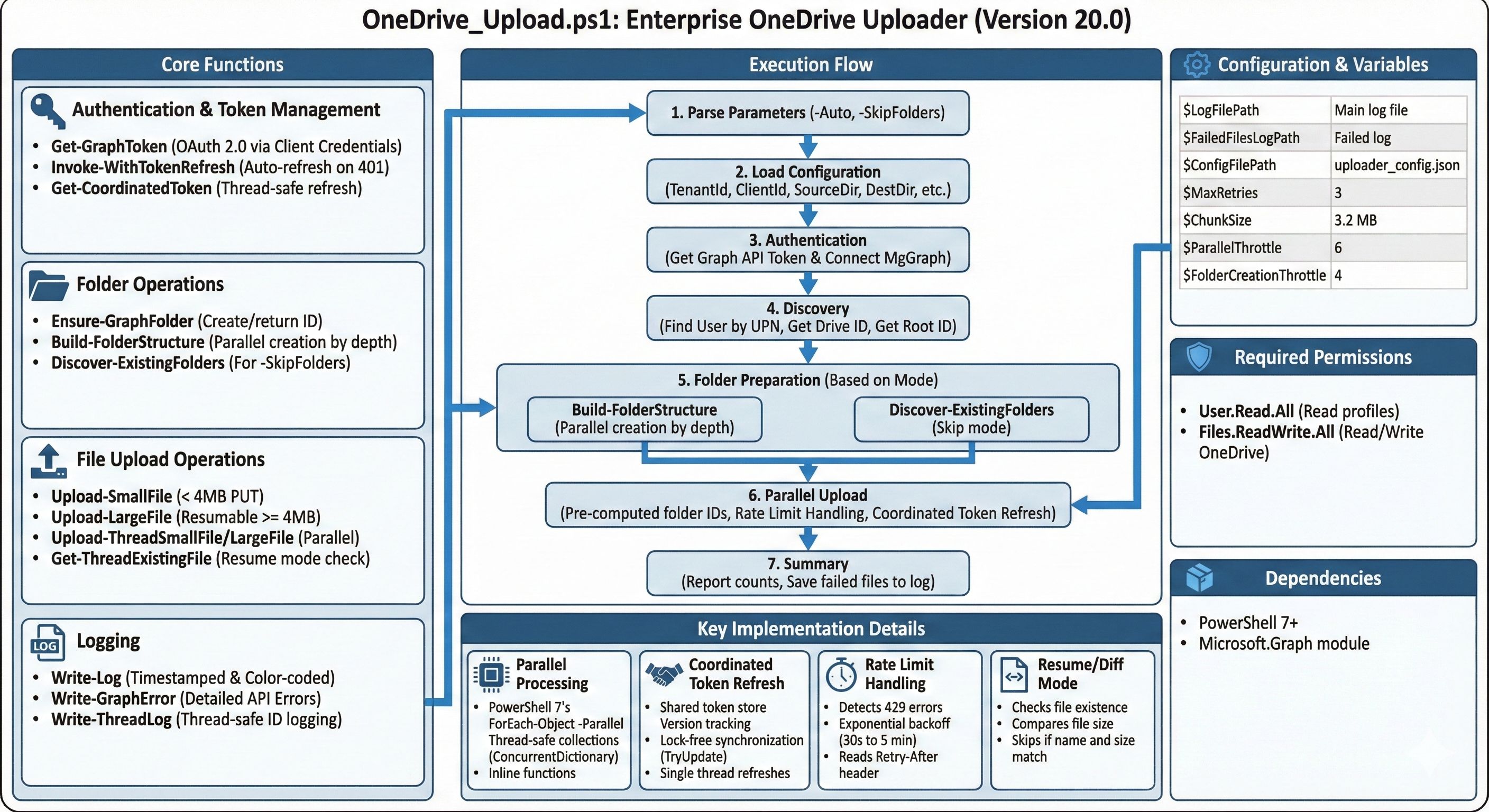
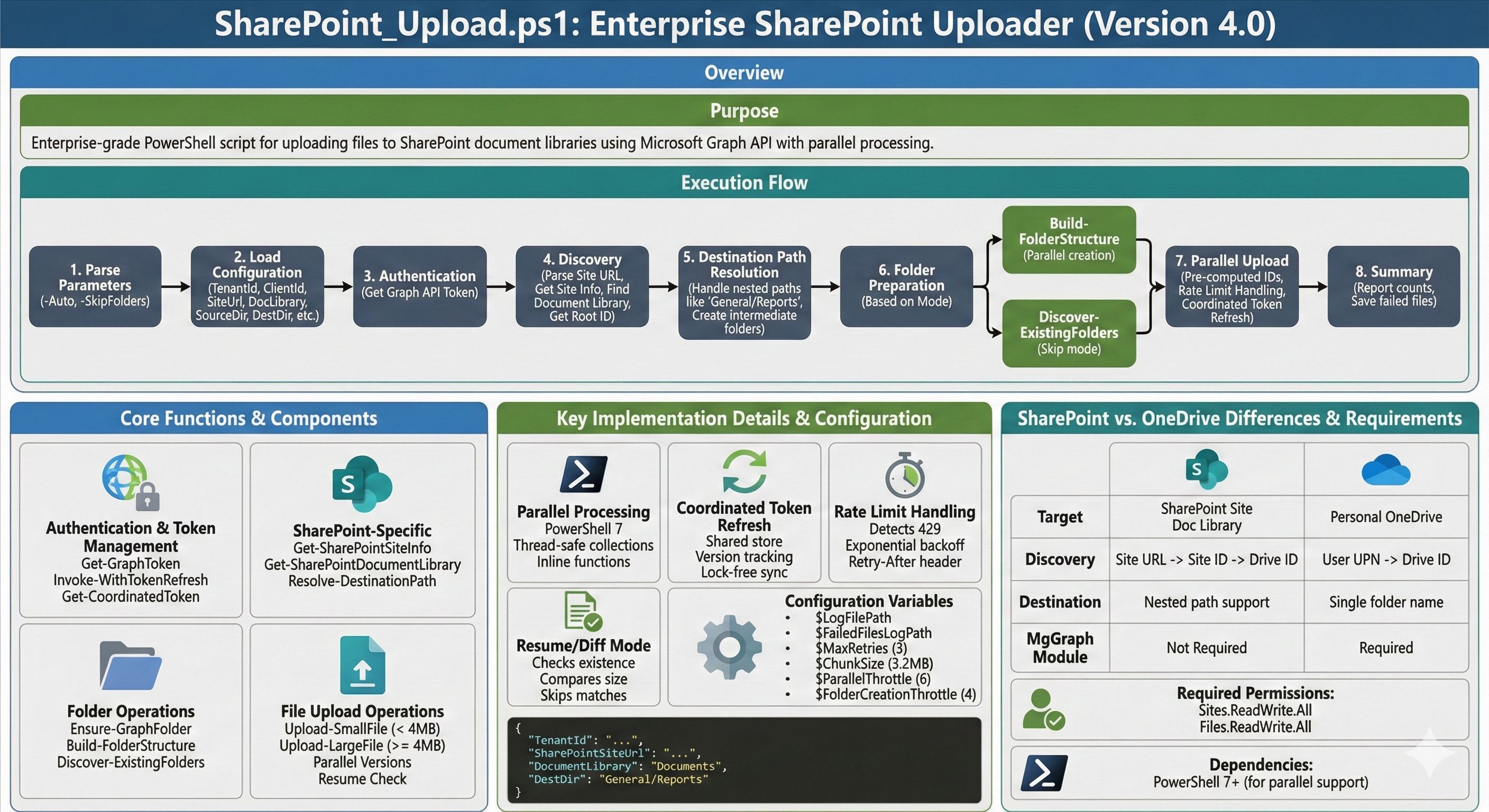
The Enterprise Upload Suite consists of two PowerShell scripts for bulk file uploads using the Microsoft Graph API:
- OneDrive Uploader (v20.0) – Upload files to a user’s OneDrive for Business
- SharePoint Uploader (v4.0) – Upload files to SharePoint document libraries
Both scripts feature parallel processing, auto/unattended mode, resume capability, and intelligent rate limit handling.
Key Features
- Parallel Uploads: Configurable concurrent uploads (default: 6 threads)
- Parallel Folder Creation: Creates folders in parallel by depth level
- Auto Mode: Run unattended with
-Autoswitch using saved configuration - Skip Folder Creation: Use
-SkipFoldersfor reruns where folders already exist - Resume/Diff Mode: Skip files that already exist with matching size
- Rate Limit Handling: Detects 429 errors with exponential backoff (30s, 60s, 120s…)
- Coordinated Token Refresh: Single thread refreshes token, others wait and reuse
- Chunked Uploads: Large files (>4MB) uploaded in 3.2MB chunks
- Comprehensive Logging: Timestamped logs with failed file tracking
Command Line Parameters
# OneDrive - Interactive mode
.OneDrive_Upload.ps1

# OneDrive - Auto mode (uses saved config, creates folders, enables resume)
.OneDrive_Upload.ps1 -Auto

# OneDrive - Auto mode, discover existing folders instead of creating
.OneDrive_Upload.ps1 -Auto -SkipFolders

# SharePoint - Same parameters available
.SharePoint_Upload.ps1 -Auto -SkipFolders
Configuration Options
| Variable | Value | Description |
|---|---|---|
$ChunkSize |
3.2 MB | Chunk size for large file uploads |
$ParallelThrottle |
6 | Concurrent upload threads |
$FolderCreationThrottle |
4 | Concurrent folder creation threads |
$MaxRetries |
3 | Retry attempts per file |
Core Functions
| Function | Purpose |
|---|---|
Get-GraphToken |
Acquires OAuth access token via client credentials |
Test-TokenExpired |
Checks if token needs refresh (5-min buffer) |
Get-CoordinatedToken |
Thread-safe token refresh across parallel threads |
Invoke-WithTokenRefresh |
Wrapper that auto-refreshes token on 401 errors |
Ensure-GraphFolder |
Creates folder if missing, returns folder ID |
Build-FolderStructure |
Pre-creates folders in parallel by depth level |
Discover-ExistingFolders |
Finds existing folders (for -SkipFolders mode) |
Upload-SmallFile |
Direct PUT upload for files <4MB |
Upload-LargeFile |
Resumable upload session for large files |
Start-UploadProcess |
Main orchestration function |
SharePoint-Specific Functions
| Function | Purpose |
|---|---|
Get-SharePointSiteInfo |
Parses SharePoint URL and retrieves site info |
Get-SharePointDocumentLibrary |
Finds document library by name |
Resolve-DestinationPath |
Handles nested paths (e.g., General/Reports) |
Execution Flow
- Authentication – Gets Graph API token (+ MgGraph module for OneDrive)
- Discovery – Finds target drive (OneDrive user or SharePoint library)
- Folder Prep – Pre-creates folder structure in parallel OR discovers existing
- Upload – Parallel file uploads with retry logic and rate limit handling
- Summary – Reports uploaded/skipped/failed counts
Parallel Upload Implementation
Uses PowerShell 7’s ForEach-Object -Parallel with:
– Thread-safe counters (ConcurrentDictionary)
– Thread-safe collections (ConcurrentBag) for failures/skipped
– Coordinated token refresh via shared token store with version tracking
– Lock-free synchronization using TryUpdate pattern
– Inline function definitions (required for parallel scope)
Requirements
- PowerShell 7+ (for parallel support)
- Microsoft.Graph module (for OneDrive initial auth/discovery)
- Azure AD App registration with appropriate permissions:
- OneDrive:
User.Read.All,Files.ReadWrite.All - SharePoint:
Sites.ReadWrite.All,Files.ReadWrite.All
OneDrive Uploader Script (v20.0)
Save as OneDrive_Upload.ps1:
# Command line parameters
param(
[switch]$Auto, # Run in unattended mode (uses saved settings, creates folders, enables resume)
[switch]$SkipFolders # In auto mode: discover existing folders instead of creating
)
<#
.SYNOPSIS
Enterprise OneDrive Uploader (v20.0 - Parallel Uploads with Auto Mode)
.DESCRIPTION
Uploads files to OneDrive for Business with parallel processing.
Resume/Diff Functionality:
- Optional check for existing files before upload
- Skips files already in OneDrive with matching size
- Perfect for resuming interrupted uploads
- Re-uploads files with size differences
- Tracks skipped files in summary
Additional Features:
- PARALLEL UPLOADS: Configurable concurrent uploads (default: 6)
- PARALLEL FOLDER CREATION: Creates folders in parallel by depth level
- SKIP FOLDER CREATION: Option to skip folder creation on reruns
- SHARED TOKEN REFRESH: Single coordinated token refresh across all threads
- RATE LIMIT HANDLING: Detects 429 errors and waits with exponential backoff
- AUTO MODE: Run unattended with --auto switch (uses saved config)
- Uses direct Graph API calls for reliable personal OneDrive targeting
- Validates WebUrl contains "/personal/" to prevent SharePoint confusion
- Comprehensive logging and clear success/failure reporting
.PARAMETER Auto
Run in unattended mode. Requires saved configuration file.
Automatically creates folders and enables resume mode.
.PARAMETER SkipFolders
Use with -Auto to discover existing folders instead of creating them.
.EXAMPLE
.OneDrive_Upload.ps1
Interactive mode with prompts.
.EXAMPLE
.OneDrive_Upload.ps1 -Auto
Unattended mode using saved settings, creates folders, resume mode enabled.
.EXAMPLE
.OneDrive_Upload.ps1 -Auto -SkipFolders
Unattended mode, discovers existing folders instead of creating.
.NOTES
Requires: Microsoft.Graph module (for initial authentication only)
Requires: PowerShell 7+ for parallel upload support
#>
# --- CONFIGURATION ---
$LogFilePath = "$PSScriptRootOneDriveUploadLog_$(Get-Date -Format 'yyyyMMdd-HHmm').txt"
$FailedFilesLogPath = "$PSScriptRootFailedUploads_$(Get-Date -Format 'yyyyMMdd-HHmm').txt"
$ConfigFilePath = "$PSScriptRootuploader_config.json"
$MaxRetries = 3
$ChunkSize = 320 * 1024 * 10 # 3.2 MB chunks
$ParallelThrottle = 6 # Concurrent file uploads (can increase for small files)
$FolderCreationThrottle = 4 # Concurrent folder creations (keep low to avoid 429 rate limits)
# --- HELPER FUNCTIONS ---
function Write-Log {
param ([string]$Message, [string]$Level = "INFO")
$timestamp = Get-Date -Format "yyyy-MM-dd HH:mm:ss"
$color = switch ($Level) { "ERROR" {"Red"} "SUCCESS" {"Green"} "WARN" {"Yellow"} "DEBUG" {"Magenta"} Default {"Cyan"} }
Write-Host "[$timestamp] [$Level] $Message" -ForegroundColor $color
Add-Content -Path $LogFilePath -Value "[$timestamp] [$Level] $Message"
}
function Write-GraphError {
param ($ExceptionObject, [string]$Context = "")
$msg = $ExceptionObject.Message
if ($Context) {
$msg = "$Context - $msg"
}
if ($ExceptionObject.Response -and $ExceptionObject.Response.StatusCode) {
$msg += " [Status: $($ExceptionObject.Response.StatusCode)]"
}
# Try to extract detailed error from response
try {
if ($ExceptionObject.Exception.Response) {
$result = $ExceptionObject.Exception.Response.GetResponseStream()
$reader = New-Object System.IO.StreamReader($result)
$reader.BaseStream.Position = 0
$responseBody = $reader.ReadToEnd()
if ($responseBody) {
Write-Log "Response Body: $responseBody" "ERROR"
}
}
} catch {
# If we can't read the response, just continue
}
Write-Log "API Error: $msg" "ERROR"
}
function Get-GraphToken {
param ($TenantId, $ClientId, $ClientSecret)
try {
$tokenBody = @{
Grant_Type = "client_credentials"
Scope = "https://graph.microsoft.com/.default"
Client_Id = $ClientId
Client_Secret = $ClientSecret
}
$tokenResponse = Invoke-RestMethod -Uri "https://login.microsoftonline.com/$TenantId/oauth2/v2.0/token" -Method POST -Body $tokenBody -ErrorAction Stop
# Return token info including expiration
return @{
Token = $tokenResponse.access_token
ExpiresIn = $tokenResponse.expires_in
AcquiredAt = Get-Date
}
} catch {
Write-GraphError $_.Exception
throw "Failed to acquire Access Token"
}
}
function Test-TokenExpired {
param ($TokenInfo, [int]$BufferMinutes = 5)
if (-not $TokenInfo -or -not $TokenInfo.AcquiredAt) {
return $true
}
$expirationTime = $TokenInfo.AcquiredAt.AddSeconds($TokenInfo.ExpiresIn)
$bufferTime = (Get-Date).AddMinutes($BufferMinutes)
# Return true if token will expire within buffer time
return $bufferTime -gt $expirationTime
}
function Invoke-WithTokenRefresh {
param (
[ScriptBlock]$ScriptBlock,
[ref]$TokenInfoRef,
$TenantId,
$ClientId,
$ClientSecret
)
$maxRetries = 2
$attempt = 0
while ($attempt -lt $maxRetries) {
$attempt++
# Check if token needs refresh before operation
if (Test-TokenExpired -TokenInfo $TokenInfoRef.Value) {
Write-Log "Token expired or expiring soon, refreshing..." "INFO"
$TokenInfoRef.Value = Get-GraphToken -TenantId $TenantId -ClientId $ClientId -ClientSecret $ClientSecret
Write-Log "Token refreshed successfully" "SUCCESS"
}
try {
# Execute the script block with current token
return & $ScriptBlock
}
catch {
# Check if it's a 401 Unauthorized error
if ($_.Exception.Response -and $_.Exception.Response.StatusCode -eq 401) {
Write-Log "Received 401 Unauthorized - refreshing token and retrying..." "WARN"
$TokenInfoRef.Value = Get-GraphToken -TenantId $TenantId -ClientId $ClientId -ClientSecret $ClientSecret
Write-Log "Token refreshed, retrying operation..." "INFO"
}
else {
# Not a 401 error, rethrow
throw
}
}
}
throw "Operation failed after token refresh attempts"
}
function Get-FreshToken {
param ([ref]$TokenInfoRef, $TenantId, $ClientId, $ClientSecret)
# Check if token needs refresh
if (Test-TokenExpired -TokenInfo $TokenInfoRef.Value) {
Write-Log "Token expiring soon, refreshing..." "INFO"
$TokenInfoRef.Value = Get-GraphToken -TenantId $TenantId -ClientId $ClientId -ClientSecret $ClientSecret
$expiresAt = $TokenInfoRef.Value.AcquiredAt.AddSeconds($TokenInfoRef.Value.ExpiresIn)
Write-Log "Token refreshed (New expiration: $($expiresAt.ToString('HH:mm:ss')))" "SUCCESS"
}
return $TokenInfoRef.Value.Token
}
function Ensure-GraphFolder {
param ([string]$DriveId, [string]$ParentItemId, [string]$FolderName, [string]$AccessToken)
# Validate folder name is not empty
if ([string]::IsNullOrWhiteSpace($FolderName)) {
Write-Log "ERROR: Attempted to create folder with empty name! Parent: $ParentItemId" "ERROR"
throw "Invalid folder name (empty or whitespace)"
}
$headers = @{ "Authorization" = "Bearer $AccessToken"; "Content-Type" = "application/json" }
# 1. Check exists
try {
$uri = "https://graph.microsoft.com/v1.0/drives/$DriveId/items/$ParentItemId/children?`$filter=name eq '$FolderName'"
$response = Invoke-RestMethod -Method GET -Uri $uri -Headers $headers -ErrorAction Stop
$item = $response.value | Select-Object -First 1
if ($item) {
return $item.id
}
} catch {
# Folder doesn't exist, will create
}
# 2. Create (or get if already exists)
try {
# Use "replace" to avoid conflicts - if folder exists, it will return the existing folder
$body = @{
name = $FolderName
folder = @{}
"@microsoft.graph.conflictBehavior" = "replace"
} | ConvertTo-Json
$createUri = "https://graph.microsoft.com/v1.0/drives/$DriveId/items/$ParentItemId/children"
$newItem = Invoke-RestMethod -Method POST -Uri $createUri -Headers $headers -Body $body -ErrorAction Stop
Write-Log "Created folder: $FolderName" "INFO"
return $newItem.id
} catch {
# If creation fails for any reason, try to fetch the existing folder
Write-Log "Folder creation failed, attempting to fetch existing folder..." "WARN"
Write-GraphError $_.Exception "Folder Creation"
try {
$uri = "https://graph.microsoft.com/v1.0/drives/$DriveId/items/$ParentItemId/children?`$top=999"
Write-Log "Fetching children to find folder: $uri" "DEBUG"
$response = Invoke-RestMethod -Method GET -Uri $uri -Headers $headers -ErrorAction Stop
$target = $response.value | Where-Object { $_.name -eq $FolderName } | Select-Object -First 1
if ($target) {
Write-Log "Found existing folder: $($target.webUrl)" "SUCCESS"
return $target.id
} else {
Write-Log "Folder '$FolderName' not found in parent" "ERROR"
}
} catch {
Write-Log "Failed to fetch folder list: $($_.Exception.Message)" "ERROR"
}
Write-Log "CRITICAL: Unable to create or find folder '$FolderName'" "ERROR"
throw "Folder operation failed for: $FolderName"
}
}
function Build-FolderStructure {
param (
[string]$DriveId,
[string]$RootFolderId,
[string]$SourceDir,
[array]$Files,
[string]$AccessToken,
[int]$FolderThrottle = 4,
[string]$TenantId,
[string]$ClientId,
[string]$ClientSecret
)
Write-Log "Pre-creating folder structure (parallel by depth level)..." "INFO"
# Build unique set of relative folder paths
$folderPaths = @{}
foreach ($file in $Files) {
$relativePath = $file.DirectoryName.Substring($SourceDir.Length)
$cleanPath = $relativePath.Trim([System.IO.Path]::DirectorySeparatorChar, [System.IO.Path]::AltDirectorySeparatorChar)
if ($cleanPath.Length -gt 0) {
# Add this path and all parent paths
$parts = $cleanPath.Split([System.IO.Path]::DirectorySeparatorChar, [System.StringSplitOptions]::RemoveEmptyEntries)
$buildPath = ""
foreach ($part in $parts) {
if ($buildPath) { $buildPath += [System.IO.Path]::DirectorySeparatorChar }
$buildPath += $part
$folderPaths[$buildPath] = $true
}
}
}
if ($folderPaths.Count -eq 0) {
Write-Log "No folders to create" "INFO"
$result = @{}
$result[""] = $RootFolderId
return $result
}
# Group paths by depth level
$pathsByDepth = @{}
foreach ($path in $folderPaths.Keys) {
$depth = ($path.Split([System.IO.Path]::DirectorySeparatorChar, [System.StringSplitOptions]::RemoveEmptyEntries)).Count
if (-not $pathsByDepth.ContainsKey($depth)) {
$pathsByDepth[$depth] = @()
}
$pathsByDepth[$depth] += $path
}
$maxDepth = ($pathsByDepth.Keys | Measure-Object -Maximum).Maximum
Write-Log "Creating $($folderPaths.Count) folders across $maxDepth depth levels..." "INFO"
# Thread-safe folder map
$folderMap = [System.Collections.Concurrent.ConcurrentDictionary[string,string]]::new()
$folderMap[""] = $RootFolderId
# Shared token store for coordinated token refresh across threads
$folderTokenStore = [System.Collections.Concurrent.ConcurrentDictionary[string,object]]::new()
$folderTokenStore["token"] = $AccessToken
$folderTokenStore["version"] = [long]0
$folderTokenStore["refreshLock"] = [int]0
# Process each depth level in order (parallel within each level)
for ($depth = 1; $depth -le $maxDepth; $depth++) {
$pathsAtDepth = $pathsByDepth[$depth]
if (-not $pathsAtDepth) { continue }
Write-Log " Level $depth`: $($pathsAtDepth.Count) folders" "DEBUG"
$pathsAtDepth | ForEach-Object -ThrottleLimit $FolderThrottle -Parallel {
$path = $_
$DriveId = $using:DriveId
$FolderMapRef = $using:folderMap
$TokenStore = $using:folderTokenStore
$TenantId = $using:TenantId
$ClientId = $using:ClientId
$ClientSecret = $using:ClientSecret
# Get current token from shared store
$currentTokenVersion = [long]$TokenStore["version"]
$currentToken = $TokenStore["token"]
# Coordinated token refresh function (inline for parallel scope)
function Get-FolderCoordinatedToken {
param ($TokenStore, $MyVersion, $TenantId, $ClientId, $ClientSecret)
$currentVersion = [long]$TokenStore["version"]
if ($currentVersion -gt $MyVersion) {
return @{ Token = $TokenStore["token"]; Version = $currentVersion; Refreshed = $false }
}
$gotLock = $TokenStore.TryUpdate("refreshLock", 1, 0)
if ($gotLock) {
$currentVersion = [long]$TokenStore["version"]
if ($currentVersion -gt $MyVersion) {
$TokenStore["refreshLock"] = 0
return @{ Token = $TokenStore["token"]; Version = $currentVersion; Refreshed = $false }
}
try {
$tokenBody = @{
Grant_Type = "client_credentials"
Scope = "https://graph.microsoft.com/.default"
Client_Id = $ClientId
Client_Secret = $ClientSecret
}
$tokenResponse = Invoke-RestMethod -Uri "https://login.microsoftonline.com/$TenantId/oauth2/v2.0/token" -Method POST -Body $tokenBody -ErrorAction Stop
$newVersion = $currentVersion + 1
$TokenStore["token"] = $tokenResponse.access_token
$TokenStore["version"] = $newVersion
return @{ Token = $tokenResponse.access_token; Version = $newVersion; Refreshed = $true }
}
finally { $TokenStore["refreshLock"] = 0 }
}
else {
$waitCount = 0
while ([int]$TokenStore["refreshLock"] -eq 1 -and $waitCount -lt 30) {
Start-Sleep -Milliseconds 500
$waitCount++
}
return @{ Token = $TokenStore["token"]; Version = [long]$TokenStore["version"]; Refreshed = $false }
}
}
# Parse path to get folder name and parent
$parts = $path.Split([System.IO.Path]::DirectorySeparatorChar, [System.StringSplitOptions]::RemoveEmptyEntries)
$folderName = $parts[-1]
$parentPath = if ($parts.Count -eq 1) { "" } else { ($parts[0..($parts.Count - 2)]) -join [System.IO.Path]::DirectorySeparatorChar }
$parentId = $FolderMapRef[$parentPath]
# Retry logic with token refresh
$maxRetries = 3
$folderId = $null
for ($attempt = 1; $attempt -le $maxRetries; $attempt++) {
$headers = @{ "Authorization" = "Bearer $currentToken"; "Content-Type" = "application/json" }
try {
# Check if folder exists
$uri = "https://graph.microsoft.com/v1.0/drives/$DriveId/items/$parentId/children?`$filter=name eq '$folderName'"
$response = Invoke-RestMethod -Method GET -Uri $uri -Headers $headers -ErrorAction Stop
$existing = $response.value | Select-Object -First 1
if ($existing) { $folderId = $existing.id; break }
# Create folder
$body = @{ name = $folderName; folder = @{}; "@microsoft.graph.conflictBehavior" = "replace" } | ConvertTo-Json
$createUri = "https://graph.microsoft.com/v1.0/drives/$DriveId/items/$parentId/children"
$newItem = Invoke-RestMethod -Method POST -Uri $createUri -Headers $headers -Body $body -ErrorAction Stop
$folderId = $newItem.id
break
}
catch {
$errorMsg = $_.Exception.Message
$is401 = ($errorMsg -match "401") -or ($errorMsg -match "Unauthorized")
$is429 = ($errorMsg -match "429") -or ($errorMsg -match "Too Many Requests")
if ($is401 -and $attempt -lt $maxRetries) {
$refreshResult = Get-FolderCoordinatedToken -TokenStore $TokenStore -MyVersion $currentTokenVersion -TenantId $TenantId -ClientId $ClientId -ClientSecret $ClientSecret
$currentToken = $refreshResult.Token
$currentTokenVersion = $refreshResult.Version
}
elseif ($is429 -and $attempt -lt $maxRetries) {
$waitSeconds = 30 * [Math]::Pow(2, $attempt - 1)
if ($waitSeconds -gt 300) { $waitSeconds = 300 }
Start-Sleep -Seconds $waitSeconds
}
elseif ($attempt -eq $maxRetries) {
throw "Failed to create folder '$folderName' after $maxRetries attempts: $errorMsg"
}
}
}
if ($folderId) { $FolderMapRef[$path] = $folderId }
}
}
Write-Log "Folder structure created successfully" "SUCCESS"
# Convert to regular hashtable for return
$result = @{}
foreach ($key in $folderMap.Keys) { $result[$key] = $folderMap[$key] }
return $result
}
function Discover-ExistingFolders {
param (
[string]$DriveId,
[string]$RootFolderId,
[string]$SourceDir,
[array]$Files,
[string]$AccessToken
)
Write-Log "Discovering existing folder structure..." "INFO"
# Build unique set of relative folder paths needed
$folderPaths = @{}
foreach ($file in $Files) {
$relativePath = $file.DirectoryName.Substring($SourceDir.Length)
$cleanPath = $relativePath.Trim([System.IO.Path]::DirectorySeparatorChar, [System.IO.Path]::AltDirectorySeparatorChar)
if ($cleanPath.Length -gt 0) {
$parts = $cleanPath.Split([System.IO.Path]::DirectorySeparatorChar, [System.StringSplitOptions]::RemoveEmptyEntries)
$buildPath = ""
foreach ($part in $parts) {
if ($buildPath) { $buildPath += [System.IO.Path]::DirectorySeparatorChar }
$buildPath += $part
$folderPaths[$buildPath] = $true
}
}
}
if ($folderPaths.Count -eq 0) {
Write-Log "No folders to discover" "INFO"
$result = @{}
$result[""] = $RootFolderId
return $result
}
# Sort paths by depth to discover parents before children
$sortedPaths = $folderPaths.Keys | Sort-Object { $_.Split([System.IO.Path]::DirectorySeparatorChar).Count }
Write-Log "Discovering $($sortedPaths.Count) existing folders..." "INFO"
$folderMap = @{}
$folderMap[""] = $RootFolderId
$headers = @{ "Authorization" = "Bearer $AccessToken" }
foreach ($path in $sortedPaths) {
$parts = $path.Split([System.IO.Path]::DirectorySeparatorChar, [System.StringSplitOptions]::RemoveEmptyEntries)
$folderName = $parts[-1]
$parentPath = if ($parts.Count -eq 1) { "" } else { ($parts[0..($parts.Count - 2)]) -join [System.IO.Path]::DirectorySeparatorChar }
$parentId = $folderMap[$parentPath]
try {
$encodedName = [Uri]::EscapeDataString($folderName)
$uri = "https://graph.microsoft.com/v1.0/drives/$DriveId/items/$parentId`:/$encodedName"
$folder = Invoke-RestMethod -Method GET -Uri $uri -Headers $headers -ErrorAction Stop
if ($folder -and $folder.id) {
$folderMap[$path] = $folder.id
Write-Log " Found: $path" "DEBUG"
}
}
catch {
Write-Log " WARNING: Folder not found: $path - uploads to this path may fail" "WARN"
$folderMap[$path] = $null
}
}
Write-Log "Folder discovery complete" "SUCCESS"
return $folderMap
}
function Upload-SmallFile {
param ($DriveId, $ParentId, $FileObj, $AccessToken)
$encodedName = [Uri]::EscapeDataString($FileObj.Name)
$uri = "https://graph.microsoft.com/v1.0/drives/$DriveId/items/$ParentId`:/$encodedName`:/content"
$headers = @{ "Authorization" = "Bearer $AccessToken"; "Content-Type" = "application/octet-stream" }
try {
# Read file bytes directly to handle special characters in filenames (brackets, spaces)
$fileBytes = [System.IO.File]::ReadAllBytes($FileObj.FullName)
$uploadedItem = Invoke-RestMethod -Method PUT -Uri $uri -Headers $headers -Body $fileBytes -ErrorAction Stop
return $uploadedItem
}
catch {
Write-Log "Upload failed for: $($FileObj.Name)" "ERROR"
Write-GraphError $_.Exception "Small File Upload"
throw "Small File Upload Failed"
}
}
function Upload-LargeFile {
param ($DriveId, $ParentId, $FileObj, $AccessToken)
$fileName = $FileObj.Name
$fileSize = $FileObj.Length
$encodedName = [Uri]::EscapeDataString($fileName)
Write-Log "Uploading large file: $fileName ($([math]::Round($fileSize/1MB, 2)) MB)" "INFO"
$sessionUri = "https://graph.microsoft.com/v1.0/drives/$DriveId/items/$ParentId`:/$encodedName`:/createUploadSession"
$headers = @{ "Authorization" = "Bearer $AccessToken"; "Content-Type" = "application/json" }
$body = @{
item = @{
"@microsoft.graph.conflictBehavior" = "replace"
}
} | ConvertTo-Json -Depth 3
try {
$session = Invoke-RestMethod -Method POST -Uri $sessionUri -Headers $headers -Body $body -ErrorAction Stop
$uploadUrl = $session.uploadUrl
} catch {
Write-Log "Failed to create upload session for: $fileName" "ERROR"
Write-Log "Error details: $($_.Exception.Message)" "ERROR"
# Try to get more details from the response
if ($_.Exception.Response) {
try {
$reader = New-Object System.IO.StreamReader($_.Exception.Response.GetResponseStream())
$reader.BaseStream.Position = 0
$responseBody = $reader.ReadToEnd()
Write-Log "API Response: $responseBody" "ERROR"
} catch {
Write-Log "Could not read error response body" "DEBUG"
}
}
Write-GraphError $_.Exception "Large File Upload Session"
throw "Failed to create upload session"
}
$stream = [System.IO.File]::OpenRead($FileObj.FullName)
$buffer = New-Object Byte[] $ChunkSize
$uploadedBytes = 0
try {
while ($uploadedBytes -lt $fileSize) {
$bytesRead = $stream.Read($buffer, 0, $ChunkSize)
$rangeEnd = $uploadedBytes + $bytesRead - 1
$headerRange = "bytes $uploadedBytes-$rangeEnd/$fileSize"
# ALWAYS create a buffer with exactly the right size
# Don't reuse the original buffer as it might cause size mismatches
$chunkData = New-Object Byte[] $bytesRead
[Array]::Copy($buffer, 0, $chunkData, 0, $bytesRead)
# Content-Range is required for chunked uploads
$chunkHeaders = @{
"Content-Range" = $headerRange
}
try {
# Use Invoke-WebRequest for binary uploads - it handles byte arrays better
$webResponse = Invoke-WebRequest -Method PUT -Uri $uploadUrl -Headers $chunkHeaders -Body $chunkData -UseBasicParsing -ErrorAction Stop
# Parse JSON response
if ($webResponse.Content) {
$response = $webResponse.Content | ConvertFrom-Json
} else {
$response = $null
}
$uploadedBytes += $bytesRead
Write-Host -NoNewline "."
if ($response -and $response.id) {
# Upload complete
Write-Host " Done."
if ($response.webUrl) { Write-Log "Uploaded Large File: $($response.webUrl)" "SUCCESS" }
return $response
}
}
catch {
Write-Log "Chunk upload failed at byte $uploadedBytes" "ERROR"
Write-Log "Error: $($_.Exception.Message)" "ERROR"
# Try to extract error details
if ($_.Exception.Response) {
try {
$reader = New-Object System.IO.StreamReader($_.Exception.Response.GetResponseStream())
$reader.BaseStream.Position = 0
$errorBody = $reader.ReadToEnd()
Write-Log "API Error Response: $errorBody" "ERROR"
} catch {}
}
throw
}
}
# If we loop finishes but no response returned (unlikely if loop logic is correct), fetch it.
$finalUri = "https://graph.microsoft.com/v1.0/drives/$DriveId/items/$ParentId/children?`$filter=name eq '$encodedName'"
$finalRes = Invoke-RestMethod -Method GET -Uri $finalUri -Headers $headers
return $finalRes.value | Select-Object -First 1
}
catch {
Write-GraphError $_.Exception
throw "Large File Chunk Failed"
}
finally { $stream.Close(); $stream.Dispose() }
}
function Start-UploadProcess {
param ($SourceDir, $DestDirName, $TargetUPN, $TenantId, $ClientId, $ClientSecret, [bool]$AutoMode = $false, [bool]$SkipFolderCreation = $false)
Write-Log "Initializing..." "INFO"
# 1. AUTH (Get Token with expiration tracking)
$TokenInfo = $null
try {
$TokenInfo = Get-GraphToken -TenantId $TenantId -ClientId $ClientId -ClientSecret $ClientSecret
if (-not $TokenInfo -or -not $TokenInfo.Token) { throw "Empty Access Token" }
$expiresAt = $TokenInfo.AcquiredAt.AddSeconds($TokenInfo.ExpiresIn)
Write-Log "Token Acquired (Expires: $($expiresAt.ToString('HH:mm:ss')))" "SUCCESS"
# Also Connect-MgGraph for Discovery (using same creds)
$secSecret = ConvertTo-SecureString $ClientSecret -AsPlainText -Force
$cred = New-Object System.Management.Automation.PSCredential($ClientId, $secSecret)
Connect-MgGraph -TenantId $TenantId -Credential $cred -ErrorAction Stop
Write-Log "Graph Module Connected." "SUCCESS"
} catch { Write-Log "Auth Failed: $($_.Exception.Message)" "ERROR"; return }
# Store credentials for token refresh
$script:AuthCreds = @{
TenantId = $TenantId
ClientId = $ClientId
ClientSecret = $ClientSecret
}
# 2. DISCOVERY
$DriveIdString = $null; $RootIdString = $null
try {
Write-Log "Finding User/Drive..." "INFO"
$user = Get-MgUser -UserId $TargetUPN -ErrorAction Stop
# Use token refresh wrapper for API calls
$TokenInfoRef = [ref]$TokenInfo
$targetDrive = Invoke-WithTokenRefresh -TokenInfoRef $TokenInfoRef -TenantId $TenantId -ClientId $ClientId -ClientSecret $ClientSecret -ScriptBlock {
$headers = @{ "Authorization" = "Bearer $($TokenInfoRef.Value.Token)" }
$driveUri = "https://graph.microsoft.com/v1.0/users/$($user.Id)/drive"
Invoke-RestMethod -Method GET -Uri $driveUri -Headers $headers -ErrorAction Stop
}
$TokenInfo = $TokenInfoRef.Value
if (-not $targetDrive) { throw "No OneDrive for Business drive found for $($user.UserPrincipalName)." }
# Verify this is actually a personal OneDrive (WebUrl should contain "/personal/")
if ($targetDrive.webUrl -notmatch "/personal/") {
Write-Log "WARNING: Drive WebUrl does not contain '/personal/'. WebUrl: $($targetDrive.webUrl)" "WARN"
Write-Log "This may be a SharePoint site instead of personal OneDrive. Proceeding anyway..." "WARN"
}
Write-Log "Connected to OneDrive: $($user.UserPrincipalName)" "SUCCESS"
$DriveIdString = $targetDrive.id.ToString()
# Get root item using REST API with token refresh
$rootItem = Invoke-WithTokenRefresh -TokenInfoRef $TokenInfoRef -TenantId $TenantId -ClientId $ClientId -ClientSecret $ClientSecret -ScriptBlock {
$headers = @{ "Authorization" = "Bearer $($TokenInfoRef.Value.Token)" }
$rootUri = "https://graph.microsoft.com/v1.0/drives/$DriveIdString/root"
Invoke-RestMethod -Method GET -Uri $rootUri -Headers $headers -ErrorAction Stop
}
$TokenInfo = $TokenInfoRef.Value
$RootIdString = $rootItem.id.ToString()
} catch { Write-Log "Discovery Error: $($_.Exception.Message)" "ERROR"; return }
# Token reference for refresh operations (shared across phases)
$TokenInfoRef = [ref]$TokenInfo
# 3. UPLOAD PHASE
$uploadedCount = [System.Collections.Concurrent.ConcurrentDictionary[string,int]]::new()
$uploadedCount["count"] = 0
$failedUploads = [System.Collections.Concurrent.ConcurrentBag[string]]::new()
$skippedFiles = [System.Collections.Concurrent.ConcurrentBag[string]]::new()
if (-not (Test-Path $SourceDir)) { Write-Log "Missing Source: $SourceDir" "ERROR"; return }
$files = Get-ChildItem -Path $SourceDir -Recurse -File
# Calculate and display source directory size
$totalBytes = ($files | Measure-Object -Property Length -Sum).Sum
$sizeDisplay = if ($totalBytes -ge 1GB) {
"{0:N2} GB" -f ($totalBytes / 1GB)
} elseif ($totalBytes -ge 1MB) {
"{0:N2} MB" -f ($totalBytes / 1MB)
} else {
"{0:N2} KB" -f ($totalBytes / 1KB)
}
Write-Log "Found $($files.Count) files ($sizeDisplay total)" "INFO"
# Get fresh token for upload operations
$currentToken = Get-FreshToken -TokenInfoRef $TokenInfoRef -TenantId $TenantId -ClientId $ClientId -ClientSecret $ClientSecret
$TokenInfo = $TokenInfoRef.Value
$currentRemoteParentId = $RootIdString
if (-not [string]::IsNullOrWhiteSpace($DestDirName)) {
$currentRemoteParentId = Ensure-GraphFolder -DriveId $DriveIdString -ParentItemId $RootIdString -FolderName $DestDirName -AccessToken $currentToken
if (-not $currentRemoteParentId) { return }
}
# Determine folder creation mode
$skipFolders = $SkipFolderCreation
if (-not $AutoMode) {
Write-Host ""
Write-Host "Skip folder creation? (Use for reruns where folders already exist)" -ForegroundColor Cyan
Write-Host " Choose 'y' if you've already run this script and folders exist." -ForegroundColor Gray
Write-Host " Choose 'n' for first run or if folder structure changed." -ForegroundColor Gray
$skipFolders = (Read-Host "Skip folder creation? (y/n)") -eq 'y'
Write-Host ""
} else {
if ($skipFolders) {
Write-Log "Auto mode: Discovering existing folders" "INFO"
} else {
Write-Log "Auto mode: Creating folder structure" "INFO"
}
}
# Build folder map - either create new or discover existing
$folderMap = $null
if ($skipFolders) {
Write-Log "Skipping folder creation - discovering existing folders..." "INFO"
$folderMap = Discover-ExistingFolders -DriveId $DriveIdString -RootFolderId $currentRemoteParentId -SourceDir $SourceDir -Files $files -AccessToken $currentToken
} else {
Write-Log "Creating folder structure..." "INFO"
$folderMap = Build-FolderStructure -DriveId $DriveIdString -RootFolderId $currentRemoteParentId -SourceDir $SourceDir -Files $files -AccessToken $currentToken -FolderThrottle $FolderCreationThrottle -TenantId $TenantId -ClientId $ClientId -ClientSecret $ClientSecret
}
# Determine resume mode
$checkExisting = $AutoMode # Auto mode defaults to resume enabled
if (-not $AutoMode) {
Write-Host ""
Write-Host "Check for existing files and skip them? (Resume/Diff mode)" -ForegroundColor Cyan
Write-Host " This will check OneDrive before uploading each file." -ForegroundColor Gray
Write-Host " Files with matching size and name will be skipped." -ForegroundColor Gray
$checkExisting = (Read-Host "Enable resume mode? (y/n)") -eq 'y'
Write-Host ""
} else {
Write-Log "Auto mode: Resume mode enabled" "INFO"
}
Write-Log "=== UPLOADING FILES (Parallel: $ParallelThrottle threads) ===" "INFO"
if ($checkExisting) {
Write-Log "Resume mode enabled - will skip existing files" "INFO"
}
# Progress tracking (thread-safe)
$progressCounter = [System.Collections.Concurrent.ConcurrentDictionary[string,int]]::new()
$progressCounter["completed"] = 0
$totalFiles = $files.Count
# Shared token store for coordinated token refresh across threads
$sharedTokenStore = [System.Collections.Concurrent.ConcurrentDictionary[string,object]]::new()
$sharedTokenStore["token"] = $currentToken
$sharedTokenStore["version"] = [long]0
$sharedTokenStore["refreshLock"] = [int]0
# Prepare file upload jobs with pre-computed folder IDs
$uploadJobs = foreach ($file in $files) {
$relativePath = $file.DirectoryName.Substring($SourceDir.Length)
$cleanPath = $relativePath.Trim([System.IO.Path]::DirectorySeparatorChar, [System.IO.Path]::AltDirectorySeparatorChar)
# Look up target folder from pre-built map
$targetFolderId = if ($cleanPath.Length -gt 0) { $folderMap[$cleanPath] } else { $currentRemoteParentId }
[PSCustomObject]@{
File = $file
TargetFolderId = $targetFolderId
RelativePath = $cleanPath
}
}
# Parallel upload execution
$uploadJobs | ForEach-Object -ThrottleLimit $ParallelThrottle -Parallel {
$job = $_
$file = $job.File
$targetFolderId = $job.TargetFolderId
# Import variables from parent scope
$DriveId = $using:DriveIdString
$CheckExisting = $using:checkExisting
$MaxRetries = $using:MaxRetries
$ChunkSize = $using:ChunkSize
$LogFile = $using:LogFilePath
$TotalFiles = $using:totalFiles
$ProgressCounter = $using:progressCounter
$UploadedCountRef = $using:uploadedCount
$FailedUploadsRef = $using:failedUploads
$SkippedFilesRef = $using:skippedFiles
$TenantId = $using:TenantId
$ClientId = $using:ClientId
$ClientSecret = $using:ClientSecret
$TokenStore = $using:sharedTokenStore
# Get current token from shared store and track version
$currentTokenVersion = [long]$TokenStore["version"]
$AccessToken = $TokenStore["token"]
# Thread-local logging function
function Write-ThreadLog {
param ([string]$Message, [string]$Level = "INFO")
$timestamp = Get-Date -Format "yyyy-MM-dd HH:mm:ss"
$color = switch ($Level) { "ERROR" {"Red"} "SUCCESS" {"Green"} "WARN" {"Yellow"} Default {"Cyan"} }
$threadId = [System.Threading.Thread]::CurrentThread.ManagedThreadId
Write-Host "[$timestamp] [$Level] [T$threadId] $Message" -ForegroundColor $color
Add-Content -Path $LogFile -Value "[$timestamp] [$Level] [T$threadId] $Message"
}
# Coordinated token refresh - only one thread refreshes, others wait and use updated token
function Get-CoordinatedToken {
param ($TokenStore, $MyVersion, $TenantId, $ClientId, $ClientSecret)
$currentVersion = [long]$TokenStore["version"]
if ($currentVersion -gt $MyVersion) {
return @{ Token = $TokenStore["token"]; Version = $currentVersion; Refreshed = $false }
}
$gotLock = $TokenStore.TryUpdate("refreshLock", 1, 0)
if ($gotLock) {
$currentVersion = [long]$TokenStore["version"]
if ($currentVersion -gt $MyVersion) {
$TokenStore["refreshLock"] = 0
return @{ Token = $TokenStore["token"]; Version = $currentVersion; Refreshed = $false }
}
try {
$tokenBody = @{
Grant_Type = "client_credentials"
Scope = "https://graph.microsoft.com/.default"
Client_Id = $ClientId
Client_Secret = $ClientSecret
}
$tokenResponse = Invoke-RestMethod -Uri "https://login.microsoftonline.com/$TenantId/oauth2/v2.0/token" -Method POST -Body $tokenBody -ErrorAction Stop
$newVersion = $currentVersion + 1
$TokenStore["token"] = $tokenResponse.access_token
$TokenStore["version"] = $newVersion
return @{ Token = $tokenResponse.access_token; Version = $newVersion; Refreshed = $true }
}
finally { $TokenStore["refreshLock"] = 0 }
}
else {
$waitCount = 0
while ([int]$TokenStore["refreshLock"] -eq 1 -and $waitCount -lt 30) {
Start-Sleep -Milliseconds 500
$waitCount++
}
return @{ Token = $TokenStore["token"]; Version = [long]$TokenStore["version"]; Refreshed = $false }
}
}
# Thread-local small file upload
function Upload-ThreadSmallFile {
param ($DriveId, $ParentId, $FileObj, $Token)
$encodedName = [Uri]::EscapeDataString($FileObj.Name)
$uri = "https://graph.microsoft.com/v1.0/drives/$DriveId/items/$ParentId`:/$encodedName`:/content"
$headers = @{ "Authorization" = "Bearer $Token"; "Content-Type" = "application/octet-stream" }
$fileBytes = [System.IO.File]::ReadAllBytes($FileObj.FullName)
return Invoke-RestMethod -Method PUT -Uri $uri -Headers $headers -Body $fileBytes -ErrorAction Stop
}
# Thread-local large file upload
function Upload-ThreadLargeFile {
param ($DriveId, $ParentId, $FileObj, $Token, $ChunkSize)
$fileName = $FileObj.Name
$fileSize = $FileObj.Length
$encodedName = [Uri]::EscapeDataString($fileName)
$sessionUri = "https://graph.microsoft.com/v1.0/drives/$DriveId/items/$ParentId`:/$encodedName`:/createUploadSession"
$headers = @{ "Authorization" = "Bearer $Token"; "Content-Type" = "application/json" }
$body = @{ item = @{ "@microsoft.graph.conflictBehavior" = "replace" } } | ConvertTo-Json -Depth 3
$session = Invoke-RestMethod -Method POST -Uri $sessionUri -Headers $headers -Body $body -ErrorAction Stop
$uploadUrl = $session.uploadUrl
$stream = [System.IO.File]::OpenRead($FileObj.FullName)
$buffer = New-Object Byte[] $ChunkSize
$uploadedBytes = 0
try {
while ($uploadedBytes -lt $fileSize) {
$bytesRead = $stream.Read($buffer, 0, $ChunkSize)
$rangeEnd = $uploadedBytes + $bytesRead - 1
$headerRange = "bytes $uploadedBytes-$rangeEnd/$fileSize"
$chunkData = New-Object Byte[] $bytesRead
[Array]::Copy($buffer, 0, $chunkData, 0, $bytesRead)
$chunkHeaders = @{ "Content-Range" = $headerRange }
$webResponse = Invoke-WebRequest -Method PUT -Uri $uploadUrl -Headers $chunkHeaders -Body $chunkData -UseBasicParsing -ErrorAction Stop
if ($webResponse.Content) { $response = $webResponse.Content | ConvertFrom-Json } else { $response = $null }
$uploadedBytes += $bytesRead
if ($response -and $response.id) { return $response }
}
}
finally { $stream.Close(); $stream.Dispose() }
}
# Thread-local check for existing file
function Get-ThreadExistingFile {
param ($DriveId, $ParentId, $FileName, $Token)
$headers = @{ "Authorization" = "Bearer $Token" }
$encodedName = [Uri]::EscapeDataString($FileName)
try {
$uri = "https://graph.microsoft.com/v1.0/drives/$DriveId/items/$ParentId`:/$encodedName"
return Invoke-RestMethod -Method GET -Uri $uri -Headers $headers -ErrorAction SilentlyContinue
} catch { return $null }
}
# Update progress
$completed = $ProgressCounter.AddOrUpdate("completed", 1, { param($k,$v) $v + 1 })
# Check if file already exists (resume/diff mode)
if ($CheckExisting) {
$existingFile = Get-ThreadExistingFile -DriveId $DriveId -ParentId $targetFolderId -FileName $file.Name -Token $AccessToken
if ($existingFile -and $existingFile.size -eq $file.Length) {
Write-ThreadLog "[$completed/$TotalFiles] Skipped (exists): $($file.Name)" "INFO"
$SkippedFilesRef.Add($file.Name)
$null = $UploadedCountRef.AddOrUpdate("count", 1, { param($k,$v) $v + 1 })
return
}
}
# Upload with retry logic (includes 401 token refresh and 429 rate limit handling)
$success = $false
$attempt = 0
$currentToken = $AccessToken
do {
$attempt++
try {
Write-ThreadLog "[$completed/$TotalFiles] Uploading: $($file.Name)..." "INFO"
$uploadedItem = if ($file.Length -gt 4000000) {
Upload-ThreadLargeFile -DriveId $DriveId -ParentId $targetFolderId -FileObj $file -Token $currentToken -ChunkSize $ChunkSize
} else {
Upload-ThreadSmallFile -DriveId $DriveId -ParentId $targetFolderId -FileObj $file -Token $currentToken
}
if (-not $uploadedItem -or -not $uploadedItem.id) { throw "API Response Empty" }
Write-ThreadLog "[$completed/$TotalFiles] Complete: $($file.Name)" "SUCCESS"
$null = $UploadedCountRef.AddOrUpdate("count", 1, { param($k,$v) $v + 1 })
$success = $true
}
catch {
$errorMsg = $_.Exception.Message
$waitSeconds = 2
# Check for 429 Too Many Requests - rate limited
$is429 = ($errorMsg -match "429") -or ($errorMsg -match "Too Many Requests")
# Check for 401 Unauthorized - token expired
$is401 = ($errorMsg -match "401") -or ($errorMsg -match "Unauthorized")
if ($is429) {
$waitSeconds = 30 * [Math]::Pow(2, $attempt - 1)
if ($waitSeconds -gt 300) { $waitSeconds = 300 }
Write-ThreadLog "[$completed/$TotalFiles] Rate limited (429). Waiting $waitSeconds seconds..." "WARN"
}
elseif ($is401) {
Write-ThreadLog "[$completed/$TotalFiles] Token expired, requesting coordinated refresh..." "WARN"
try {
$refreshResult = Get-CoordinatedToken -TokenStore $TokenStore -MyVersion $currentTokenVersion -TenantId $TenantId -ClientId $ClientId -ClientSecret $ClientSecret
$currentToken = $refreshResult.Token
$currentTokenVersion = $refreshResult.Version
if ($refreshResult.Refreshed) {
Write-ThreadLog "[$completed/$TotalFiles] Token refreshed (this thread), retrying..." "INFO"
} else {
Write-ThreadLog "[$completed/$TotalFiles] Using token refreshed by another thread, retrying..." "INFO"
}
}
catch { Write-ThreadLog "[$completed/$TotalFiles] Token refresh failed: $($_.Exception.Message)" "ERROR" }
}
else {
Write-ThreadLog "[$completed/$TotalFiles] Retry $attempt/$MaxRetries for $($file.Name): $errorMsg" "WARN"
}
Start-Sleep -Seconds $waitSeconds
}
} while ($attempt -lt $MaxRetries -and -not $success)
if (-not $success) {
Write-ThreadLog "[$completed/$TotalFiles] FAILED: $($file.Name)" "ERROR"
$FailedUploadsRef.Add($file.FullName)
}
}
# Convert thread-safe collections to arrays for summary
$failedUploadsArray = @($failedUploads.ToArray())
$skippedFilesArray = @($skippedFiles.ToArray())
$actuallyUploaded = $uploadedCount["count"] - $skippedFilesArray.Count
Write-Log "=== UPLOAD COMPLETE ===" "SUCCESS"
Write-Log "Total files: $($files.Count) | Uploaded: $actuallyUploaded | Skipped: $($skippedFilesArray.Count) | Failed: $($failedUploadsArray.Count)" "INFO"
if ($skippedFilesArray.Count -gt 0) {
Write-Log "Skipped $($skippedFilesArray.Count) existing files (resume mode)" "INFO"
}
if ($failedUploadsArray.Count -gt 0) {
Write-Log "Failed uploads: $($failedUploadsArray.Count) files" "ERROR"
$failedUploadsArray | Set-Content -Path $FailedFilesLogPath
Write-Log "Failed file paths saved to: $FailedFilesLogPath" "INFO"
}
Write-Log "=== PROCESS COMPLETE ===" "SUCCESS"
}
# --- MAIN ---
Clear-Host
Write-Host "--- OneDrive Uploader v20.0 (Parallel Uploads with Auto Mode) ---" -ForegroundColor Cyan
Write-Host " Concurrent threads: $ParallelThrottle (adjust `$ParallelThrottle to change)" -ForegroundColor Gray
if ($Auto) {
Write-Host " Running in AUTO mode (unattended)" -ForegroundColor Yellow
}
$TenantId=$null;$ClientId=$null;$ClientSecret=$null;$TargetUPN=$null;$SourceDir=$null;$DestDir="MigratedFiles"
$settingsLoaded = $false
# Auto mode requires saved config
if ($Auto) {
if (-not (Test-Path $ConfigFilePath)) {
Write-Host "ERROR: Auto mode requires saved configuration. Run interactively first to save settings." -ForegroundColor Red
exit 1
}
try {
$s = Get-Content $ConfigFilePath -Raw | ConvertFrom-Json
$TenantId=$s.TenantId;$ClientId=$s.ClientId;$ClientSecret=$s.ClientSecret;$TargetUPN=$s.TargetUPN;$SourceDir=$s.SourceDir;$DestDir=$s.DestDir
Write-Host "Settings Loaded from config." -ForegroundColor Green
$settingsLoaded = $true
} catch {
Write-Host "ERROR: Failed to load configuration: $($_.Exception.Message)" -ForegroundColor Red
exit 1
}
} elseif (Test-Path $ConfigFilePath) {
if ((Read-Host "Use saved settings? (y/n)") -eq 'y') {
try {
$s = Get-Content $ConfigFilePath -Raw | ConvertFrom-Json
$TenantId=$s.TenantId;$ClientId=$s.ClientId;$ClientSecret=$s.ClientSecret;$TargetUPN=$s.TargetUPN;$SourceDir=$s.SourceDir;$DestDir=$s.DestDir
Write-Host "Settings Loaded." -ForegroundColor Green
$settingsLoaded = $true
} catch { Write-Host "Load Error." -ForegroundColor Red }
}
}
if (-not $TenantId) { $TenantId = Read-Host "Tenant ID" }
if (-not $ClientId) { $ClientId = Read-Host "Client ID" }
if (-not $ClientSecret) { $ClientSecret = Read-Host "Client Secret" }
if (-not $TargetUPN) { $TargetUPN = Read-Host "Target UPN" }
if (-not $SourceDir) { $SourceDir = Read-Host "Source Path" }
if (-not $DestDir) { $DestDir = Read-Host "Dest Folder" }
# Only ask to save if settings weren't already loaded from config
if (-not $settingsLoaded -and -not $Auto) {
if ((Read-Host "Save settings? (y/n)") -eq 'y') {
@{ TenantId=$TenantId; ClientId=$ClientId; ClientSecret=$ClientSecret; TargetUPN=$TargetUPN; SourceDir=$SourceDir; DestDir=$DestDir } | ConvertTo-Json | Set-Content $ConfigFilePath
}
}
Start-UploadProcess -TenantId $TenantId -ClientId $ClientId -ClientSecret $ClientSecret -TargetUPN $TargetUPN -SourceDir $SourceDir -DestDirName $DestDir -AutoMode $Auto -SkipFolderCreation $SkipFolders
if (-not $Auto) {
Write-Host "Done. Press Enter."
Read-Host
} else {
Write-Host "Done."
}
SharePoint Uploader Script (v4.0)
Save as SharePoint_Upload.ps1:
# Command line parameters
param(
[switch]$Auto, # Run in unattended mode (uses saved settings, creates folders, enables resume)
[switch]$SkipFolders # In auto mode: discover existing folders instead of creating
)
<#
.SYNOPSIS
Enterprise SharePoint Uploader (v4.0 - Parallel Uploads with Auto Mode)
.DESCRIPTION
Uploads files to SharePoint document libraries with parallel processing.
Resume/Diff Functionality:
- Optional check for existing files before upload
- Skips files already in SharePoint with matching size
- Perfect for resuming interrupted uploads
- Re-uploads files with size differences
- Tracks skipped files in summary
Additional Features:
- PARALLEL UPLOADS: Configurable concurrent uploads (default: 6)
- PARALLEL FOLDER CREATION: Creates folders in parallel by depth level
- SKIP FOLDER CREATION: Option to skip folder creation on reruns
- SHARED TOKEN REFRESH: Single coordinated token refresh across all threads
- RATE LIMIT HANDLING: Detects 429 errors and waits with exponential backoff
- AUTO MODE: Run unattended with --auto switch (uses saved config)
- Uses direct Graph API calls for SharePoint site targeting
- Validates site URL contains "/sites/" to confirm SharePoint target
- Supports subsites (e.g., /sites/Parent/Child)
- Supports nested destination paths (e.g., General/Reports for Teams channel sites)
- Comprehensive logging and clear success/failure reporting
.PARAMETER Auto
Run in unattended mode. Requires saved configuration file.
Automatically creates folders and enables resume mode.
.PARAMETER SkipFolders
Use with -Auto to discover existing folders instead of creating them.
.EXAMPLE
.SharePoint_Upload.ps1
Interactive mode with prompts.
.EXAMPLE
.SharePoint_Upload.ps1 -Auto
Unattended mode using saved settings, creates folders, resume mode enabled.
.EXAMPLE
.SharePoint_Upload.ps1 -Auto -SkipFolders
Unattended mode, discovers existing folders instead of creating.
.NOTES
Requires: PowerShell 7+ for parallel upload support
Permissions: Sites.ReadWrite.All, Files.ReadWrite.All (Application)
#>
# --- CONFIGURATION ---
$LogFilePath = "$PSScriptRootSharePointUploadLog_$(Get-Date -Format 'yyyyMMdd-HHmm').txt"
$FailedFilesLogPath = "$PSScriptRootSharePointFailedUploads_$(Get-Date -Format 'yyyyMMdd-HHmm').txt"
$ConfigFilePath = "$PSScriptRootsharepoint_uploader_config.json"
$MaxRetries = 3
$ChunkSize = 320 * 1024 * 10 # 3.2 MB chunks
$ParallelThrottle = 6 # Concurrent file uploads (can increase for small files)
$FolderCreationThrottle = 4 # Concurrent folder creations (keep low to avoid 429 rate limits)
# --- HELPER FUNCTIONS ---
function Write-Log {
param ([string]$Message, [string]$Level = "INFO")
$timestamp = Get-Date -Format "yyyy-MM-dd HH:mm:ss"
$color = switch ($Level) { "ERROR" {"Red"} "SUCCESS" {"Green"} "WARN" {"Yellow"} "DEBUG" {"Magenta"} Default {"Cyan"} }
Write-Host "[$timestamp] [$Level] $Message" -ForegroundColor $color
Add-Content -Path $LogFilePath -Value "[$timestamp] [$Level] $Message"
}
function Write-GraphError {
param ($ExceptionObject, [string]$Context = "")
$msg = $ExceptionObject.Message
if ($Context) {
$msg = "$Context - $msg"
}
if ($ExceptionObject.Response -and $ExceptionObject.Response.StatusCode) {
$msg += " [Status: $($ExceptionObject.Response.StatusCode)]"
}
# Try to extract detailed error from response
try {
if ($ExceptionObject.Exception.Response) {
$result = $ExceptionObject.Exception.Response.GetResponseStream()
$reader = New-Object System.IO.StreamReader($result)
$reader.BaseStream.Position = 0
$responseBody = $reader.ReadToEnd()
if ($responseBody) {
Write-Log "Response Body: $responseBody" "ERROR"
}
}
} catch {
# If we can't read the response, just continue
}
Write-Log "API Error: $msg" "ERROR"
}
function Get-GraphToken {
param ($TenantId, $ClientId, $ClientSecret)
try {
$tokenBody = @{
Grant_Type = "client_credentials"
Scope = "https://graph.microsoft.com/.default"
Client_Id = $ClientId
Client_Secret = $ClientSecret
}
$tokenResponse = Invoke-RestMethod -Uri "https://login.microsoftonline.com/$TenantId/oauth2/v2.0/token" -Method POST -Body $tokenBody -ErrorAction Stop
# Return token info including expiration
return @{
Token = $tokenResponse.access_token
ExpiresIn = $tokenResponse.expires_in
AcquiredAt = Get-Date
}
} catch {
Write-GraphError $_.Exception
throw "Failed to acquire Access Token"
}
}
function Test-TokenExpired {
param ($TokenInfo, [int]$BufferMinutes = 5)
if (-not $TokenInfo -or -not $TokenInfo.AcquiredAt) {
return $true
}
$expirationTime = $TokenInfo.AcquiredAt.AddSeconds($TokenInfo.ExpiresIn)
$bufferTime = (Get-Date).AddMinutes($BufferMinutes)
# Return true if token will expire within buffer time
return $bufferTime -gt $expirationTime
}
function Invoke-WithTokenRefresh {
param (
[ScriptBlock]$ScriptBlock,
[ref]$TokenInfoRef,
$TenantId,
$ClientId,
$ClientSecret
)
$maxRetries = 2
$attempt = 0
while ($attempt -lt $maxRetries) {
$attempt++
# Check if token needs refresh before operation
if (Test-TokenExpired -TokenInfo $TokenInfoRef.Value) {
Write-Log "Token expired or expiring soon, refreshing..." "INFO"
$TokenInfoRef.Value = Get-GraphToken -TenantId $TenantId -ClientId $ClientId -ClientSecret $ClientSecret
Write-Log "Token refreshed successfully" "SUCCESS"
}
try {
# Execute the script block with current token
return & $ScriptBlock
}
catch {
# Check if it's a 401 Unauthorized error
if ($_.Exception.Response -and $_.Exception.Response.StatusCode -eq 401) {
Write-Log "Received 401 Unauthorized - refreshing token and retrying..." "WARN"
$TokenInfoRef.Value = Get-GraphToken -TenantId $TenantId -ClientId $ClientId -ClientSecret $ClientSecret
Write-Log "Token refreshed, retrying operation..." "INFO"
}
else {
# Not a 401 error, rethrow
throw
}
}
}
throw "Operation failed after token refresh attempts"
}
function Get-FreshToken {
param ([ref]$TokenInfoRef, $TenantId, $ClientId, $ClientSecret)
# Check if token needs refresh
if (Test-TokenExpired -TokenInfo $TokenInfoRef.Value) {
Write-Log "Token expiring soon, refreshing..." "INFO"
$TokenInfoRef.Value = Get-GraphToken -TenantId $TenantId -ClientId $ClientId -ClientSecret $ClientSecret
$expiresAt = $TokenInfoRef.Value.AcquiredAt.AddSeconds($TokenInfoRef.Value.ExpiresIn)
Write-Log "Token refreshed (New expiration: $($expiresAt.ToString('HH:mm:ss')))" "SUCCESS"
}
return $TokenInfoRef.Value.Token
}
function Get-SharePointSiteInfo {
param (
[string]$SiteUrl,
[string]$AccessToken
)
# Parse SharePoint site URL
# Expected formats:
# https://contoso.sharepoint.com/sites/MySite
# https://contoso.sharepoint.com/sites/Parent/Child
try {
$uri = [System.Uri]$SiteUrl
$hostname = $uri.Host
$sitePath = $uri.AbsolutePath.TrimEnd('/')
if ([string]::IsNullOrWhiteSpace($sitePath) -or $sitePath -eq "/") {
throw "Invalid SharePoint site URL. Expected format: https://tenant.sharepoint.com/sites/SiteName"
}
Write-Log "Parsed URL - Host: $hostname, Path: $sitePath" "DEBUG"
$headers = @{ "Authorization" = "Bearer $AccessToken" }
# Get site by hostname and path
$siteUri = "https://graph.microsoft.com/v1.0/sites/${hostname}:${sitePath}"
Write-Log "Fetching site info from: $siteUri" "DEBUG"
$site = Invoke-RestMethod -Method GET -Uri $siteUri -Headers $headers -ErrorAction Stop
return $site
}
catch {
Write-Log "Failed to get SharePoint site: $($_.Exception.Message)" "ERROR"
throw
}
}
function Get-SharePointDocumentLibrary {
param (
[string]$SiteId,
[string]$LibraryName,
[string]$AccessToken
)
$headers = @{ "Authorization" = "Bearer $AccessToken" }
try {
# Get all drives (document libraries) for the site
$drivesUri = "https://graph.microsoft.com/v1.0/sites/$SiteId/drives"
$drives = Invoke-RestMethod -Method GET -Uri $drivesUri -Headers $headers -ErrorAction Stop
# Find the matching library
$targetDrive = $drives.value | Where-Object { $_.name -eq $LibraryName } | Select-Object -First 1
if (-not $targetDrive) {
Write-Log "Document library '$LibraryName' not found. Available libraries:" "WARN"
foreach ($drive in $drives.value) {
Write-Log " - $($drive.name)" "INFO"
}
throw "Document library '$LibraryName' not found"
}
return $targetDrive
}
catch {
Write-Log "Failed to get document library: $($_.Exception.Message)" "ERROR"
throw
}
}
function Resolve-DestinationPath {
param (
[string]$DriveId,
[string]$RootItemId,
[string]$DestPath,
[string]$AccessToken
)
# Handle nested destination paths like "General/Subfolder" or "Channel1DocumentsReports"
# Splits by / or and navigates/creates each folder level
if ([string]::IsNullOrWhiteSpace($DestPath)) {
return $RootItemId
}
# Normalize and split the path using PowerShell's -split operator (handles / and )
$cleanPath = $DestPath.Trim('/', '', ' ')
$pathSegments = $cleanPath -split '[/\]' | Where-Object { $_ -ne '' }
if (-not $pathSegments -or $pathSegments.Count -eq 0) {
return $RootItemId
}
# Ensure it's an array even for single segments
$pathSegments = @($pathSegments)
Write-Log "Resolving destination path: $cleanPath ($($pathSegments.Count) segments)" "INFO"
Write-Log " Path segments: $($pathSegments -join ' -> ')" "DEBUG"
$currentParentId = $RootItemId
foreach ($segment in $pathSegments) {
Write-Log " Navigating to: $segment" "DEBUG"
$currentParentId = Ensure-GraphFolder -DriveId $DriveId -ParentItemId $currentParentId -FolderName $segment -AccessToken $AccessToken
if (-not $currentParentId) {
throw "Failed to resolve path segment: $segment"
}
}
Write-Log "Destination path resolved successfully" "SUCCESS"
return $currentParentId
}
function Ensure-GraphFolder {
param ([string]$DriveId, [string]$ParentItemId, [string]$FolderName, [string]$AccessToken)
# Validate folder name is not empty
if ([string]::IsNullOrWhiteSpace($FolderName)) {
Write-Log "ERROR: Attempted to create folder with empty name! Parent: $ParentItemId" "ERROR"
throw "Invalid folder name (empty or whitespace)"
}
$headers = @{ "Authorization" = "Bearer $AccessToken"; "Content-Type" = "application/json" }
# 1. Check exists
try {
$uri = "https://graph.microsoft.com/v1.0/drives/$DriveId/items/$ParentItemId/children?`$filter=name eq '$FolderName'"
$response = Invoke-RestMethod -Method GET -Uri $uri -Headers $headers -ErrorAction Stop
$item = $response.value | Select-Object -First 1
if ($item) {
return $item.id
}
} catch {
# Folder doesn't exist, will create
}
# 2. Create (or get if already exists)
try {
# Use "replace" to avoid conflicts - if folder exists, it will return the existing folder
$body = @{
name = $FolderName
folder = @{}
"@microsoft.graph.conflictBehavior" = "replace"
} | ConvertTo-Json
$createUri = "https://graph.microsoft.com/v1.0/drives/$DriveId/items/$ParentItemId/children"
$newItem = Invoke-RestMethod -Method POST -Uri $createUri -Headers $headers -Body $body -ErrorAction Stop
Write-Log "Created folder: $FolderName" "INFO"
return $newItem.id
} catch {
# If creation fails for any reason, try to fetch the existing folder
Write-Log "Folder creation failed, attempting to fetch existing folder..." "WARN"
Write-GraphError $_.Exception "Folder Creation"
try {
$uri = "https://graph.microsoft.com/v1.0/drives/$DriveId/items/$ParentItemId/children?`$top=999"
Write-Log "Fetching children to find folder: $uri" "DEBUG"
$response = Invoke-RestMethod -Method GET -Uri $uri -Headers $headers -ErrorAction Stop
$target = $response.value | Where-Object { $_.name -eq $FolderName } | Select-Object -First 1
if ($target) {
Write-Log "Found existing folder: $($target.webUrl)" "SUCCESS"
return $target.id
} else {
Write-Log "Folder '$FolderName' not found in parent" "ERROR"
}
} catch {
Write-Log "Failed to fetch folder list: $($_.Exception.Message)" "ERROR"
}
Write-Log "CRITICAL: Unable to create or find folder '$FolderName'" "ERROR"
throw "Folder operation failed for: $FolderName"
}
}
function Build-FolderStructure {
param (
[string]$DriveId,
[string]$RootFolderId,
[string]$SourceDir,
[array]$Files,
[string]$AccessToken,
[int]$FolderThrottle = 4,
[string]$TenantId,
[string]$ClientId,
[string]$ClientSecret
)
Write-Log "Pre-creating folder structure (parallel by depth level)..." "INFO"
# Build unique set of relative folder paths
$folderPaths = @{}
foreach ($file in $Files) {
$relativePath = $file.DirectoryName.Substring($SourceDir.Length)
$cleanPath = $relativePath.Trim([System.IO.Path]::DirectorySeparatorChar, [System.IO.Path]::AltDirectorySeparatorChar)
if ($cleanPath.Length -gt 0) {
# Add this path and all parent paths
$parts = $cleanPath.Split([System.IO.Path]::DirectorySeparatorChar, [System.StringSplitOptions]::RemoveEmptyEntries)
$buildPath = ""
foreach ($part in $parts) {
if ($buildPath) { $buildPath += [System.IO.Path]::DirectorySeparatorChar }
$buildPath += $part
$folderPaths[$buildPath] = $true
}
}
}
if ($folderPaths.Count -eq 0) {
Write-Log "No folders to create" "INFO"
$result = @{}
$result[""] = $RootFolderId
return $result
}
# Group paths by depth level
$pathsByDepth = @{}
foreach ($path in $folderPaths.Keys) {
$depth = ($path.Split([System.IO.Path]::DirectorySeparatorChar, [System.StringSplitOptions]::RemoveEmptyEntries)).Count
if (-not $pathsByDepth.ContainsKey($depth)) {
$pathsByDepth[$depth] = @()
}
$pathsByDepth[$depth] += $path
}
$maxDepth = ($pathsByDepth.Keys | Measure-Object -Maximum).Maximum
Write-Log "Creating $($folderPaths.Count) folders across $maxDepth depth levels..." "INFO"
# Thread-safe folder map
$folderMap = [System.Collections.Concurrent.ConcurrentDictionary[string,string]]::new()
$folderMap[""] = $RootFolderId
# Shared token store for coordinated token refresh across threads
$folderTokenStore = [System.Collections.Concurrent.ConcurrentDictionary[string,object]]::new()
$folderTokenStore["token"] = $AccessToken
$folderTokenStore["version"] = [long]0
$folderTokenStore["refreshLock"] = [int]0
# Process each depth level in order (parallel within each level)
for ($depth = 1; $depth -le $maxDepth; $depth++) {
$pathsAtDepth = $pathsByDepth[$depth]
if (-not $pathsAtDepth) { continue }
Write-Log " Level $depth`: $($pathsAtDepth.Count) folders" "DEBUG"
$pathsAtDepth | ForEach-Object -ThrottleLimit $FolderThrottle -Parallel {
$path = $_
$DriveId = $using:DriveId
$FolderMapRef = $using:folderMap
$TokenStore = $using:folderTokenStore
$TenantId = $using:TenantId
$ClientId = $using:ClientId
$ClientSecret = $using:ClientSecret
# Get current token from shared store
$currentTokenVersion = [long]$TokenStore["version"]
$currentToken = $TokenStore["token"]
# Coordinated token refresh function
function Get-FolderCoordinatedToken {
param ($TokenStore, $MyVersion, $TenantId, $ClientId, $ClientSecret)
$currentVersion = [long]$TokenStore["version"]
if ($currentVersion -gt $MyVersion) {
return @{ Token = $TokenStore["token"]; Version = $currentVersion; Refreshed = $false }
}
$gotLock = $TokenStore.TryUpdate("refreshLock", 1, 0)
if ($gotLock) {
$currentVersion = [long]$TokenStore["version"]
if ($currentVersion -gt $MyVersion) {
$TokenStore["refreshLock"] = 0
return @{ Token = $TokenStore["token"]; Version = $currentVersion; Refreshed = $false }
}
try {
$tokenBody = @{
Grant_Type = "client_credentials"
Scope = "https://graph.microsoft.com/.default"
Client_Id = $ClientId
Client_Secret = $ClientSecret
}
$tokenResponse = Invoke-RestMethod -Uri "https://login.microsoftonline.com/$TenantId/oauth2/v2.0/token" -Method POST -Body $tokenBody -ErrorAction Stop
$newVersion = $currentVersion + 1
$TokenStore["token"] = $tokenResponse.access_token
$TokenStore["version"] = $newVersion
return @{ Token = $tokenResponse.access_token; Version = $newVersion; Refreshed = $true }
}
finally {
$TokenStore["refreshLock"] = 0
}
}
else {
$waitCount = 0
while ([int]$TokenStore["refreshLock"] -eq 1 -and $waitCount -lt 30) {
Start-Sleep -Milliseconds 500
$waitCount++
}
return @{ Token = $TokenStore["token"]; Version = [long]$TokenStore["version"]; Refreshed = $false }
}
}
# Parse path to get folder name and parent
$parts = $path.Split([System.IO.Path]::DirectorySeparatorChar, [System.StringSplitOptions]::RemoveEmptyEntries)
$folderName = $parts[-1]
$parentPath = if ($parts.Count -eq 1) { "" } else { ($parts[0..($parts.Count - 2)]) -join [System.IO.Path]::DirectorySeparatorChar }
$parentId = $FolderMapRef[$parentPath]
# Retry logic with token refresh
$maxRetries = 3
$folderId = $null
for ($attempt = 1; $attempt -le $maxRetries; $attempt++) {
$headers = @{ "Authorization" = "Bearer $currentToken"; "Content-Type" = "application/json" }
try {
# Check if folder exists
$uri = "https://graph.microsoft.com/v1.0/drives/$DriveId/items/$parentId/children?`$filter=name eq '$folderName'"
$response = Invoke-RestMethod -Method GET -Uri $uri -Headers $headers -ErrorAction Stop
$existing = $response.value | Select-Object -First 1
if ($existing) {
$folderId = $existing.id
break
}
# Create folder
$body = @{
name = $folderName
folder = @{}
"@microsoft.graph.conflictBehavior" = "replace"
} | ConvertTo-Json
$createUri = "https://graph.microsoft.com/v1.0/drives/$DriveId/items/$parentId/children"
$newItem = Invoke-RestMethod -Method POST -Uri $createUri -Headers $headers -Body $body -ErrorAction Stop
$folderId = $newItem.id
break
}
catch {
$errorMsg = $_.Exception.Message
$is401 = ($errorMsg -match "401") -or ($errorMsg -match "Unauthorized") -or
($_.Exception.Response -and $_.Exception.Response.StatusCode -eq 401)
$is429 = ($errorMsg -match "429") -or ($errorMsg -match "Too Many Requests") -or
($_.Exception.Response -and $_.Exception.Response.StatusCode -eq 429)
if ($is401 -and $attempt -lt $maxRetries) {
$refreshResult = Get-FolderCoordinatedToken -TokenStore $TokenStore -MyVersion $currentTokenVersion -TenantId $TenantId -ClientId $ClientId -ClientSecret $ClientSecret
$currentToken = $refreshResult.Token
$currentTokenVersion = $refreshResult.Version
}
elseif ($is429 -and $attempt -lt $maxRetries) {
$waitSeconds = 30 * [Math]::Pow(2, $attempt - 1)
if ($waitSeconds -gt 300) { $waitSeconds = 300 }
Start-Sleep -Seconds $waitSeconds
}
elseif ($attempt -eq $maxRetries) {
throw "Failed to create folder '$folderName' after $maxRetries attempts: $errorMsg"
}
}
}
if ($folderId) {
$FolderMapRef[$path] = $folderId
}
}
}
Write-Log "Folder structure created successfully" "SUCCESS"
# Convert to regular hashtable for return
$result = @{}
foreach ($key in $folderMap.Keys) {
$result[$key] = $folderMap[$key]
}
return $result
}
function Discover-ExistingFolders {
param (
[string]$DriveId,
[string]$RootFolderId,
[string]$SourceDir,
[array]$Files,
[string]$AccessToken
)
Write-Log "Discovering existing folder structure..." "INFO"
# Build unique set of relative folder paths needed
$folderPaths = @{}
foreach ($file in $Files) {
$relativePath = $file.DirectoryName.Substring($SourceDir.Length)
$cleanPath = $relativePath.Trim([System.IO.Path]::DirectorySeparatorChar, [System.IO.Path]::AltDirectorySeparatorChar)
if ($cleanPath.Length -gt 0) {
$parts = $cleanPath.Split([System.IO.Path]::DirectorySeparatorChar, [System.StringSplitOptions]::RemoveEmptyEntries)
$buildPath = ""
foreach ($part in $parts) {
if ($buildPath) { $buildPath += [System.IO.Path]::DirectorySeparatorChar }
$buildPath += $part
$folderPaths[$buildPath] = $true
}
}
}
if ($folderPaths.Count -eq 0) {
Write-Log "No folders to discover" "INFO"
$result = @{}
$result[""] = $RootFolderId
return $result
}
# Sort paths by depth to discover parents before children
$sortedPaths = $folderPaths.Keys | Sort-Object { $_.Split([System.IO.Path]::DirectorySeparatorChar).Count }
Write-Log "Discovering $($sortedPaths.Count) existing folders..." "INFO"
$folderMap = @{}
$folderMap[""] = $RootFolderId
$headers = @{ "Authorization" = "Bearer $AccessToken" }
foreach ($path in $sortedPaths) {
$parts = $path.Split([System.IO.Path]::DirectorySeparatorChar, [System.StringSplitOptions]::RemoveEmptyEntries)
$folderName = $parts[-1]
$parentPath = if ($parts.Count -eq 1) { "" } else { ($parts[0..($parts.Count - 2)]) -join [System.IO.Path]::DirectorySeparatorChar }
$parentId = $folderMap[$parentPath]
try {
# Look up folder by name in parent
$encodedName = [Uri]::EscapeDataString($folderName)
$uri = "https://graph.microsoft.com/v1.0/drives/$DriveId/items/$parentId`:/$encodedName"
$folder = Invoke-RestMethod -Method GET -Uri $uri -Headers $headers -ErrorAction Stop
if ($folder -and $folder.id) {
$folderMap[$path] = $folder.id
Write-Log " Found: $path" "DEBUG"
}
}
catch {
Write-Log " WARNING: Folder not found: $path - uploads to this path may fail" "WARN"
# Still add a placeholder - uploads will fail but won't crash the script
$folderMap[$path] = $null
}
}
Write-Log "Folder discovery complete" "SUCCESS"
return $folderMap
}
function Upload-SmallFile {
param ($DriveId, $ParentId, $FileObj, $AccessToken)
$encodedName = [Uri]::EscapeDataString($FileObj.Name)
$uri = "https://graph.microsoft.com/v1.0/drives/$DriveId/items/$ParentId`:/$encodedName`:/content"
$headers = @{ "Authorization" = "Bearer $AccessToken"; "Content-Type" = "application/octet-stream" }
try {
# Read file bytes directly to handle special characters in filenames (brackets, spaces)
$fileBytes = [System.IO.File]::ReadAllBytes($FileObj.FullName)
$uploadedItem = Invoke-RestMethod -Method PUT -Uri $uri -Headers $headers -Body $fileBytes -ErrorAction Stop
return $uploadedItem
}
catch {
Write-Log "Upload failed for: $($FileObj.Name)" "ERROR"
Write-GraphError $_.Exception "Small File Upload"
throw "Small File Upload Failed"
}
}
function Upload-LargeFile {
param ($DriveId, $ParentId, $FileObj, $AccessToken)
$fileName = $FileObj.Name
$fileSize = $FileObj.Length
$encodedName = [Uri]::EscapeDataString($fileName)
Write-Log "Uploading large file: $fileName ($([math]::Round($fileSize/1MB, 2)) MB)" "INFO"
$sessionUri = "https://graph.microsoft.com/v1.0/drives/$DriveId/items/$ParentId`:/$encodedName`:/createUploadSession"
$headers = @{ "Authorization" = "Bearer $AccessToken"; "Content-Type" = "application/json" }
$body = @{
item = @{
"@microsoft.graph.conflictBehavior" = "replace"
}
} | ConvertTo-Json -Depth 3
try {
$session = Invoke-RestMethod -Method POST -Uri $sessionUri -Headers $headers -Body $body -ErrorAction Stop
$uploadUrl = $session.uploadUrl
} catch {
Write-Log "Failed to create upload session for: $fileName" "ERROR"
Write-Log "Error details: $($_.Exception.Message)" "ERROR"
# Try to get more details from the response
if ($_.Exception.Response) {
try {
$reader = New-Object System.IO.StreamReader($_.Exception.Response.GetResponseStream())
$reader.BaseStream.Position = 0
$responseBody = $reader.ReadToEnd()
Write-Log "API Response: $responseBody" "ERROR"
} catch {
Write-Log "Could not read error response body" "DEBUG"
}
}
Write-GraphError $_.Exception "Large File Upload Session"
throw "Failed to create upload session"
}
$stream = [System.IO.File]::OpenRead($FileObj.FullName)
$buffer = New-Object Byte[] $ChunkSize
$uploadedBytes = 0
try {
while ($uploadedBytes -lt $fileSize) {
$bytesRead = $stream.Read($buffer, 0, $ChunkSize)
$rangeEnd = $uploadedBytes + $bytesRead - 1
$headerRange = "bytes $uploadedBytes-$rangeEnd/$fileSize"
# ALWAYS create a buffer with exactly the right size
# Don't reuse the original buffer as it might cause size mismatches
$chunkData = New-Object Byte[] $bytesRead
[Array]::Copy($buffer, 0, $chunkData, 0, $bytesRead)
# Content-Range is required for chunked uploads
$chunkHeaders = @{
"Content-Range" = $headerRange
}
try {
# Use Invoke-WebRequest for binary uploads - it handles byte arrays better
$webResponse = Invoke-WebRequest -Method PUT -Uri $uploadUrl -Headers $chunkHeaders -Body $chunkData -UseBasicParsing -ErrorAction Stop
# Parse JSON response
if ($webResponse.Content) {
$response = $webResponse.Content | ConvertFrom-Json
} else {
$response = $null
}
$uploadedBytes += $bytesRead
Write-Host -NoNewline "."
if ($response -and $response.id) {
# Upload complete
Write-Host " Done."
if ($response.webUrl) { Write-Log "Uploaded Large File: $($response.webUrl)" "SUCCESS" }
return $response
}
}
catch {
Write-Log "Chunk upload failed at byte $uploadedBytes" "ERROR"
Write-Log "Error: $($_.Exception.Message)" "ERROR"
# Try to extract error details
if ($_.Exception.Response) {
try {
$reader = New-Object System.IO.StreamReader($_.Exception.Response.GetResponseStream())
$reader.BaseStream.Position = 0
$errorBody = $reader.ReadToEnd()
Write-Log "API Error Response: $errorBody" "ERROR"
} catch {}
}
throw
}
}
# If we loop finishes but no response returned (unlikely if loop logic is correct), fetch it.
$finalUri = "https://graph.microsoft.com/v1.0/drives/$DriveId/items/$ParentId/children?`$filter=name eq '$encodedName'"
$finalRes = Invoke-RestMethod -Method GET -Uri $finalUri -Headers $headers
return $finalRes.value | Select-Object -First 1
}
catch {
Write-GraphError $_.Exception
throw "Large File Chunk Failed"
}
finally { $stream.Close(); $stream.Dispose() }
}
function Start-UploadProcess {
param ($SourceDir, $DestDirName, $SharePointSiteUrl, $DocumentLibrary, $TenantId, $ClientId, $ClientSecret, [bool]$AutoMode = $false, [bool]$SkipFolderCreation = $false)
Write-Log "Initializing..." "INFO"
# 1. AUTH (Get Token with expiration tracking)
$TokenInfo = $null
try {
$TokenInfo = Get-GraphToken -TenantId $TenantId -ClientId $ClientId -ClientSecret $ClientSecret
if (-not $TokenInfo -or -not $TokenInfo.Token) { throw "Empty Access Token" }
$expiresAt = $TokenInfo.AcquiredAt.AddSeconds($TokenInfo.ExpiresIn)
Write-Log "Token Acquired (Expires: $($expiresAt.ToString('HH:mm:ss')))" "SUCCESS"
} catch { Write-Log "Auth Failed: $($_.Exception.Message)" "ERROR"; return }
# Store credentials for token refresh
$script:AuthCreds = @{
TenantId = $TenantId
ClientId = $ClientId
ClientSecret = $ClientSecret
}
# 2. DISCOVERY - SharePoint Site and Document Library
$DriveIdString = $null; $RootIdString = $null; $SiteInfo = $null
try {
Write-Log "Finding SharePoint Site..." "INFO"
# Get SharePoint site info
$SiteInfo = Get-SharePointSiteInfo -SiteUrl $SharePointSiteUrl -AccessToken $TokenInfo.Token
if (-not $SiteInfo) { throw "Failed to retrieve SharePoint site information" }
Write-Log "Connected to SharePoint Site: $($SiteInfo.displayName)" "SUCCESS"
Write-Log "Site URL: $($SiteInfo.webUrl)" "INFO"
# Validate this is a SharePoint site (not personal OneDrive)
if ($SiteInfo.webUrl -notmatch "/sites/") {
Write-Log "WARNING: Site URL does not contain '/sites/'. This may not be a standard SharePoint site." "WARN"
}
# Get the document library
Write-Log "Finding Document Library: $DocumentLibrary..." "INFO"
$targetDrive = Get-SharePointDocumentLibrary -SiteId $SiteInfo.id -LibraryName $DocumentLibrary -AccessToken $TokenInfo.Token
if (-not $targetDrive) { throw "Document library '$DocumentLibrary' not found" }
Write-Log "Connected to Document Library: $($targetDrive.name)" "SUCCESS"
$DriveIdString = $targetDrive.id.ToString()
# Get root item of the document library
$headers = @{ "Authorization" = "Bearer $($TokenInfo.Token)" }
$rootUri = "https://graph.microsoft.com/v1.0/drives/$DriveIdString/root"
$rootItem = Invoke-RestMethod -Method GET -Uri $rootUri -Headers $headers -ErrorAction Stop
$RootIdString = $rootItem.id.ToString()
} catch { Write-Log "Discovery Error: $($_.Exception.Message)" "ERROR"; return }
# Token reference for refresh operations
$TokenInfoRef = [ref]$TokenInfo
# 3. UPLOAD PHASE
$uploadedCount = [System.Collections.Concurrent.ConcurrentDictionary[string,int]]::new()
$uploadedCount["count"] = 0
$failedUploads = [System.Collections.Concurrent.ConcurrentBag[string]]::new()
$skippedFiles = [System.Collections.Concurrent.ConcurrentBag[string]]::new()
if (-not (Test-Path $SourceDir)) { Write-Log "Missing Source: $SourceDir" "ERROR"; return }
$files = Get-ChildItem -Path $SourceDir -Recurse -File
# Calculate and display source directory size
$totalBytes = ($files | Measure-Object -Property Length -Sum).Sum
$sizeDisplay = if ($totalBytes -ge 1GB) {
"{0:N2} GB" -f ($totalBytes / 1GB)
} elseif ($totalBytes -ge 1MB) {
"{0:N2} MB" -f ($totalBytes / 1MB)
} else {
"{0:N2} KB" -f ($totalBytes / 1KB)
}
Write-Log "Found $($files.Count) files ($sizeDisplay total)" "INFO"
# Get fresh token for upload operations
$currentToken = Get-FreshToken -TokenInfoRef $TokenInfoRef -TenantId $TenantId -ClientId $ClientId -ClientSecret $ClientSecret
$TokenInfo = $TokenInfoRef.Value
# Resolve destination path (supports nested paths like "General/Subfolder" for channel sites)
$currentRemoteParentId = Resolve-DestinationPath -DriveId $DriveIdString -RootItemId $RootIdString -DestPath $DestDirName -AccessToken $currentToken
if (-not $currentRemoteParentId) { return }
# Determine folder creation mode
$skipFolders = $SkipFolderCreation
if (-not $AutoMode) {
# Ask if user wants to skip folder creation (for reruns where folders already exist)
Write-Host ""
Write-Host "Skip folder creation? (Use for reruns where folders already exist)" -ForegroundColor Cyan
Write-Host " Choose 'y' if you've already run this script and folders exist." -ForegroundColor Gray
Write-Host " Choose 'n' for first run or if folder structure changed." -ForegroundColor Gray
$skipFolders = (Read-Host "Skip folder creation? (y/n)") -eq 'y'
Write-Host ""
} else {
if ($skipFolders) {
Write-Log "Auto mode: Discovering existing folders" "INFO"
} else {
Write-Log "Auto mode: Creating folder structure" "INFO"
}
}
# Build folder map - either create new or discover existing
$folderMap = $null
if ($skipFolders) {
Write-Log "Skipping folder creation - discovering existing folders..." "INFO"
$folderMap = Discover-ExistingFolders -DriveId $DriveIdString -RootFolderId $currentRemoteParentId -SourceDir $SourceDir -Files $files -AccessToken $currentToken
} else {
Write-Log "Creating folder structure..." "INFO"
$folderMap = Build-FolderStructure -DriveId $DriveIdString -RootFolderId $currentRemoteParentId -SourceDir $SourceDir -Files $files -AccessToken $currentToken -FolderThrottle $FolderCreationThrottle -TenantId $TenantId -ClientId $ClientId -ClientSecret $ClientSecret
}
# Determine resume mode
$checkExisting = $AutoMode # Auto mode defaults to resume enabled
if (-not $AutoMode) {
# Ask if user wants to check for existing files (resume/diff functionality)
Write-Host ""
Write-Host "Check for existing files and skip them? (Resume/Diff mode)" -ForegroundColor Cyan
Write-Host " This will check SharePoint before uploading each file." -ForegroundColor Gray
Write-Host " Files with matching size and name will be skipped." -ForegroundColor Gray
$checkExisting = (Read-Host "Enable resume mode? (y/n)") -eq 'y'
Write-Host ""
} else {
Write-Log "Auto mode: Resume mode enabled" "INFO"
}
Write-Log "=== UPLOADING FILES (Parallel: $ParallelThrottle threads) ===" "INFO"
if ($checkExisting) {
Write-Log "Resume mode enabled - will skip existing files" "INFO"
}
# Progress tracking (thread-safe)
$progressCounter = [System.Collections.Concurrent.ConcurrentDictionary[string,int]]::new()
$progressCounter["completed"] = 0
$totalFiles = $files.Count
# Shared token store for coordinated token refresh across threads
# version: increments on each refresh, used to prevent multiple threads from refreshing simultaneously
# token: current valid access token
# refreshLock: 0 = unlocked, 1 = refresh in progress
$sharedTokenStore = [System.Collections.Concurrent.ConcurrentDictionary[string,object]]::new()
$sharedTokenStore["token"] = $currentToken
$sharedTokenStore["version"] = [long]0
$sharedTokenStore["refreshLock"] = [int]0
# Prepare file upload jobs with pre-computed folder IDs
$uploadJobs = foreach ($file in $files) {
$relativePath = $file.DirectoryName.Substring($SourceDir.Length)
$cleanPath = $relativePath.Trim([System.IO.Path]::DirectorySeparatorChar, [System.IO.Path]::AltDirectorySeparatorChar)
# Look up target folder from pre-built map
$targetFolderId = if ($cleanPath.Length -gt 0) { $folderMap[$cleanPath] } else { $currentRemoteParentId }
[PSCustomObject]@{
File = $file
TargetFolderId = $targetFolderId
RelativePath = $cleanPath
}
}
# Parallel upload execution
$uploadJobs | ForEach-Object -ThrottleLimit $ParallelThrottle -Parallel {
$job = $_
$file = $job.File
$targetFolderId = $job.TargetFolderId
# Import variables from parent scope
$DriveId = $using:DriveIdString
$CheckExisting = $using:checkExisting
$MaxRetries = $using:MaxRetries
$ChunkSize = $using:ChunkSize
$LogFile = $using:LogFilePath
$TotalFiles = $using:totalFiles
$ProgressCounter = $using:progressCounter
$UploadedCountRef = $using:uploadedCount
$FailedUploadsRef = $using:failedUploads
$SkippedFilesRef = $using:skippedFiles
# Import credentials for token refresh
$TenantId = $using:TenantId
$ClientId = $using:ClientId
$ClientSecret = $using:ClientSecret
# Import shared token store
$TokenStore = $using:sharedTokenStore
# Get current token from shared store and track version
$currentTokenVersion = [long]$TokenStore["version"]
$AccessToken = $TokenStore["token"]
# Thread-local logging function
function Write-ThreadLog {
param ([string]$Message, [string]$Level = "INFO")
$timestamp = Get-Date -Format "yyyy-MM-dd HH:mm:ss"
$color = switch ($Level) { "ERROR" {"Red"} "SUCCESS" {"Green"} "WARN" {"Yellow"} Default {"Cyan"} }
$threadId = [System.Threading.Thread]::CurrentThread.ManagedThreadId
Write-Host "[$timestamp] [$Level] [T$threadId] $Message" -ForegroundColor $color
Add-Content -Path $LogFile -Value "[$timestamp] [$Level] [T$threadId] $Message"
}
# Coordinated token refresh - only one thread refreshes, others wait and use updated token
function Get-CoordinatedToken {
param ($TokenStore, $MyVersion, $TenantId, $ClientId, $ClientSecret)
# Check if another thread already refreshed (version changed)
$currentVersion = [long]$TokenStore["version"]
if ($currentVersion -gt $MyVersion) {
# Another thread already refreshed - use the new token
return @{
Token = $TokenStore["token"]
Version = $currentVersion
Refreshed = $false
}
}
# Try to acquire the refresh lock (0 = unlocked, 1 = locked)
$gotLock = $TokenStore.TryUpdate("refreshLock", 1, 0)
if ($gotLock) {
# We have the lock - check version again (double-check pattern)
$currentVersion = [long]$TokenStore["version"]
if ($currentVersion -gt $MyVersion) {
# Another thread beat us - release lock and use new token
$TokenStore["refreshLock"] = 0
return @{
Token = $TokenStore["token"]
Version = $currentVersion
Refreshed = $false
}
}
# We're responsible for refreshing
try {
$tokenBody = @{
Grant_Type = "client_credentials"
Scope = "https://graph.microsoft.com/.default"
Client_Id = $ClientId
Client_Secret = $ClientSecret
}
$tokenResponse = Invoke-RestMethod -Uri "https://login.microsoftonline.com/$TenantId/oauth2/v2.0/token" -Method POST -Body $tokenBody -ErrorAction Stop
# Update shared store
$newVersion = $currentVersion + 1
$TokenStore["token"] = $tokenResponse.access_token
$TokenStore["version"] = $newVersion
return @{
Token = $tokenResponse.access_token
Version = $newVersion
Refreshed = $true
}
}
finally {
# Release lock
$TokenStore["refreshLock"] = 0
}
}
else {
# Another thread is currently refreshing - wait for it
$waitCount = 0
while ([int]$TokenStore["refreshLock"] -eq 1 -and $waitCount -lt 30) {
Start-Sleep -Milliseconds 500
$waitCount++
}
# Return the (hopefully refreshed) token
return @{
Token = $TokenStore["token"]
Version = [long]$TokenStore["version"]
Refreshed = $false
}
}
}
# Thread-local small file upload
function Upload-ThreadSmallFile {
param ($DriveId, $ParentId, $FileObj, $Token)
$encodedName = [Uri]::EscapeDataString($FileObj.Name)
$uri = "https://graph.microsoft.com/v1.0/drives/$DriveId/items/$ParentId`:/$encodedName`:/content"
$headers = @{ "Authorization" = "Bearer $Token"; "Content-Type" = "application/octet-stream" }
# Read file bytes directly to handle special characters in filenames (brackets, spaces)
$fileBytes = [System.IO.File]::ReadAllBytes($FileObj.FullName)
return Invoke-RestMethod -Method PUT -Uri $uri -Headers $headers -Body $fileBytes -ErrorAction Stop
}
# Thread-local large file upload
function Upload-ThreadLargeFile {
param ($DriveId, $ParentId, $FileObj, $Token, $ChunkSize)
$fileName = $FileObj.Name
$fileSize = $FileObj.Length
$encodedName = [Uri]::EscapeDataString($fileName)
$sessionUri = "https://graph.microsoft.com/v1.0/drives/$DriveId/items/$ParentId`:/$encodedName`:/createUploadSession"
$headers = @{ "Authorization" = "Bearer $Token"; "Content-Type" = "application/json" }
$body = @{ item = @{ "@microsoft.graph.conflictBehavior" = "replace" } } | ConvertTo-Json -Depth 3
$session = Invoke-RestMethod -Method POST -Uri $sessionUri -Headers $headers -Body $body -ErrorAction Stop
$uploadUrl = $session.uploadUrl
$stream = [System.IO.File]::OpenRead($FileObj.FullName)
$buffer = New-Object Byte[] $ChunkSize
$uploadedBytes = 0
try {
while ($uploadedBytes -lt $fileSize) {
$bytesRead = $stream.Read($buffer, 0, $ChunkSize)
$rangeEnd = $uploadedBytes + $bytesRead - 1
$headerRange = "bytes $uploadedBytes-$rangeEnd/$fileSize"
$chunkData = New-Object Byte[] $bytesRead
[Array]::Copy($buffer, 0, $chunkData, 0, $bytesRead)
$chunkHeaders = @{ "Content-Range" = $headerRange }
$webResponse = Invoke-WebRequest -Method PUT -Uri $uploadUrl -Headers $chunkHeaders -Body $chunkData -UseBasicParsing -ErrorAction Stop
if ($webResponse.Content) {
$response = $webResponse.Content | ConvertFrom-Json
} else {
$response = $null
}
$uploadedBytes += $bytesRead
if ($response -and $response.id) {
return $response
}
}
}
finally {
$stream.Close()
$stream.Dispose()
}
}
# Thread-local check for existing file
function Get-ThreadExistingFile {
param ($DriveId, $ParentId, $FileName, $Token)
$headers = @{ "Authorization" = "Bearer $Token" }
$encodedName = [Uri]::EscapeDataString($FileName)
try {
$uri = "https://graph.microsoft.com/v1.0/drives/$DriveId/items/$ParentId`:/$encodedName"
return Invoke-RestMethod -Method GET -Uri $uri -Headers $headers -ErrorAction SilentlyContinue
} catch { return $null }
}
# Update progress
$completed = $ProgressCounter.AddOrUpdate("completed", 1, { param($k,$v) $v + 1 })
# Check if file already exists (resume/diff mode)
if ($CheckExisting) {
$existingFile = Get-ThreadExistingFile -DriveId $DriveId -ParentId $targetFolderId -FileName $file.Name -Token $AccessToken
if ($existingFile -and $existingFile.size -eq $file.Length) {
Write-ThreadLog "[$completed/$TotalFiles] Skipped (exists): $($file.Name)" "INFO"
$SkippedFilesRef.Add($file.Name)
$null = $UploadedCountRef.AddOrUpdate("count", 1, { param($k,$v) $v + 1 })
return
}
}
# Upload with retry logic (includes 401 token refresh)
$success = $false
$attempt = 0
$currentToken = $AccessToken
do {
$attempt++
try {
Write-ThreadLog "[$completed/$TotalFiles] Uploading: $($file.Name)..." "INFO"
$uploadedItem = if ($file.Length -gt 4000000) {
Upload-ThreadLargeFile -DriveId $DriveId -ParentId $targetFolderId -FileObj $file -Token $currentToken -ChunkSize $ChunkSize
} else {
Upload-ThreadSmallFile -DriveId $DriveId -ParentId $targetFolderId -FileObj $file -Token $currentToken
}
if (-not $uploadedItem -or -not $uploadedItem.id) {
throw "API Response Empty"
}
Write-ThreadLog "[$completed/$TotalFiles] Complete: $($file.Name)" "SUCCESS"
$null = $UploadedCountRef.AddOrUpdate("count", 1, { param($k,$v) $v + 1 })
$success = $true
}
catch {
$errorMsg = $_.Exception.Message
$waitSeconds = 2 # Default wait
# Check for 429 Too Many Requests - rate limited
$is429 = ($errorMsg -match "429") -or ($errorMsg -match "Too Many Requests") -or
($_.Exception.Response -and $_.Exception.Response.StatusCode -eq 429)
# Check for 401 Unauthorized - token expired
$is401 = ($errorMsg -match "401") -or ($errorMsg -match "Unauthorized") -or
($_.Exception.Response -and $_.Exception.Response.StatusCode -eq 401)
if ($is429) {
# Try to get Retry-After header, default to 30 seconds with exponential backoff
$retryAfter = 30
try {
if ($_.Exception.Response -and $_.Exception.Response.Headers) {
$retryHeader = $_.Exception.Response.Headers | Where-Object { $_.Key -eq "Retry-After" } | Select-Object -First 1
if ($retryHeader) {
$retryAfter = [int]$retryHeader.Value[0]
}
}
} catch { }
# Apply exponential backoff: 30s, 60s, 120s...
$waitSeconds = $retryAfter * [Math]::Pow(2, $attempt - 1)
if ($waitSeconds -gt 300) { $waitSeconds = 300 } # Cap at 5 minutes
Write-ThreadLog "[$completed/$TotalFiles] Rate limited (429). Waiting $waitSeconds seconds..." "WARN"
}
elseif ($is401) {
Write-ThreadLog "[$completed/$TotalFiles] Token expired, requesting coordinated refresh..." "WARN"
try {
$refreshResult = Get-CoordinatedToken -TokenStore $TokenStore -MyVersion $currentTokenVersion -TenantId $TenantId -ClientId $ClientId -ClientSecret $ClientSecret
$currentToken = $refreshResult.Token
$currentTokenVersion = $refreshResult.Version
if ($refreshResult.Refreshed) {
Write-ThreadLog "[$completed/$TotalFiles] Token refreshed (this thread), retrying..." "INFO"
} else {
Write-ThreadLog "[$completed/$TotalFiles] Using token refreshed by another thread, retrying..." "INFO"
}
}
catch {
Write-ThreadLog "[$completed/$TotalFiles] Token refresh failed: $($_.Exception.Message)" "ERROR"
}
}
else {
Write-ThreadLog "[$completed/$TotalFiles] Retry $attempt/$MaxRetries for $($file.Name): $errorMsg" "WARN"
}
Start-Sleep -Seconds $waitSeconds
}
} while ($attempt -lt $MaxRetries -and -not $success)
if (-not $success) {
Write-ThreadLog "[$completed/$TotalFiles] FAILED: $($file.Name)" "ERROR"
$FailedUploadsRef.Add($file.FullName)
}
}
# Convert thread-safe collections to arrays for summary
$failedUploadsArray = @($failedUploads.ToArray())
$skippedFilesArray = @($skippedFiles.ToArray())
$actuallyUploaded = $uploadedCount["count"] - $skippedFilesArray.Count
Write-Log "=== UPLOAD COMPLETE ===" "SUCCESS"
Write-Log "Total files: $($files.Count) | Uploaded: $actuallyUploaded | Skipped: $($skippedFilesArray.Count) | Failed: $($failedUploadsArray.Count)" "INFO"
if ($skippedFilesArray.Count -gt 0) {
Write-Log "Skipped $($skippedFilesArray.Count) existing files (resume mode)" "INFO"
}
if ($failedUploadsArray.Count -gt 0) {
Write-Log "Failed uploads: $($failedUploadsArray.Count) files" "ERROR"
# Write failed file paths to separate log for manual remediation
$failedUploadsArray | Set-Content -Path $FailedFilesLogPath
Write-Log "Failed file paths saved to: $FailedFilesLogPath" "INFO"
}
Write-Log "=== PROCESS COMPLETE ===" "SUCCESS"
}
# --- MAIN ---
Clear-Host
Write-Host "--- SharePoint Uploader v4.0 (Parallel Uploads with Auto Mode) ---" -ForegroundColor Cyan
Write-Host " Concurrent threads: $ParallelThrottle (adjust `$ParallelThrottle to change)" -ForegroundColor Gray
if ($Auto) {
Write-Host " Running in AUTO mode (unattended)" -ForegroundColor Yellow
}
$TenantId=$null;$ClientId=$null;$ClientSecret=$null;$SharePointSiteUrl=$null;$DocumentLibrary="Documents";$SourceDir=$null;$DestDir=""
$settingsLoaded = $false
# Auto mode requires saved config
if ($Auto) {
if (-not (Test-Path $ConfigFilePath)) {
Write-Host "ERROR: Auto mode requires saved configuration. Run interactively first to save settings." -ForegroundColor Red
exit 1
}
try {
$s = Get-Content $ConfigFilePath -Raw | ConvertFrom-Json
$TenantId=$s.TenantId;$ClientId=$s.ClientId;$ClientSecret=$s.ClientSecret;$SharePointSiteUrl=$s.SharePointSiteUrl;$DocumentLibrary=$s.DocumentLibrary;$SourceDir=$s.SourceDir;$DestDir=$s.DestDir
Write-Host "Settings Loaded from config." -ForegroundColor Green
$settingsLoaded = $true
} catch {
Write-Host "ERROR: Failed to load configuration: $($_.Exception.Message)" -ForegroundColor Red
exit 1
}
} elseif (Test-Path $ConfigFilePath) {
if ((Read-Host "Use saved settings? (y/n)") -eq 'y') {
try {
$s = Get-Content $ConfigFilePath -Raw | ConvertFrom-Json
$TenantId=$s.TenantId;$ClientId=$s.ClientId;$ClientSecret=$s.ClientSecret;$SharePointSiteUrl=$s.SharePointSiteUrl;$DocumentLibrary=$s.DocumentLibrary;$SourceDir=$s.SourceDir;$DestDir=$s.DestDir
Write-Host "Settings Loaded." -ForegroundColor Green
$settingsLoaded = $true
} catch { Write-Host "Load Error." -ForegroundColor Red }
}
}
if (-not $TenantId) { $TenantId = Read-Host "Tenant ID" }
if (-not $ClientId) { $ClientId = Read-Host "Client ID" }
if (-not $ClientSecret) { $ClientSecret = Read-Host "Client Secret" }
if (-not $SharePointSiteUrl) { $SharePointSiteUrl = Read-Host "SharePoint Site URL (e.g., https://contoso.sharepoint.com/sites/MySite)" }
if (-not $DocumentLibrary) { $DocumentLibrary = Read-Host "Document Library (default: Documents)" }
if ([string]::IsNullOrWhiteSpace($DocumentLibrary)) { $DocumentLibrary = "Documents" }
if (-not $SourceDir) { $SourceDir = Read-Host "Source Path" }
if (-not $DestDir) { $DestDir = Read-Host "Destination Folder (e.g., General/Reports for channel sites, blank for root)" }
# Only ask to save if settings weren't already loaded from config
if (-not $settingsLoaded -and -not $Auto) {
if ((Read-Host "Save settings? (y/n)") -eq 'y') {
@{ TenantId=$TenantId; ClientId=$ClientId; ClientSecret=$ClientSecret; SharePointSiteUrl=$SharePointSiteUrl; DocumentLibrary=$DocumentLibrary; SourceDir=$SourceDir; DestDir=$DestDir } | ConvertTo-Json | Set-Content $ConfigFilePath
}
}
Start-UploadProcess -TenantId $TenantId -ClientId $ClientId -ClientSecret $ClientSecret -SharePointSiteUrl $SharePointSiteUrl -DocumentLibrary $DocumentLibrary -SourceDir $SourceDir -DestDirName $DestDir -AutoMode $Auto -SkipFolderCreation $SkipFolders
if (-not $Auto) {
Write-Host "Done. Press Enter."
Read-Host
} else {
Write-Host "Done."
}
Usage
OneDrive Uploader
- Save the script as
OneDrive_Upload.ps1 - Ensure you have PowerShell 7+ installed
- Install the Microsoft.Graph module:
Install-Module Microsoft.Graph - Create an Azure AD App Registration with
User.Read.AllandFiles.ReadWrite.Allpermissions - Run the script:
- Interactive:
.OneDrive_Upload.ps1 - Auto mode:
.OneDrive_Upload.ps1 -Auto(uses saved config) - Auto + Skip folders:
.OneDrive_Upload.ps1 -Auto -SkipFolders
SharePoint Uploader
- Save the script as
SharePoint_Upload.ps1 - Ensure you have PowerShell 7+ installed
- Create an Azure AD App Registration with
Sites.ReadWrite.AllandFiles.ReadWrite.Allpermissions - Run the script with your SharePoint site URL and document library name
Configuration Files
Both scripts save configuration to JSON files for reuse:
– OneDrive: uploader_config.json
– SharePoint: sharepoint_uploader_config.json
Run interactively first to save settings, then use -Auto for unattended runs.