Migration Guide: GroupWise to Exchange Online
Overview
- Purpose: The organization made a decision to migrate from GroupWise to Exchange Online, licensed under M365.
- Scope: The scope of this migration included approximately 110 post offices, 1650 user mailboxes, and 450 resource mailboxes.
- Timeline: The timeline for this migration was 17 weeks.
Prerequisites
System Requirements
The minimum version of your Primary Domain needs to be 18.5 to utilize the same steps listed in this guide. 18.5 provides certain API functions, including rule creation on user mailboxes. We also migrated between an on-premises security gateway to a SaaS gateway during this project. Your configuration may vary and some items listed below will not apply.
Data Preparation
Prior to the migration, the organization set an email retention policy. This assisted in reducing the amount of data needed to migrate. The migration tool used for this project was BitTitan. I would highly recommend looking into leveraging Retain if you have the Enterprise Messaging license, as you are entitled to that product with your GroupWise licenses.
Network Preparation
BitTitan requires a SOAP connection to each post office. We were able to leverage a load balancer to help expose certain post offices that were behind a double-NAT ISP. If you have any locations with a dynamic IP address, I would recommend using some form of DDNS registration if possible to avoid having to update IP addresses within BitTitan. It is also recommended to have a secondary domain name to associate with your GroupWise environment. This allows you to leverage batch migrations and continue routing mail internally between Exchange Online and GroupWise as users are migrated.
User Preparation
It was communicated to users on how to manually export address books, calendars, and save emails that fell outside of the retention period in formats that would be compatible with the Outlook client.
Migration Steps
Step 1: Prior to Migration
- Task 1: Create all of your users within M365.
- Task 2: Create a forwarding rule on all of your M365 users to forward to a secondary domain associated with your GroupWise environment.
- Task 3: Create Transport Rules in Exchange Online to forward emails destined to the secondary domain directly to GWIA if desired. This helped prevent overhead of multiple passes between email security gateways. Below is a diagram that shows the mail flow during our migration.
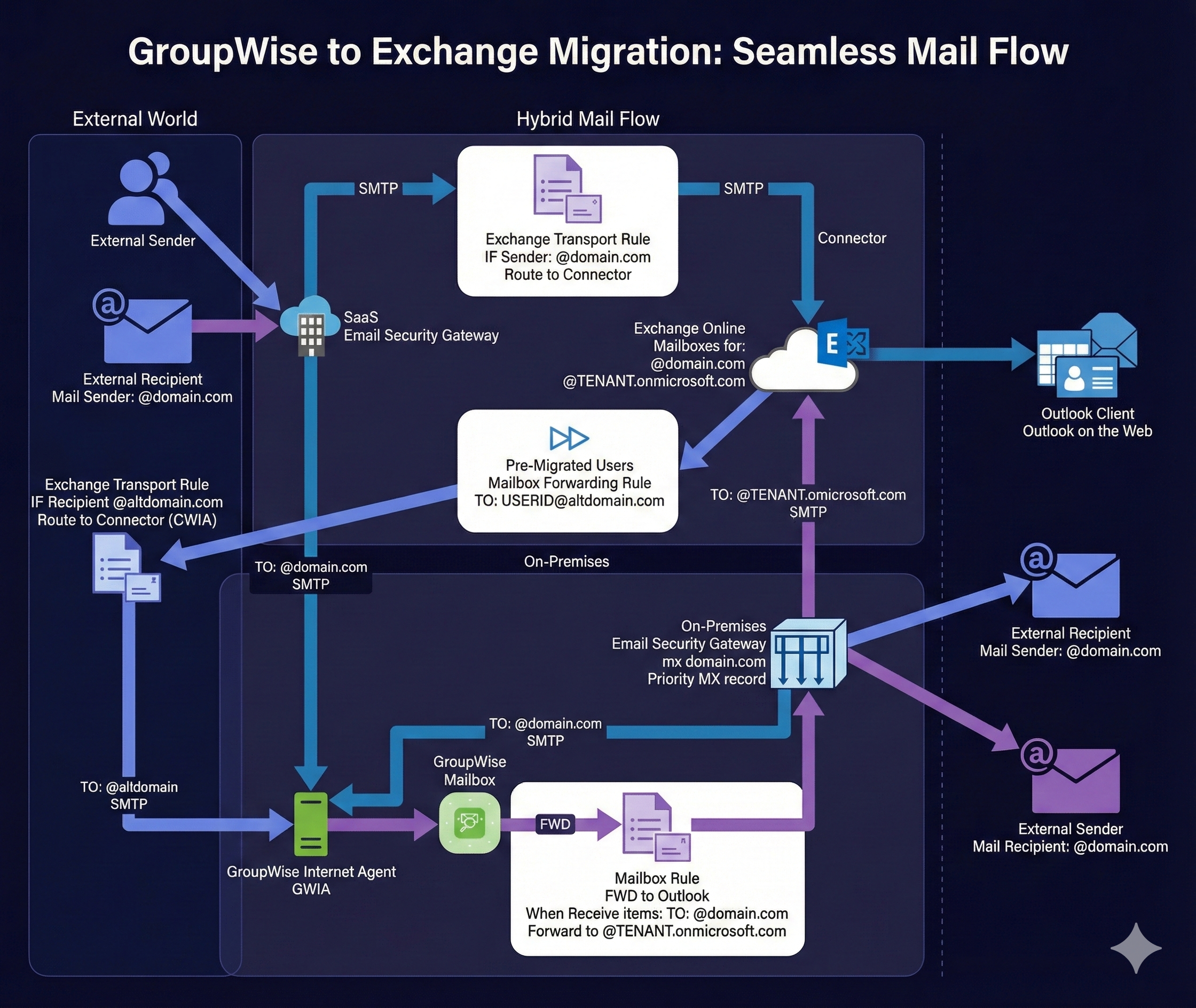
Step 2: User Maintenance Prior to Cutover
- Task 1: Run a GroupWise GWCHECK on the user(s) that you plan to migrate at least a week prior. See GW-API-GWCHECK script.
- Task 2: Verify your GWCHECK is clean of errors for each user intended to migrate. If you see any errors, re-run the GWCHECK and/or troubleshoot as necessary.
Step 3: User Updates for Cutover
- Task 1: Create GroupWise mailbox rules to forward to Exchange Online, using the TENANT.onmicrosoft.com domain. See GW-API-createFWDtoOutlook.ps1. I also recommend creating a clean-up rule that deletes forwarded emails created from this rule. See GW-API-createFWDCleanup.ps1.
- Task 2: After BitTitan is completed, disable the user logins. See GW-API-disableUsers.ps1. You can also dissociate from LDAP if desired. See GW-API-dissociateUser.ps1.
- Task 3: Disable the Exchange Online mailbox forwarding rules to USERID@altdomain.com.
Step 4: Post-Migration
- Task 1: Update any routing between your email security gateways to route directly to Exchange Online.
- Task 2: Remove any Transport Rules that were created specifically for this migration.
- Task 3: Plan how long you will maintain the GroupWise environment prior to sunset.
Troubleshooting
Rollback Procedure
We left the legacy GroupWise system available post migration so administrators could assist in retrieving user items. There are also various support scripts listed below if you need to fully rollback user migrations, such as deleting rules and enabling users.
Additional Considerations
I only included the GroupWise scripts in this write-up, as M365 scripts are readily available online. This is not the absolute way to handle a migration but worked best for our environment.
GroupWise Support Scripts
Most support scripts listed below rely on a gwusers.csv file within the same directory. The requirements can be created via GW-Full-Reportv2.ps1 and be mindful of reading the comments within the script. It will require an empty workbook created in a specific directory to generate the data. As an additional note to these scripts, you have a page limit of 1000 entries on the GroupWise user query. There are mentions of a resultInfo.nextId variable which were only tested with one additional page, as we had less than 2000 users to query against.
GW-API-createFWDCleanup.ps1
This script creates a cleanup rule that purges forwarded emails from GroupWise mailboxes.
$server = read-host "GroupWise Admin Server IP/Hostname: "
$port = read-host "GroupWise Admin Service Port: "
# Manually define below
#$server = ''
#$port =

$admin = read-host "GroupWise Administrator: "
$pwd = Read-Host -Prompt "Password for GW administrator: "
$credCombo = $admin + ":" + $pwd
#/gwadmin-service/static/apidocs/index.html
#Needed to ignore self signed cert from GW admin service
add-type @"
using System.Net;
using System.Security.Cryptography.X509Certificates;
public class TrustAllCertsPolicy : ICertificatePolicy {
public bool CheckValidationResult(
ServicePoint srvPoint, X509Certificate certificate,
WebRequest request, int certificateProblem) {
return true;
}
}
"@

[System.Net.ServicePointManager]::CertificatePolicy = New-Object TrustAllCertsPolicy
# Ignore homemade certs end
# Create GWadmin Credentials in the correct format and add to headers variable
$encoded = [System.Convert]::ToBase64String([System.Text.Encoding]::UTF8.GetBytes($credCombo))
$Global:headers = @{
    Authorization = "Basic " + $encoded
    }
# Replace line 76 - TENANT with your M365 tenant
$jsonFWDCleanup = @'
{
  "@type": "userRule",
  "enabled": true,
  "displayName": "Clean up FWD",
  "executionType": "EXECUTION_TYPE_NEW",
  "ruleActions": [
    {
      "actionType": "ACTION_TYPE_PURGE",
      "item": {
        "link": []
      },
      "categories": {
        "category": []
      }
    }
  ],
  "ruleTypes": [
    {
      "ruleType": "RULE_TYPE_APPOINTMENT"
    },
    {
      "ruleType": "RULE_TYPE_MAIL"
    },
    {
      "ruleType": "RULE_TYPE_TASK"
    },
    {
      "ruleType": "RULE_TYPE_NOTE"
    },
    {
      "ruleType": "RULE_TYPE_PHONE_MESSAGE"
    }
  ],
  "ruleSources": [
    {
      "ruleSource": "RULE_SOURCE_SENT"
    }
  ],
  "ruleFilter": {
    "element": {
      "op": "contains",
      "field": "to",
      "custom": {},
      "value": "UNIQUEUSERID@TENANT.onmicrosoft.com"
    }
  }
}
'@

# Gather all user info
$gwuserURL = "https://" + $server + ":" + $port + "/gwadmin-service/list/USER"
$response = Invoke-WebRequest -Uri $gwuserURL -Headers $headers -Method GET -ContentType "application/json"
$jsonObj = ConvertFrom-Json -InputObject $response
$dataUser = $jsonObj.object
if ( $jsonObj.resultInfo.nextId -ne $null ) {
    $gwuserURL = "https://" + $server + ":" + $port + "/gwadmin-service/list/USER?nextid=" + $jsonObj.resultInfo.nextId
    $response = Invoke-WebRequest -Uri $gwuserURL -Headers $headers -Method GET -ContentType "application/json"
    $jsonObj = ConvertFrom-Json -InputObject $response
    $dataUser = $dataUser + $jsonObj.object
}

$accountlist = import-csv ".\gwusers.csv"
foreach ($i in $accountlist) {
    echo "updating: $($i.userid)"
    $userinfo = $dataUser | Where-Object { $_.name -like $i.userid }
    $jsonpost = $jsonFWDCleanup.Replace('UNIQUEUSERID', $($i.userid))
    $gwurl = "https://" + $server + ":" + $port + $userinfo.'@url' + "/rules"
    $response = Invoke-WebRequest -Uri $gwurl -headers $headers -Body $jsonpost -ContentType "application/json" -method POST
    if ($response.StatusCode -eq "200") {
        Write-Host "Success for $($i.userid)"
    }else{
        Write-Host "Failed for $($i.userid)"
    }
}
GW-API-createFWDtoOutlook.ps1
This script creates forwarding rules on GroupWise mailboxes to redirect mail to Exchange Online.
$server = read-host "GroupWise Admin Server IP/Hostname: "
$port = read-host "GroupWise Admin Service Port: "
# Manually define below
#$server = ''
#$port =

$admin = read-host "GroupWise Administrator: "
$pwd = Read-Host -Prompt "Password for GW administrator: "

$credCombo = $admin + ":" + $pwd
#/gwadmin-service/static/apidocs/index.html
#Needed to ignore self signed cert from GW admin service
add-type @"
using System.Net;
using System.Security.Cryptography.X509Certificates;
public class TrustAllCertsPolicy : ICertificatePolicy {
public bool CheckValidationResult(
ServicePoint srvPoint, X509Certificate certificate,
WebRequest request, int certificateProblem) {
return true;
}
}
"@

[System.Net.ServicePointManager]::CertificatePolicy = New-Object TrustAllCertsPolicy
# Ignore homemade certs end
# Create GWadmin Credentials in the correct format and add to headers variable
$encoded = [System.Convert]::ToBase64String([System.Text.Encoding]::UTF8.GetBytes($credCombo))
$Global:headers = @{
    Authorization = "Basic " + $encoded
    }
# Replace line 44,45,48,67 - TENANT with your M365 tenant
$xmlFWD2Outlook = @'
<userRule>
<displayName>FWD to Outlook</displayName>
<enabled>true</enabled>
<executionType>EXECUTION_TYPE_NEW</executionType>
<ruleActions>
<actionType>ACTION_TYPE_FORWARD</actionType>
<item>
<distribution>
<recipients>
<recipient>
<displayName>UNIQUEUSERID@TENANT.onmicrosoft.com</displayName>
<email>UNIQUEUSERID@TENANT.onmicrosoft.com</email>
<distType>TO</distType>
<flags/>
<idomain>TENANT.onmicrosoft.com</idomain>
<recipType>USER</recipType>
<recipientStatus/>
</recipient>
</recipients>
<replyOptions/>
<sendOptions>
<internetStatusTracking/>
<notification/>
<notifyRecipients>true</notifyRecipients>
<requestReply/>
<statusTracking>
<value>DELIVERED_AND_OPENED</value>
</statusTracking>
<statusTrackingFlags>
<delivered>true</delivered>
<opened>true</opened>
</statusTrackingFlags>
</sendOptions>
<to>UNIQUEUSERID@TENANT.onmicrosoft.com</to>
</distribution>
<options>
<priority>STANDARD</priority>
</options>
<size>541</size>
<subjectPrefix>Fwd: </subjectPrefix>
</item>
</ruleActions>
<ruleSources>
<ruleSource>RULE_SOURCE_RECEIVED</ruleSource>
</ruleSources>
<ruleTypes>
<ruleType>RULE_TYPE_APPOINTMENT</ruleType>
</ruleTypes>
<ruleTypes>
<ruleType>RULE_TYPE_MAIL</ruleType>
</ruleTypes>
<ruleTypes>
<ruleType>RULE_TYPE_TASK</ruleType>
</ruleTypes>
<ruleTypes>
<ruleType>RULE_TYPE_NOTE</ruleType>
</ruleTypes>
<ruleTypes>
<ruleType>RULE_TYPE_PHONE_MESSAGE</ruleType>
</ruleTypes>
</userRule>
'@

# Gather all user info
$gwuserURL = "https://" + $server + ":" + $port + "/gwadmin-service/list/USER"
$response = Invoke-WebRequest -Uri $gwuserURL -Headers $headers -Method GET -ContentType "application/json"
$jsonObj = ConvertFrom-Json -InputObject $response
$dataUser = $jsonObj.object
if ( $jsonObj.resultInfo.nextId -ne $null ) {
    $gwuserURL = "https://" + $server + ":" + $port + "/gwadmin-service/list/USER?nextid=" + $jsonObj.resultInfo.nextId
    $response = Invoke-WebRequest -Uri $gwuserURL -Headers $headers -Method GET -ContentType "application/json"
    $jsonObj = ConvertFrom-Json -InputObject $response
    $dataUser = $dataUser + $jsonObj.object
}

$accountlist = import-csv ".\gwusers.csv"
foreach ($i in $accountlist) {
    echo "updating: $($i.userid)"
    $userinfo = $dataUser | Where-Object { $_.name -like $i.userid }
    $xmlpost = $xmlFWD2Outlook.Replace('UNIQUEUSERID', $($i.userid))
    $gwurl = "https://" + $server + ":" + $port + $userinfo.'@url' + "/rules"
    $response = Invoke-WebRequest -Uri $gwurl -headers $headers -Body $xmlpost -ContentType "application/xml" -method POST
    if ($response.StatusCode -eq "200") {
        Write-Host "Success for $($i.userid)"
    }else{
        Write-Host "Failed for $($i.userid)"
    }
}
GW-API-deleteFWDCleanup.ps1
This script deletes the cleanup forwarding rule from GroupWise mailboxes.
$server = read-host "GroupWise Admin Server IP/Hostname: "
$port = read-host "GroupWise Admin Service Port: "
# Manually define below
#$server = ''
#$port =

$admin = read-host "GroupWise Administrator: "
$pwd = Read-Host -Prompt "Password for GW administrator: "
$credCombo = $admin + ":" + $pwd
#/gwadmin-service/static/apidocs/index.html
#Needed to ignore self signed cert from GW admin service
add-type @"
using System.Net;
using System.Security.Cryptography.X509Certificates;
public class TrustAllCertsPolicy : ICertificatePolicy {
public bool CheckValidationResult(
ServicePoint srvPoint, X509Certificate certificate,
WebRequest request, int certificateProblem) {
return true;
}
}
"@

[System.Net.ServicePointManager]::CertificatePolicy = New-Object TrustAllCertsPolicy
# Ignore homemade certs end
# Create GWadmin Credentials in the correct format and add to headers variable
$encoded = [System.Convert]::ToBase64String([System.Text.Encoding]::UTF8.GetBytes($credCombo))
$Global:headers = @{
    Authorization = "Basic " + $encoded
    }

# Gather all user info
$gwuserURL = "https://" + $server + ":" + $port + "/gwadmin-service/list/USER"
$response = Invoke-WebRequest -Uri $gwuserURL -Headers $headers -Method GET -ContentType "application/json"
$jsonObj = ConvertFrom-Json -InputObject $response
$dataUser = $jsonObj.object
if ( $jsonObj.resultInfo.nextId -ne $null ) {
    $gwuserURL = "https://" + $server + ":" + $port + "/gwadmin-service/list/USER?nextid=" + $jsonObj.resultInfo.nextId
    $response = Invoke-WebRequest -Uri $gwuserURL -Headers $headers -Method GET -ContentType "application/json"
    $jsonObj = ConvertFrom-Json -InputObject $response
    $dataUser = $dataUser + $jsonObj.object
}

$accountlist = import-csv ".\gwusers.csv"
foreach ($i in $accountlist) {
    echo "Gathering Information for: $($i.userid)"
    $userinfo = $dataUser | Where-Object { $_.name -like $i.userid }
    $gwurlGET = "https://" + $server + ":" + $port + $userinfo.'@url' + "/rules"
    $response = Invoke-WebRequest -Uri $gwurlGET -Headers $headers -Method GET -ContentType "application/xml"
    # Convert the JSON string to a PowerShell object
    $jsonObj = ConvertFrom-Json -InputObject $response
    # Get the "object" property containing the rule data (assuming the structure is consistent)
    $rules = $jsonObj.object
    # Specify the display name you want to find
    $targetDisplayName = "Clean up FWD"
    # Find the rule object with the matching display name
    $matchingRule = $rules | Where-Object { $_.displayName -match $targetDisplayName }
    # Check if a rule was found
    if ($matchingRule) {
        # Extract the ruleId from the matching rule
        $ruleId = $matchingRule.ruleId
        Write-Host "ruleId for '$targetDisplayName': $ruleId found ... deleting!"
        $gwurlDEL = "https://" + $server + ":" + $port + $userinfo.'@url' + "/rules/" + $ruleId
        $delresponse = Invoke-WebRequest -Uri $gwurlDEL -headers $headers -method DELETE
        }else{
        Write-Host "No rule found on $($i.userid) with display name: '$targetDisplayName'"
    }
}
GW-API-deleteFWDtoOutlook.ps1
This script deletes the forwarding rule to Outlook from GroupWise mailboxes.
$server = read-host "GroupWise Admin Server IP/Hostname: "
$port = read-host "GroupWise Admin Service Port: "
# Manually define below
#$server = ''
#$port =

$admin = read-host "GroupWise Administrator: "
$pwd = Read-Host -Prompt "Password for GW administrator: "
$credCombo = $admin + ":" + $pwd
#/gwadmin-service/static/apidocs/index.html
#Needed to ignore self signed cert from GW admin service
add-type @"
using System.Net;
using System.Security.Cryptography.X509Certificates;
public class TrustAllCertsPolicy : ICertificatePolicy {
public bool CheckValidationResult(
ServicePoint srvPoint, X509Certificate certificate,
WebRequest request, int certificateProblem) {
return true;
}
}
"@

[System.Net.ServicePointManager]::CertificatePolicy = New-Object TrustAllCertsPolicy
# Ignore homemade certs end
# Create GWadmin Credentials in the correct format and add to headers variable
$encoded = [System.Convert]::ToBase64String([System.Text.Encoding]::UTF8.GetBytes($credCombo))
$Global:headers = @{
    Authorization = "Basic " + $encoded
    }

# Gather all user info
$gwuserURL = "https://" + $server + ":" + $port + "/gwadmin-service/list/USER"
$response = Invoke-WebRequest -Uri $gwuserURL -Headers $headers -Method GET -ContentType "application/json"
$jsonObj = ConvertFrom-Json -InputObject $response
$dataUser = $jsonObj.object
if ( $jsonObj.resultInfo.nextId -ne $null ) {
    $gwuserURL = "https://" + $server + ":" + $port + "/gwadmin-service/list/USER?nextid=" + $jsonObj.resultInfo.nextId
    $response = Invoke-WebRequest -Uri $gwuserURL -Headers $headers -Method GET -ContentType "application/json"
    $jsonObj = ConvertFrom-Json -InputObject $response
    $dataUser = $dataUser + $jsonObj.object
}

$accountlist = import-csv ".\gwusers.csv"
foreach ($i in $accountlist) {
    echo "Gathering Information for: $($i.userid)"
    $userinfo = $dataUser | Where-Object { $_.name -like $i.userid }
    $gwurlGET = "https://" + $server + ":" + $port + $userinfo.'@url' + "/rules"
    $response = Invoke-WebRequest -Uri $gwurlGET -Headers $headers -Method GET -ContentType "application/xml"
    # Convert the JSON string to a PowerShell object
    $jsonObj = ConvertFrom-Json -InputObject $response
    # Get the "object" property containing the rule data (assuming the structure is consistent)
    $rules = $jsonObj.object
    # Specify the display name you want to find
    $targetDisplayName = "FWD to Outlook"
    # Find the rule object with the matching display name
    $matchingRule = $rules | Where-Object { $_.displayName -match $targetDisplayName }
    # Check if a rule was found
    if ($matchingRule) {
        # Extract the ruleId from the matching rule
        $ruleId = $matchingRule.ruleId
        Write-Host "ruleId for '$targetDisplayName': $ruleId found ... deleting!"
        $gwurlDEL = "https://" + $server + ":" + $port + $userinfo.'@url' + "/rules/" + $ruleId
        $delresponse = Invoke-WebRequest -Uri $gwurlDEL -headers $headers -method DELETE
        }else{
        Write-Host "No rule found on $($i.userid) with display name: '$targetDisplayName'"
    }
}
GW-API-disableUsers.ps1
This script disables GroupWise user logins after migration.
$server = read-host "GroupWise Admin Server IP/Hostname: "
$port = read-host "GroupWise Admin Service Port: "
# Manually define below
#$server = ''
#$port =

$admin = read-host "GroupWise Administrator: "
$pwd = Read-Host -Prompt "Password for GW administrator: "
$credCombo = $admin + ":" + $pwd
#/gwadmin-service/static/apidocs/index.html
#Needed to ignore self signed cert from GW admin service
add-type @"
using System.Net;
using System.Security.Cryptography.X509Certificates;
public class TrustAllCertsPolicy : ICertificatePolicy {
public bool CheckValidationResult(
ServicePoint srvPoint, X509Certificate certificate,
WebRequest request, int certificateProblem) {
return true;
}
}
"@

[System.Net.ServicePointManager]::CertificatePolicy = New-Object TrustAllCertsPolicy
# Ignore homemade certs end
# Create GWadmin Credentials in the correct format and add to headers variable
$encoded = [System.Convert]::ToBase64String([System.Text.Encoding]::UTF8.GetBytes($credCombo))
$Global:headers = @{
    Authorization = "Basic " + $encoded
    }

$jsonDisable = @'
{
  "loginDisabled" : true
}
'@

# Gather all user info
$gwuserURL = "https://" + $server + ":" + $port + "/gwadmin-service/list/USER"
$response = Invoke-WebRequest -Uri $gwuserURL -Headers $headers -Method GET -ContentType "application/json"
$jsonObj = ConvertFrom-Json -InputObject $response
$dataUser = $jsonObj.object
if ( $jsonObj.resultInfo.nextId -ne $null ) {
    $gwuserURL = "https://" + $server + ":" + $port + "/gwadmin-service/list/USER?nextid=" + $jsonObj.resultInfo.nextId
    $response = Invoke-WebRequest -Uri $gwuserURL -Headers $headers -Method GET -ContentType "application/json"
    $jsonObj = ConvertFrom-Json -InputObject $response
    $dataUser = $dataUser + $jsonObj.object
}

$accountlist = import-csv ".\gwusers.csv"
foreach ($i in $accountlist) {
    echo "updating: $($i.userid)"
    $userinfo = $dataUser | Where-Object { $_.name -like $i.userid }
    $gwurl = "https://" + $server + ":" + $port + $userinfo.'@url'
    $response = Invoke-WebRequest -Uri $gwurl -headers $headers -Body $jsonDisable -ContentType "application/json" -method PUT
    if ($response.StatusCode -eq "200") {
        Write-Host "Success for $($i.userid)"
    }else{
        Write-Host "Failed for $($i.userid)"
    }
}
GW-API-enableUsers.ps1
This script re-enables GroupWise user logins (for rollback scenarios).
$server = read-host "GroupWise Admin Server IP/Hostname: "
$port = read-host "GroupWise Admin Service Port: "
# Manually define below
#$server = ''
#$port =

$admin = read-host "GroupWise Administrator: "
$pwd = Read-Host -Prompt "Password for GW administrator: "
$credCombo = $admin + ":" + $pwd
#/gwadmin-service/static/apidocs/index.html
#Needed to ignore self signed cert from GW admin service
add-type @"
using System.Net;
using System.Security.Cryptography.X509Certificates;
public class TrustAllCertsPolicy : ICertificatePolicy {
public bool CheckValidationResult(
ServicePoint srvPoint, X509Certificate certificate,
WebRequest request, int certificateProblem) {
return true;
}
}
"@

[System.Net.ServicePointManager]::CertificatePolicy = New-Object TrustAllCertsPolicy
# Ignore homemade certs end
# Create GWadmin Credentials in the correct format and add to headers variable
$encoded = [System.Convert]::ToBase64String([System.Text.Encoding]::UTF8.GetBytes($credCombo))
$Global:headers = @{
    Authorization = "Basic " + $encoded
    }

$jsonDisable = @'
{
  "loginDisabled" : false
}
'@

# Gather all user info
$gwuserURL = "https://" + $server + ":" + $port + "/gwadmin-service/list/USER"
$response = Invoke-WebRequest -Uri $gwuserURL -Headers $headers -Method GET -ContentType "application/json"
$jsonObj = ConvertFrom-Json -InputObject $response
$dataUser = $jsonObj.object
if ( $jsonObj.resultInfo.nextId -ne $null ) {
    $gwuserURL = "https://" + $server + ":" + $port + "/gwadmin-service/list/USER?nextid=" + $jsonObj.resultInfo.nextId
    $response = Invoke-WebRequest -Uri $gwuserURL -Headers $headers -Method GET -ContentType "application/json"
    $jsonObj = ConvertFrom-Json -InputObject $response
    $dataUser = $dataUser + $jsonObj.object
}

$accountlist = import-csv ".\gwusers.csv"
foreach ($i in $accountlist) {
    echo "updating: $($i.userid)"
    $userinfo = $dataUser | Where-Object { $_.name -like $i.userid }
    $gwurl = "https://" + $server + ":" + $port + $userinfo.'@url'
    $response = Invoke-WebRequest -Uri $gwurl -headers $headers -Body $jsonDisable -ContentType "application/json" -method PUT
    if ($response.StatusCode -eq "200") {
        Write-Host "Success for $($i.userid)"
    }else{
        Write-Host "Failed for $($i.userid)"
    }
}
GW-API-dissociateUser.ps1
This script dissociates GroupWise users from LDAP.
$server = read-host "GroupWise Admin Server IP/Hostname: "
$port = read-host "GroupWise Admin Service Port: "
# Manually define below
#$server = ''
#$port =

$admin = read-host "GroupWise Administrator: "
$pwd = Read-Host -Prompt "Password for GW administrator: "
$credCombo = $admin + ":" + $pwd
#/gwadmin-service/static/apidocs/index.html
#Needed to ignore self signed cert from GW admin service
add-type @"
using System.Net;
using System.Security.Cryptography.X509Certificates;
public class TrustAllCertsPolicy : ICertificatePolicy {
public bool CheckValidationResult(
ServicePoint srvPoint, X509Certificate certificate,
WebRequest request, int certificateProblem) {
return true;
}
}
"@

[System.Net.ServicePointManager]::CertificatePolicy = New-Object TrustAllCertsPolicy
# Ignore homemade certs end
# Create GWadmin Credentials in the correct format and add to headers variable
$encoded = [System.Convert]::ToBase64String([System.Text.Encoding]::UTF8.GetBytes($credCombo))
$Global:headers = @{
    Authorization = "Basic " + $encoded
    }

# Gather all user info
$gwuserURL = "https://" + $server + ":" + $port + "/gwadmin-service/list/USER"
$response = Invoke-WebRequest -Uri $gwuserURL -Headers $headers -Method GET -ContentType "application/json"
$jsonObj = ConvertFrom-Json -InputObject $response
$dataUser = $jsonObj.object
if ( $jsonObj.resultInfo.nextId -ne $null ) {
    $gwuserURL = "https://" + $server + ":" + $port + "/gwadmin-service/list/USER?nextid=" + $jsonObj.resultInfo.nextId
    $response = Invoke-WebRequest -Uri $gwuserURL -Headers $headers -Method GET -ContentType "application/json"
    $jsonObj = ConvertFrom-Json -InputObject $response
    $dataUser = $dataUser + $jsonObj.object
}

$accountlist = import-csv ".\gwusers.csv"
foreach ($i in $accountlist) {
    echo "updating: $($i.userid)"
    $userinfo = $dataUser | Where-Object { $_.name -like $i.userid }
    $gwurl = "https://" + $server + ":" + $port + $userinfo.'@url' + "/directorylink"
    $response = Invoke-WebRequest -Uri $gwurl -headers $headers -ContentType "application/json" -method DELETE
    if ($response.StatusCode -eq "204") {
        Write-Host "Success for $($i.userid)"
    }else{
        Write-Host "Failed for $($i.userid)"
    }
}
GW-API-GWCHECK
This script runs GWCHECK maintenance on GroupWise mailboxes.
$server = read-host "GroupWise Admin Server IP/Hostname: "
$port = read-host "GroupWise Admin Service Port: "
# Manually define below
#$server = ''
#$port =

$admin = read-host "GroupWise Administrator: "
$pwd = Read-Host -Prompt "Password for GW administrator: "
$ccuser = Read-Host -Prompt "User ID to send email to: "

$credCombo = $admin + ":" + $pwd
#/gwadmin-service/static/apidocs/index.html
#Needed to ignore self signed cert from GW admin service
add-type @"
using System.Net;
using System.Security.Cryptography.X509Certificates;
public class TrustAllCertsPolicy : ICertificatePolicy {
public bool CheckValidationResult(
ServicePoint srvPoint, X509Certificate certificate,
WebRequest request, int certificateProblem) {
return true;
}
}
"@

[System.Net.ServicePointManager]::CertificatePolicy = New-Object TrustAllCertsPolicy
# Ignore homemade certs end
# Create GWadmin Credentials in the correct format and add to headers variable
$encoded = [System.Convert]::ToBase64String([System.Text.Encoding]::UTF8.GetBytes($credCombo))
$Global:headers = @{
    Authorization = "Basic " + $encoded
    }

$jsonCheck = @'
{
  "action" : "ANALYZE",
  "analyzeOptions" : {
    "checkAttachments" : true,
    "checkIndex" : true,
    "fixProblems" : true,
    "updateTotals" : true,
    "statistics" : true,
    "verify" : [ "STRUCTURE", "STRUCTURE" ]
  },
  "sendToCc" : "REPLACECCUSER"
}
'@

$jsonpost = $jsonCheck.Replace('REPLACECCUSER', $ccuser)

# Gather all user info
$gwuserURL = "https://" + $server + ":" + $port + "/gwadmin-service/list/USER"
$response = Invoke-WebRequest -Uri $gwuserURL -Headers $headers -Method GET -ContentType "application/json"
$jsonObj = ConvertFrom-Json -InputObject $response
$dataUser = $jsonObj.object
if ( $jsonObj.resultInfo.nextId -ne $null ) {
    $gwuserURL = "https://" + $server + ":" + $port + "/gwadmin-service/list/USER?nextid=" + $jsonObj.resultInfo.nextId
    $response = Invoke-WebRequest -Uri $gwuserURL -Headers $headers -Method GET -ContentType "application/json"
    $jsonObj = ConvertFrom-Json -InputObject $response
    $dataUser = $dataUser + $jsonObj.object
}

# Gather all resource info
$gwresourceURL = "https://" + $server + ":" + $port + "/gwadmin-service/list/RESOURCE"
$response = Invoke-WebRequest -Uri $gwresourceURL -Headers $headers -Method GET -ContentType "application/xml"
$jsonObj = ConvertFrom-Json -InputObject $response
$dataResource = $jsonObj.object

$accountlist = import-csv ".\gwusers.csv"
foreach ($i in $accountlist) {
    echo "Gathering address info from: $($i.userid)"
    $userinfo = $dataUser | Where-Object { $_.name -like $i.userid }
    if ("$userinfo" -eq "$null") {
      $userinfo = $dataResource | Where-Object { $_.name -like $($i.userid) }
      $gwurl = "https://" + $server + ":" + $port + $userinfo.'@url' + "/gwcheck"
    }else{
      $gwurl = "https://" + $server + ":" + $port + $userinfo.'@url' + "/gwcheck"
    }
    $response = Invoke-WebRequest -Uri $gwurl -headers $headers -body $jsonpost -ContentType "application/json"  -method POST
}
GW-Full-Reportv2.ps1
This script generates a comprehensive report of all GroupWise users and exports to Excel.
$server = read-host "GroupWise Admin Server IP/Hostname: "
$port = read-host "GroupWise Admin Service Port: "
# Manually define below
#$server = ''
#$port =

$admin = read-host "GroupWise Administrator: "
$pwd = Read-Host -Prompt "Password for GW administrator: "

$credCombo = $admin + ":" + $pwd
#/gwadmin-service/static/apidocs/index.html
#Needed to ignore self signed cert from GW admin service
add-type @"
using System.Net;
using System.Security.Cryptography.X509Certificates;
public class TrustAllCertsPolicy : ICertificatePolicy {
public bool CheckValidationResult(
ServicePoint srvPoint, X509Certificate certificate,
WebRequest request, int certificateProblem) {
return true;
}
}
"@

[System.Net.ServicePointManager]::CertificatePolicy = New-Object TrustAllCertsPolicy
# Ignore homemade certs end
# Create GWadmin Credentials in the correct format and add to headers variable
$encoded = [System.Convert]::ToBase64String([System.Text.Encoding]::UTF8.GetBytes($credCombo))
$Global:headers = @{
    Authorization = "Basic " + $encoded
    }

# Gather all user info
$gwuserURL = "https://" + $server + ":" + $port + "/gwadmin-service/list/USER"
$response = Invoke-WebRequest -Uri $gwuserURL -Headers $headers -Method GET -ContentType "application/json"
$jsonObj = ConvertFrom-Json -InputObject $response
$dataUser = $jsonObj.object
if ( $jsonObj.resultInfo.nextId -ne $null ) {
    $gwuserURL = "https://" + $server + ":" + $port + "/gwadmin-service/list/USER?nextid=" + $jsonObj.resultInfo.nextId
    $response = Invoke-WebRequest -Uri $gwuserURL -Headers $headers -Method GET -ContentType "application/json"
    $jsonObj = ConvertFrom-Json -InputObject $response
    $dataUser = $dataUser + $jsonObj.object
}

# Gather all resource info
$gwresourceURL = "https://" + $server + ":" + $port + "/gwadmin-service/list/RESOURCE"
$response = Invoke-WebRequest -Uri $gwresourceURL -Headers $headers -Method GET -ContentType "application/xml"
$jsonObj = ConvertFrom-Json -InputObject $response
$dataResource = $jsonObj.object

# Check for reference csv before starting
if (!(Test-Path -Path ".\gwobjects.csv")) {
  Write-Host "Missing gwobjects.csv file! Please create in same directory as script before continuing."
  Write-Host "csv only needs to have one header called userid followed by all user ids"
  Pause
}

# Open or create a new Excel workbook
$excel = New-Object -ComObject Excel.Application
$workbook = $excel.Workbooks.Open("C:\data_spreadsheet.xlsx")  # Replace with actual path
$worksheet = $workbook.Worksheets("Sheet1")  # Replace with actual sheet name

# Write headers
$worksheet.Cells.Item(1, 1).Value = "Domain"
$worksheet.Cells.Item(1, 2).Value = "PostOffice"
$worksheet.Cells.Item(1, 3).Value = "UserID"
$worksheet.Cells.Item(1, 4).Value = "PreferredEmail"
$worksheet.Cells.Item(1, 5).Value = "MailboxSizeMb"
$worksheet.Cells.Item(1, 6).Value = "allowedEmail"
$worksheet.Cells.Item(1, 7).Value = "nicknameEmail"
$worksheet.Cells.Item(1, 8).Value = "aliasEmail"
$row = 2  # Starting row for data

foreach ($i in $dataUser) {
    Write-Host "$($i.name)"
    $userinfo = $dataUser | Where-Object { $_.name -like $i.name }
    foreach ($a in $userinfo){
        if ("$a" -eq "$null") {
          $a = $dataResource | Where-Object { $_.name -like $($i.userid) }
          $gwurl = "https://" + $server + ":" + $port + $a.'@url' + "/emailaddresses"
        }else{
          $gwurl = "https://" + $server + ":" + $port + $a.'@url' + "/emailaddresses"
        }
        write-host $gwurl
        $response = Invoke-WebRequest -Uri $gwurl -headers $headers -method GET
        # Convert the JSON string to a PowerShell object
        $jsonObj = ConvertFrom-Json -InputObject $response
        # keywords to remove from email lists
        $keywordstoExclude = "$($a.postOfficeName)|$($i.name)|$($a.surname).$($a.givenName)"
        $prefEmail = $jsonObj.preferred | Out-String
        $allowed = $jsonObj.allowed  | Where-Object { $_ -notmatch $keywordstoExclude } | Out-String
        $nickname = $jsonObj.nickname  | Where-Object { $_ -notmatch $keywordstoExclude } | Out-String
        $alias = $jsonObj.alias | Out-String
        $worksheet.Cells.Item($row, 1).Value = $a.domainName
        $worksheet.Cells.Item($row, 2).Value = $a.postOfficeName
        $worksheet.Cells.Item($row, 3).Value = $($i.name)
        $worksheet.Cells.Item($row, 4).Value = $prefEmail
        $worksheet.Cells.Item($row, 5).Value = $($a.mailboxSizeMb | Out-String)
        $worksheet.Cells.Item($row, 6).Value = $allowed
        $worksheet.Cells.Item($row, 7).Value = $nickname
        $worksheet.Cells.Item($row, 8).Value = $alias
        $row++
    }
}

# Save and close the workbook
$workbook.Save()
$workbook.Close()
$excel.Quit()

[System.GC]::Collect()
[System.GC]::WaitForPendingFinalizers()

[System.Runtime.Interopservices.Marshal]::ReleaseComObject($workSheet)
[System.Runtime.Interopservices.Marshal]::ReleaseComObject($excel)

Remove-Variable -Name excel